Programming Instructions for keyless entry remote?

I've modified the original instructions a little bit in CAPS to make the programming work for my situation. You should be able to complete the programming if you're using a working key fob.


1. Start with the following conditions:

a. Key is out of the ignition

b. Driver door is open ( all other doors are closed)

c. Driver door is unlocked (other doors not a concern)


2. Insert the key into the ignition (don't turn it) and pull it out QUICKLY.


3. Perform these steps within 40 seconds:

a. Cycle the power locks 5 times (STARTS WITH LOCK THEN UNLOCK As 1 CYCLE(REPEAT 5x) AT ABOUT 1sec INTERVAL BETWEEN EACH CYCLE. IF YOUR ACTUATOR DOESN'T CYCLE THE LOCK/UNLOCK PROPERLY, STICK THE CAR KEY IN THE KEY-HOLE OUTSIDE OF THE DRIVER DOOR TO CYCLE THE LOCK/UNLOCK 5x. THE HORN SHOULD CHIRP THRU EACH CYCLE.


b. Close, then open the drivers door QUICKLY.


4. Perform these steps within 40 seconds:

a. Cycle the power locks 5 times (same as STEP 3A ABOVE).

b. Turn the ignition to ON then back to OFF (FAIRLY QUICK)

c. Turn the ignition to ON then back to OFF (FAIRLY QUICK).. SOMETIMES U MIGHT NEED ONLY 1 IGNITION CYCLE (STEP 4B ONLY), SKIP THIS STEP (4C)

d. Remove the key from the ignition.


5. Within 3 seconds, the power door locks should cycle LOCK/UNLOCK 2x (automatically)indicating successful entry into programming mode. Return to step 1 if the locks do not cycle AUTOMATICALLY at this point SINCE U HAVE NOT ACTIVATED THE PROGRAMMING MODE.


6. Perform these steps within 40 seconds:

a. Press the LOCK and UNLOCK buttons on the transmitter

simultaneously for 1 second.

b. Immediately after letting go of the lock and unlock buttons,

press the lock button by itself and hold for 2 seconds.

Within 3 seconds, the door locks should cycle ( LOCK then

UNLOCK) once-- indicating successful programming [THIS IS IMPORTANT!!! LOCK/UNLOCK 1x = SUCCESSFUL, BUT 2x = NOT SUCCESSFUL]. If

the door locks don't cycle, or cycle twice. Repeat steps

6a and 6b--this remote has not been accepted. [YOU MIGHT HAVE TO PROGRAM THE REMOTE SEVERAL TIMES BEFORE IT WORKS (STEP 6A-6B). PAY ATTENTION TO 1x vs. 2x LOCK/UNLOCK AUTOMATIC CYCLE BY THE CAR TO DETERMINED WHETHER YOUR REMOTE WAS ACCEPTED OR SUCCESSFULLY PROGRAMMED]

c. Repeat steps 6a and 6b for EACH transmitter that will

operate the vehicle. [YOU CAN PROGRAM MORE THAN 1 REMOTE WHILE THE CAR IS IN PROGRAMMING MODE]

7. Close the driver door WILL LEAVE THE PROGRAMMING MODE BUT THE VEHICLE MIGHT SET OFF THE ALARM. STICK THE KEY INTO THE DRIVER DOOR KEY HOLE & TURN TO RESET THE ALARM. TEST YOUR NEWLY PROGRAMMED KEY FOB AT THIS POINT WITH ALL DOORS CLOSED.


Got it using these instructions.
After letting go of the lock button the locks would cycle themselves two times. This happened a couple times as I kept pushing the lock button with the drivers door open
I closed the drivers door and tried unlocking and locking with the fob and she works. Even the rear window.
I did do the ignition x5 first to clear everything and then I did it x2. Worked for me
Also my actuators were just getting weaker and weaker after so many tries.
So ignoring the unlock/lock button all together and just sticking my key in the door and cycling it worked every time.
 
Sucess!

Hey RAV,

I got your PM-- Here are the instructions for programming the 99-02 4Runner Keyless Entry factory remotes:

1. Start with the following conditions: you are in the vehicle

a. Key is out of the ignition
b. Drive door is open ( all other doors are closed)
c. Driver door is unlocked (other door locks don't matter)

2. Insert the key into the ignition (don't turn it) and pull it out.

3. Perform these steps within 40 seconds:

a. Cycle the power locks 5 times. Use an even pace and try
to go relatively fast.

b. Close, then open the drivers door.

4. Perform these steps within 40 seconds:

a. Cycle the power locks 5 times (same as before).
b. Turn the ignition to ON then back to OFF.
c. Turn the ignition to ON then back to OFF.
d. Remove the key from the ignition.

5. Within 3 seconds, the power door locks should cycle (automatically)
indicating successful entry into programming mode. Return to step 1
if the locks do not cycle at this point.

6. Perform these steps within 40 seconds:

a. Press the LOCK and UNLOCK buttons on the transmitter
simultaneously for 1 second.

b. Immediately after letting go of the lock and unlock buttons,
press the lock button by itself and hold for 2 seconds.
Within 3 seconds, the door locks should cycle ( LOCK then
UNLOCK) once-- indicating successful programming. If
the door locks don't cycle, or cycle twice. Repeat steps
6a and 6b--this remote has not been accepted.

c. Repeat steps 6a and 6b for EACH transmitter that will
operate the vehicle. Including any old transmitters.

7. Close the driver door.

Hope this helps you, it did me greatly-- Good luck, :)

NoliWan

I recently bought a 01 4runner limited from someone on craigslist. She never used the key fob so I limitedly replaced the battery for it and it still didn't work. I had the remote tested in the store so I knew it was transmitting but thought maybe it was a blown fuse somewhere in the vehicle. After failing to locate which fuse(s) the keyless entry used I came across this remote programming and gave it a shot. It was a little tricky to get the steps down and it took about 5 times to get the remote to be accepted once in the program mode but it eventually worked! If you are having trouble with keyless entry I would suggest giving this free option a try before taking it to the dealer, it worked for me!
 
Alarm each time

This is a fantastic thread.

Here is the issue I am running into, I follow the steps provided: key in on position, reset ECU, press remote...

When I press the remote I do not get a "chirp". I instead get my alarm going off.

The remote I ordered is for the RS3000 VIP. Since I couldn't get the new remote to program without the alarm I took the guts out of the original and I put them in the new remote. Same problem with the alarm.

Has anyone else run into this problem?
 
HELP!

So, I have been trying to use this method on my 02 SR5 to program a second remote that I have and I don't seem to be having any luck at all. I started out having a HYQ12BAN that was working and I wanted to add a HYQ1512Y. Everything worked just fine until I got to 6a. While I would be holding down the lock and unlock buttons the locks would begin to cycle 3 times. when I would close the drivers door and press the lock button the locks would cycle three times. So I tried the erase all code method and started over. Now my HYQ1512Y works and my HYQ12BAN will not. All I get is the 3 cycles for the locks and horn honking...

What is the little red light on the lower left dash for?
 
I just wanted to say thank you. I registered on this forum just to do so. I was pulling my hair out and having a panic attack trying to program this SOB. What finally worked for me was because of you. I did the 5x ignition....opened the door and MANUALLY cycled the drivers door locks..... NOT using the power lock at all. Went through the rest of the procedure and AWESOME! It worked! You saved me 150 bucks. Thanks again!
 
Also my actuators were just getting weaker and weaker after so many tries.
So ignoring the unlock/lock button all together and just sticking my key in the door and cycling it worked every time.

This bit of info helped me greatly, thanks. My actuators would quit fully moving the locks after the 2-3 time, so I was having issues getting into programming mode to confirm it had keyless entry.

So I wasn't 100% sure it had the remote option, I got no fobs with the runner when I bought it. However I got on Toyota Owners site and found this in the history:

3/16/07 REPAIRED AS FOLLOWS

REPAIRED AS FOLLOWS ~|~CUST REQUEST TO PROGRAM REMOTE ~|~ ~|~164595 VEHICLE WOULD NOT GO IN REGISTRATION MODE. DIAGNOSIS FOUND RIGHT REAR LOCK ACTUATOR MALFUNCTION.NEEDS REPLACEMENT BEFORE CONTINUING.

With confirmation it had a remote at some point, I bought two KeylessOption remotes off Amazon, and using the key in the door to work the locks had both programmed in less than 10 minutes.

Sad I was able to do what Toyota could not 10 years ago. I suppose they wanted to sell a lock actuator, but still, this was so easy. For over 10 years this 4runner has had no fobs and now it does.
 
Door Lock Actuators were failing

I have a 99 4Runner and I was unable to get into programming mode due to my door lock actuators giving up after about the 3rd on\off cycle. I USED the key in the driver's door lock to perform the programming sequence to turn the locks on\off and it worked like a charm.

Thanks
 
Hey RAV,

I got your PM-- Here are the instructions for programming the 99-02 4Runner Keyless Entry factory remotes:

1. Start with the following conditions: you are in the vehicle

a. Key is out of the ignition
b. Drive door is open ( all other doors are closed)
c. Driver door is unlocked (other door locks don't matter)

2. Insert the key into the ignition (don't turn it) and pull it out.

3. Perform these steps within 40 seconds:

a. Cycle the power locks 5 times. Use an even pace and try
to go relatively fast.

b. Close, then open the drivers door.

4. Perform these steps within 40 seconds:

a. Cycle the power locks 5 times (same as before).
b. Turn the ignition to ON then back to OFF.
c. Turn the ignition to ON then back to OFF.
d. Remove the key from the ignition.

5. Within 3 seconds, the power door locks should cycle (automatically)
indicating successful entry into programming mode. Return to step 1
if the locks do not cycle at this point.

6. Perform these steps within 40 seconds:

a. Press the LOCK and UNLOCK buttons on the transmitter
simultaneously for 1 second.

b. Immediately after letting go of the lock and unlock buttons,
press the lock button by itself and hold for 2 seconds.
Within 3 seconds, the door locks should cycle ( LOCK then
UNLOCK) once-- indicating successful programming. If
the door locks don't cycle, or cycle twice. Repeat steps
6a and 6b--this remote has not been accepted.

c. Repeat steps 6a and 6b for EACH transmitter that will
operate the vehicle. Including any old transmitters.

7. Close the driver door.

Hope this helps you, it did me greatly-- Good luck, :)

NoliWan

Hey guys, new to the forums, just purchased a 2000 4RNR last weekend. Called my local Toyota and gave them my VIN to verify that I have keyless entry. They told me that my 4RNR comes with it, excited, I went ahead and purchased an original key fob from eBay and tried the above programming method(s) and was very unsuccessful. I must've read this entire thread 2-4 times reading different answers and different methods but no matter what I do, I cannot get my 4RNR to get into the cycle program mode. My actuators are very weak, I've tried manually cycling the lock and unlock by pulling/pushing the tabs, stuck my key into the driver side door to turn it to lock/unlock, reset the battery, tried a fast cycle and slow cycle to which every attempt I made, it won't cycle. Is there something I'm missing, would love for this feature to work like the rest of you, loving the forum and the community so far! Thank you in advance.
 
Hey guys, new to the forums, just purchased a 2000 4RNR last weekend. Called my local Toyota and gave them my VIN to verify that I have keyless entry. They told me that my 4RNR comes with it, excited, I went ahead and purchased an original key fob from eBay and tried the above programming method(s) and was very unsuccessful. I must've read this entire thread 2-4 times reading different answers and different methods but no matter what I do, I cannot get my 4RNR to get into the cycle program mode. My actuators are very weak, I've tried manually cycling the lock and unlock by pulling/pushing the tabs, stuck my key into the driver side door to turn it to lock/unlock, reset the battery, tried a fast cycle and slow cycle to which every attempt I made, it won't cycle. Is there something I'm missing, would love for this feature to work like the rest of you, loving the forum and the community so far! Thank you in advance.

Here's a link to some tests to determine which remote you need.
It might help.
http://www.keylessride.com/order/verify_keyless.asp?make=Toyota&remoteyear=2000&model=4Runner
 
Still no luck with the programming. I may have to take the 4runner to my local Toyota, pay them to see if they can figure it out. It's been a very frustrating week.
 
The original owner had an aftermarket radio and system installed, anyone thinks that might have tripped up the system? I know I'm doing EVERYTHING right according to the instructions, so it leads me to believe that my keyless entry was disabled possibly, so if anyone knows how to remedy that, I would greatly appreciate it!
 
I spent weeks trying to figure this thing out.....FINALLY FIXED IT! From tracking and locating the keyless entry module, to trying different variations of cycling the keyless entry, reading threads after threads from different sites, watching YouTube video how-tos, to troubleshooting every possibility and came close to taking the runner into my local dealership, I can say I found the issue.
Before I get to the solution, I had a prior issue with the rear window not operating when I used the key to roll the window down. It worked from inside the cabin, just not with the key. I checked for blown fuses, relays and even opened the rear panel where the tailgate was, inspected everything and everything checked out.
I was detailing my 4runner today, wet sanding, compounding, and waxing it. Took a break and started to read forums for more answers while I breaked myself. I came across a thread on Yotatech about rear window/defroster not working and was under the impression that most 4runners was known for broken wires hidden with a rubber boot covering the wires where the rear tailgate was, so I decided to take off the rubber boot that was covering the wires and long behold, there was a broken wire! It was split, I grabbed some extra wire and connected the lines together and the moment I made contact, my rear dome light came on. Weird? I thought. I put everything back after I made the connection, closed the tail gate and used the key to see if that would roll the window down.....IT WENT DOWN! So I thought to myself, what if I can kill 2 birds with one stone? I went ahead and started the program cycle and FINALLY, the 4runner went into programming mode!
I'm happy to say that I got everything working in the 4runner the way it should. Sad to say I didn't get much help from the community here, but I hope that what I found will help someone else should they have a problem with their rear window not rolling down, cause that will fix most of the problems you face if things start to go down hill. Anyways, I'm ecstatic and can enjoy my 4runner the way it was from the factory.
 
Last edited:
Hey RAV,

I got your PM-- Here are the instructions for programming the 99-02 4Runner Keyless Entry factory remotes:

1. Start with the following conditions: you are in the vehicle

a. Key is out of the ignition
b. Drive door is open ( all other doors are closed)
c. Driver door is unlocked (other door locks don't matter)

2. Insert the key into the ignition (don't turn it) and pull it out.

3. Perform these steps within 40 seconds:

a. Cycle the power locks 5 times. Use an even pace and try
to go relatively fast.

b. Close, then open the drivers door.

4. Perform these steps within 40 seconds:

a. Cycle the power locks 5 times (same as before).
b. Turn the ignition to ON then back to OFF.
c. Turn the ignition to ON then back to OFF.
d. Remove the key from the ignition.

5. Within 3 seconds, the power door locks should cycle (automatically)
indicating successful entry into programming mode. Return to step 1
if the locks do not cycle at this point.

6. Perform these steps within 40 seconds:

a. Press the LOCK and UNLOCK buttons on the transmitter
simultaneously for 1 second.

b. Immediately after letting go of the lock and unlock buttons,
press the lock button by itself and hold for 2 seconds.
Within 3 seconds, the door locks should cycle ( LOCK then
UNLOCK) once-- indicating successful programming. If
the door locks don't cycle, or cycle twice. Repeat steps
6a and 6b--this remote has not been accepted.

c. Repeat steps 6a and 6b for EACH transmitter that will
operate the vehicle. Including any old transmitters.

7. Close the driver door.

Hope this helps you, it did me greatly-- Good luck, :)

NoliWan


I have tried this and i can't get it to work on my 99. Now in the middle of trying it the door locks buttons just quit working. Not sure what is going wrong but something is. I'll give it another shot.
 
Re read the whole thread, I had the same issue you are having, you need to use your key in the door lock.


Here is my response above - it does work.

I have a 99 4Runner and I was unable to get into programming mode due to my door lock actuators giving up after about the 3rd on\off cycle. I USED the key in the driver's door lock to perform the programming sequence to turn the locks on\off and it worked like a charm.
 
Re read the whole thread, I had the same issue you are having, you need to use your key in the door lock.


Here is my response above - it does work.

I have a 99 4Runner and I was unable to get into programming mode due to my door lock actuators giving up after about the 3rd on\off cycle. I USED the key in the driver's door lock to perform the programming sequence to turn the locks on\off and it worked like a charm.
[MENTION=175800]TrexRunnerGirl[/MENTION]

Having this exact issue. Attempting this tonight!
 
Last edited:
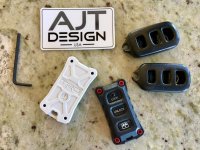
Fixed some broken fobs with AJT Design'd injection molded plastic replacements.

Bought a BROKEN USED one off eBay for $10 & programmed it. I just referenced the FCC ID for a search word.

My locks were acting up too... the drivers side wasn't always cooperating with a fast lock and unlock so I had to help it manually with my hand when I was cycling the lock/unlock button on the door.

Programming worked first time! Great!
 

Attachments

  • IMG_2191.jpg
    IMG_2191.jpg
    135.7 KB · Views: 1,332
I got a used fob from a locksmith company on fleabay. I had the dealership tell me which P/N my runner used when new, I used that to buy the used fob. While going through the lock/unlock cycles, I noticed that the drivers door lock would stop going up and down after the 3 cycle so I just manually pulled up and down on the door lock for each cycle, it worked like a charm.

BTW- for what ever reason, my runner used an odd-ball key fob that crosses to a '04-'08 Sequoia.
 

Members online

Forum statistics

Threads
278,305
Messages
3,554,044
Members
248,016
Latest member
Advally Service

Trending content

Back
Top