Programming Instructions for keyless entry remote?

Re read the whole thread, I had the same issue you are having, you need to use your key in the door lock.


Here is my response above - it does work.

I have a 99 4Runner and I was unable to get into programming mode due to my door lock actuators giving up after about the 3rd on\off cycle. I USED the key in the driver's door lock to perform the programming sequence to turn the locks on\off and it worked like a charm.

This worked for me tonight. Got it into programming mode. Wasn't sure it was reading my fob, then all of a sudden I got the 1-cycle confirm and it started working.

Thanks for this post. Most helpful! Maybe I can actually get a second fob programmed at some point... :bounce:
 
2000 limited keyless entry

I think I have an additional problem. My locks don't work unless I have key in ignition and on. Doesn't need to be started and running just power on.
I can't program my keyless entry by these instructions if my locks won't cycle with the key out of the ignition.
Is there a fuse or something I'm not finding?
They work fine as long as the ignition is on.
 
This worked for me tonight. Got it into programming mode. Wasn't sure it was reading my fob, then all of a sudden I got the 1-cycle confirm and it started working.

Thanks for this post. Most helpful! Maybe I can actually get a second fob programmed at some point... :bounce:

I can get it into programming mode, locks cycle, but pressing remote buttons and nothing happens. I ordered a new one off of amazon for $20. I opened it to check battery and made sure it was in correct, everything looks good to me. Not sure what to do?
 
Last edited:
I can get it into programming mode, locks cycle, but pressing remote buttons and nothing happens. I ordered a new one off of amazon for $20. I opened it to check battery and made sure it was in correct, everything looks good to me. Not sure what to do?

The thing that I kept getting stuck on was the timing of the buttons. I got a bunch of errors (lock/unlock cycle twice) before I got it to take. Are you getting any sort of feedback from the truck?
 
man that armored housing replacement looks fantastic. about how much did that run you? still shopping for a remote, but I definitely want to put one of those on it.

these are just injection molds you put your electronics into from your original factory FOB

$30 a pop for a piece of plastic.... :wow:
 
I tried these instructions on my 99 4 Runner at first without success. I finally gave up and went to the dealer. The dealer told me that they could not do it either because the actuators in the driver's door and the front passenger door were not working at 100 percent. They seem to work pretty good but, not when you click locks back and forth so much. They estimated about $200 to have new Actuators installed in the front doors. The actuators are the things that actually make the doors lock and unlock when you are using the arm rest lock/unlock controls. I told them I would think about it. When I got home, the actuators on the passenger door seemed okay. I followed the above instructions accept that I used my left hand to manually lock and unlock the door while I simultaneously pressed the lock and unlock controls on hte armrest with my right hand. It worked the first time.

I am having this exact problem, but it is with both my front drivers and my rear passenger. may have to get 3 friends in there to help me do it i guess.
 
Hey RAV,

I got your PM-- Here are the instructions for programming the 99-02 4Runner Keyless Entry factory remotes:

1. Start with the following conditions: you are in the vehicle

a. Key is out of the ignition
b. Drive door is open ( all other doors are closed)
c. Driver door is unlocked (other door locks don't matter)

2. Insert the key into the ignition (don't turn it) and pull it out.

3. Perform these steps within 40 seconds:

a. Cycle the power locks 5 times. Use an even pace and try
to go relatively fast.

b. Close, then open the drivers door.

4. Perform these steps within 40 seconds:

a. Cycle the power locks 5 times (same as before).
b. Turn the ignition to ON then back to OFF.
c. Turn the ignition to ON then back to OFF.
d. Remove the key from the ignition.

5. Within 3 seconds, the power door locks should cycle (automatically)
indicating successful entry into programming mode. Return to step 1
if the locks do not cycle at this point.

6. Perform these steps within 40 seconds:

a. Press the LOCK and UNLOCK buttons on the transmitter
simultaneously for 1 second.

b. Immediately after letting go of the lock and unlock buttons,
press the lock button by itself and hold for 2 seconds.
Within 3 seconds, the door locks should cycle ( LOCK then
UNLOCK) once-- indicating successful programming. If
the door locks don't cycle, or cycle twice. Repeat steps
6a and 6b--this remote has not been accepted.

c. Repeat steps 6a and 6b for EACH transmitter that will
operate the vehicle. Including any old transmitters.

7. Close the driver door.

Hope this helps you, it did me greatly-- Good luck, :)

NoliWan

I've tried to do this a few times and so far no luck. Problem I'm having is when I get to cycling the locks, it acts like it runs out of juice. The first 5 or 6 cycles on the lock are just fine, just after that it doesn't cycle very well and seems to struggle.
 
I've tried to do this a few times and so far no luck. Problem I'm having is when I get to cycling the locks, it acts like it runs out of juice. The first 5 or 6 cycles on the lock are just fine, just after that it doesn't cycle very well and seems to struggle.

use your key in the door! that's what I ended up doing. worked perfectly.
 
Wanted to thank everyone for their advice. Finally was able to program my new fob and put together two sets of factory keys super cheap.

Tips I found useful: my locks would get "tired" as well so helping them along by manually locking and unlocking the drivers door while pushing the buttons was key
Closing and "Opening" the door by just hitting the button in the door-jam
Getting your rhythm down when cycling the locks by counting "1-one-thousand, 2-one-thousand, 3-one-thousand, etc."
Actually turning the key to "On" and not "ACC".....duh

Thanks again everyone. Just got the thing with one BS Access key for it. Got two Toyota blanks off ebay along with the new fobs for under $20 shipped. Took the keys to ACE and they cut them for free. Thanks to y'all I'm all set. Thanks again!!

Andrew
 
Use your key to lock/unlock

I had the same issue you are having, you need to use your key in the door lock.


I USED the key in the driver's door lock to perform the programming sequence to turn the locks on\off and it worked like a charm.


THISSSSSSSSSS ^^^^^^^^^


I had recently attempted to program my "new to me" BLACK 4runner & I got It into programming mode on the first attempt but then fumbled on what buttons to push on the FOB so I had to start over again...


Besides the first attempt, I wasn't able to get it back into programming mode....

With my swapping of the ignition cylinder on this rig, I wasn't able to use the new key because the locks were different & the broken end of the key I did have got sucked up at the car wash vacuum... oops. This means I have to have Toyota cut a new key from my VIN. They require your ID & registration of the truck in order to make the request to get the key cutting code, so its a little bit of a process...

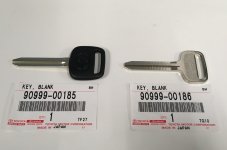
I ordered part number 90999 - 00186 which is an all metal key. for the ignition I would need a chip key but this is only for the door locks so it wouldn't work in the ignition anyways.

90999 - 00185 is NOT a transponder key! It is simply a key with a rubber/plastic end.

.
Screen Shot 2018-03-09 at 4.58.37 PM.jpg

SOOOOOOO, because I'm hoarding 3RD GEN 4Runners like its going out of style, I attempted this programming of a FOB on my 2002 Thundercloud Runner'..

I had successfully got the 2002 into programming mode before so I knew everything would work technically but THIS TIME it wouldn't go into programming mode!!!! what the heck!


!!! One thing I noticed mentioned in this thread is the door lock actuators get "tired" and that prevents the system to go into programming mode.

I was manually helping the door LOCK/UNLOCK on the 5x sequences with my fingers but noticed some of the other locks weren't actuating as well, which I think contributed to the system not going to programming mode....

By locking & unlocking the door manually from the outside with the key, the other door locks don't even move so it's a nice way to not have to worry about those other doors although I can't confirm that the other doors have an effect on the whole system....

All I can say is because these trucks aren't "new" anymore, just go straight to using the key in the drivers side door to follow the sequence of locking & unlocking 5x
 

Attachments

  • Screen Shot 2018-03-09 at 4.58.37 PM.jpg
    Screen Shot 2018-03-09 at 4.58.37 PM.jpg
    121.9 KB · Views: 1,900
THANK YOU THANK YOU!

I have an 02 SR5. Tried 50 times before I figured out my lock actuators were weak. (Keeping the vehicle from going into program mode.

This is the only way I got it to work with a factory alarm and weak actuators...

1. Key on
2. Push the red button near the dimmer switch... This puts the alarm into valet mode.
3. I used used my spare key on the drivers door. I cycled the door lock from the outside 5 times, as I would from the inside.
4. I followed the rest of the steps, and my ears "perked up" as I heard the locks cycle twice.

I was so excited after messing with this for 3 days, that I fumbled with the key fob as held down the lock and unlock buttons. It also rolls down the rear window too! Makes it handy if you have your arms full of stuff.

Thanks to the person who recomended using the key on the outside door. I sir give you to honks from my key fob. Lol!

Sent from my SM-G955U using Tapatalk
 
I'm so glad I stumbled across this thread. Believe I've spent days trying to figure out this programming re-programming of the remote that I got online. The instructions that came with the remote is exactly what is shown in this thread and couldn't get it to work. Luckily I read through all 13 pages of this thread and read about manually locking and unlocking while locking and unlocking the door using the power button. What a relief it works. This site rocks dude!

question though....how do you get the rear window button to work as some stated here? door locks and unlock, but doesn't roll the rear window down. any ideas?
 
Last edited:
I'm so glad I stumbled across this thread. Believe I've spent days trying to figure out this programming re-programming of the remote that I got online. The instructions that came with the remote is exactly what is shown in this thread and couldn't get it to work. Luckily I read through all 13 pages of this thread and read about manually locking and unlocking while locking and unlocking the door using the power button. What a relief it works. This site rocks dude!

question though....how do you get the rear window button to work as some stated here? door locks and unlock, but doesn't roll the rear window down. any ideas?


What year is your 4runner?..

Where did you buy your FOB? Do you have a picture?

We need more details. The rear window option is only a 99+ option & unless you have a 2nd FOB to program & test that window I would say maybe the FOB isn’t working right... you have to hold down that button for a couple
Moments though.. it’s not just a single click
 
What year is your 4runner?..

Where did you buy your FOB? Do you have a picture?

We need more details. The rear window option is only a 99+ option & unless you have a 2nd FOB to program & test that window I would say maybe the FOB isn’t working right... you have to hold down that button for a couple
Moments though.. it’s not just a single click

I have an 01 runner SR5. I did press the button for more than 5 seconds and it still unresponsive. I bought the fob from amazon. 89742-35021
 
man that armored housing replacement looks fantastic. about how much did that run you? still shopping for a remote, but I definitely want to put one of those on it.

I need to get a couple of those!

I am having a heck of a time. I can go through the entire programming process. However, at the end when it cycles 2 times. (I believe indicating it has received my remote control), My remote does not function at all.

Maybe it is time to visit the dealer??
 
I need to get a couple of those!

I am having a heck of a time. I can go through the entire programming process. However, at the end when it cycles 2 times. (I believe indicating it has received my remote control), My remote does not function at all.

Maybe it is time to visit the dealer??

UPDATE,

Ok, I went to the dealer this am. I explained my issue with my remote.
According the the Parts Guy and the Service Guy he spoke to. It is possible to have the wrong code (FCC number) remote but it will still "Take" the programming mode. It will however, not function as a remote for the locks or window.

I do not know if this is actually a true statement from them. They sold me a remote for a small discounted amount and programed it for me, no charge.

I now have a functioning remote! I just wanted to pass this new (to me) information on.
 

Members online

Forum statistics

Threads
278,305
Messages
3,554,044
Members
248,016
Latest member
Advally Service

Trending content

Back
Top