Radio Upgrades... Let see them.

Sounds like the PAC RP4.2-TY11 would've made it much simpler. I had zero issues installing my Pioneer MVH-1400NEX with my JBL system. Used all the factory plugs and all I did was insert a plug for steering wheel controls.

The Crux is only $65 and everything ended up working out perfectly. I couldn’t imagine trying to fit that giant PAC unit in there with the GPS receiver and the million RCA plugs that come with the 4400NEX. It was already an insanely tight fit.
 
The Crux is only $65 and everything ended up working out perfectly. I couldn’t imagine trying to fit that giant PAC unit in there with the GPS receiver and the million RCA plugs that come with the 4400NEX. It was already an insanely tight fit.

Right on... The PAC does fit up on top of the left heater duct perfectly though. Regardless it's cool we have a bunch of options.
 
Gents,

I'm a little behind the eight ball here, forgive my newbie-ness. I have a JBL system and wanted to look into one of these fandancy Android radio deals. So, I'll need the following items for a near PnP:

Some sort of a head unit with "datalink" capabilities
PAC RP4.2-TY11 (near plug n play installation). Retains steering wheel controls, BT connection, external MIC connection.

OR

Maestro (needed if you want vehicle performance data on top of what's mentioned above).

Does this sum it up?
 
Gents,

I'm a little behind the eight ball here, forgive my newbie-ness. I have a JBL system and wanted to look into one of these fandancy Android radio deals. So, I'll need the following items for a near PnP:

Some sort of a head unit with "datalink" capabilities
PAC RP4.2-TY11 (near plug n play installation). Retains steering wheel controls, BT connection, external MIC connection.

OR

Maestro (needed if you want vehicle performance data on top of what's mentioned above).


Does this sum it up?

It looks like you have an 03 so the maestro RR would not be beneficial for you because you can’t integrate information from it. In 2005 and up I believe you can use the maestro RR. Therefore your two choices are the PAC you mentioned, or the CRUX SWRTY-61J. They will both work. One is cheaper than the other but the install is not that straight forward for the Crux. The PAC seems to include a bunch of stuff you may not necessarily need. I used the Crux but many others used the PAC. Pick your poison really. Also if you are doing the head unit install I would get the BKTOYK961 instead of the 8210 that metra produces. The BK fits much better than the 8210 as far as a bezel and is so much more sturdy. I bought both and trashed the 8210.
 
It looks like you have an 03 so the maestro RR would not be beneficial for you because you can’t integrate information from it. In 2005 and up I believe you can use the maestro RR. Therefore your two choices are the PAC you mentioned, or the CRUX SWRTY-61J. They will both work. One is cheaper than the other but the install is not that straight forward for the Crux. The PAC seems to include a bunch of stuff you may not necessarily need. I used the Crux but many others used the PAC. Pick your poison really. Also if you are doing the head unit install I would get the BKTOYK961 instead of the 8210 that metra produces. The BK fits much better than the 8210 as far as a bezel and is so much more sturdy. I bought both and trashed the 8210.

Who makes the BKTOYK961? I plugged that into the Metra search bar so I could see what it looks like, and it returned 0 results.

Edit: never mind, guess I didn’t have enough coffee yet! I just realized the “BK” in the part number was for Best Kits, so I found it right away on their site. If I’m not mistaken, it looks like that kit replaces the factory brackets as well, correct? If so, this would be the “best” option for me anyway, since I don’t have the brackets (previous owner installed single DIN).
 
Last edited:
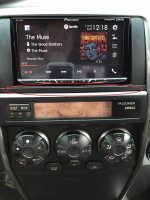
04 Limited w/ JBL and RDS

Kenwood DDX375BT
Scosche TA2079B kit
PAC SWI-CP2
Metra TYTO-01
eRapta ERT02 Backup Camera

also installed Cllena Dual USB Port Charger in the center

Havent finished the camera wiring.

The Spotify app integration works on iPhone 6, but not on my Android Oneplus 6

5RWaBQFNXIdk0YQg7b5NuAwDJQiW_KQVLIkdrlhx5kUsdu-beEai5FAB7LJ8tq2_Gc7k6cfTD3ngyJ2c4yVwzXfi_7_3i9Kc-__ax0jsgT9ZnrD9K1ZX8GHdI9eSGcSzOz32ZphuhJakRsxBiftJzV7OXO2BFnQYleGPrJQ-sdce7-lGKOwotQci1rDtVmeDxNdlSYSmDA4wMZ4HALJREJp4PPJ99yCIxDVWV70VPHABeyzuC-aMWcxZQGHqKeGQB8WB29AN1glZk-kWJJC1_p-4qC5DcbgLhPc5LULnMo3JqSEW3k_rc5Xu-rOwcG990qvKh8BJXyDILjQfmhP1lJl4ooaTn045swPySgRjkXNNld51DVrXTl65VXrRLqQzitX_U-uYuHRe4lAW378H6i9yzZ7D-FG5Nzjo1kDJivj-jxRLX48S71lDxfvnMLBUrX1f8E6vSfcCMP-JLOQVs32l4sig80Pc0P7lpcOW8IT2RmlUPPcV9m3iN9Ct2LkOoFkya8suKKznew2cBOAbDehtZuU37qMw9FfpqQWSlieDHocEf8DxbnzgMY7O_rDHLsnaO_k1Nslf_sJoeD3d_8dVfxigNJP5P4zgaAByxYWBP1U5OzatjgVNx2I10Xg5Q6tuhHqdMJheGxHpruYmFmkm-A=w1660-h1245-no


NK-re9MnIf6tn1GQOPQcJX0AD0yOevCn1wJGYO5nG1apTekMgXq1fpjXwQekh4HnFm5eZY9YSaMEXqzcNa8XXdNRQVV831rtHKCRN9CxHzry-gGKgVMH_bWcIfxGvfRxlXj-12G2DXgTxH7KDeIE2Qi-mXcbaFmhJvdZ1cKMr6hbpLXboNR5h7sQOB82zO8ww7pTaSXJvu27Vycpv7pzSfVgiuPPxFcUSMX34aJ7p-zdVuJ_5_FOJ7Oxe3HMvmQ_vprOaqevHys4HinVbdh47ER7LjzpMD_wv2-hGcGuyXQfVA1nq-Bv8yzHqot9hEwsP7-dAfZ5vv6UswvrWtdZf269kGklV8c8SmnOOBZ1xJCcrkT7AKM8VOMx1fhWXAUSbjQ3GvHzANQ0s4tTx8hCFab9yTJaar0sS8exdc7xRsGuTZxtNJUTll8yd7y08G5jQffY-SclkkhAFZiQ7fpkKZryeLH9VyE-rwnrR0_eJFBTLaBNx6450ksBzkv-Na-seYKnPipwNqXG_tCHEwZYvoNwlgRXvnDo2_xvKatiBzY1EjgeZGMrG_tdvObgEsyCz-8893U8yU3_b9A6D00TzRZMj8tNcn1OVqbL2X7McyScQwQqhBBjCZsmt8kdi8Ag6jPBAT-UWbs4Mdr8kGmffyrlKw=w955-h1272-no
 
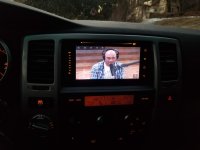
I went with a full android unit. I was perfectly happy with my stock radio in my sr5 until I read this thread....

I reviewed it in another thread, but in short its plug and play and perfectly fits the stock opening without the cheesy faceplate kits. Ordered a "Plug and Play" Android headunit

Lots of awesome upgrades on the xda forums. I installed a ROM and the interface is amazing. Looks stock and its not that expensive. I have some tips and tricks on the install (like how to keep good radio reception and deal with the diversity antenna wires). If anyone needs help with the install shoot me a PM.
 

Attachments

  • 20190121_170720.jpg
    20190121_170720.jpg
    115.5 KB · Views: 931
Can you connect stock AUX port to aftermarket HU?

I did the aux and USB in case a passenger wants to plug a device in at some point. I'll be installing one of the cameras that actually replaces the entire license plate light assembly.

Is it possible to connect the stock AUX port in the center console to aftermarket HU?
 
XTRONS headunit looks good

I went with a full android unit. I was perfectly happy with my stock radio in my sr5 until I read this thread....

I reviewed it in another thread, but in short its plug and play and perfectly fits the stock opening without the cheesy faceplate kits. Ordered a "Plug and Play" Android headunit

Lots of awesome upgrades on the xda forums. I installed a ROM and the interface is amazing. Looks stock and its not that expensive. I have some tips and tricks on the install (like how to keep good radio reception and deal with the diversity antenna wires). If anyone needs help with the install shoot me a PM.

Nice install with the XTRONS. Very tempted to go that route too.

Does it support Android Auto, either wired or wireless?
 
Is it possible to connect the stock AUX port in the center console to aftermarket HU?

Yes, with the PAC RP4.2-TY11 I could've (and still could) utilize the stock aux port. The PAC unit has RCA outputs for connection to H/U inputs that would provide that signal.
 
Did you try a Metra 95-8202 kit instead of the 95-8210? Crutchfield recommends the 95-8202.

So I did purchase the 95-8202 after my first attempt with the 95-8210 ... I tried to use the factory brackets, but without being able to attach the trim kit to the brackets, the trim was loose. So I bought the 95-8202 thinking that would help. It does attach to the factory bracket, but the trim is rounded on the top and the bottom and didn't look right in my 4Runner. So I went back to the 95-8210 and used the brackets that came with the kit so that the trim would attach to the bracket. What you're seeing is the end result.

Crutchfield actually recommended (and sold me) the 95-8210 based on my specific stock radio and interior trim. My understanding is that some combinations do better with 95-8202, and some do better with 95-8210. There are others on this forum that have enough knowledge of the differences to be able to give you a complete rundown, but I can't. But I can say that what Crutchfield recommended actually worked ... they may have taken a while to learn the nuances of the 4th Gen, but they seem to have it pretty well dialed in now. So if they're telling you to go with 95-8202 for your specific vehicle, that's what I'd try first ...

 
Did you try a Metra 95-8202 kit instead of the 95-8210? Crutchfield recommends the 95-8202. Also see posts #51, #63, and #64 in this same thread:

https://www.toyota-4runner.org/2279951-post51.html

https://www.toyota-4runner.org/2286204-post63.html

https://www.toyota-4runner.org/2286238-post64.html

take a pic of the current radio in your car, i can tell which kit you will need to make it look right. that poster has a jbl radio opening, its different from the non jbl 4runner.
 
So I did purchase the 95-8202 after my first attempt with the 95-8210 ... I tried to use the factory brackets, but without being able to attach the trim kit to the brackets, the trim was loose. So I bought the 95-8202 thinking that would help. It does attach to the factory bracket, but the trim is rounded on the top and the bottom and didn't look right in my 4Runner. So I went back to the 95-8210 and used the brackets that came with the kit so that the trim would attach to the bracket. What you're seeing is the end result.

Crutchfield actually recommended (and sold me) the 95-8210 based on my specific stock radio and interior trim. My understanding is that some combinations do better with 95-8202, and some do better with 95-8210. There are others on this forum that have enough knowledge of the differences to be able to give you a complete rundown, but I can't. But I can say that what Crutchfield recommended actually worked ... they may have taken a while to learn the nuances of the 4th Gen, but they seem to have it pretty well dialed in now. So if they're telling you to go with 95-8202 for your specific vehicle, that's what I'd try first ...

i still think the bestkits look better.
Perfect dash kit for 4th gen limited 4runner w/ aftermarket NAV/double din
 
06 SR5 w/ non-JBL radio

take a pic of the current radio in your car, i can tell which kit you will need to make it look right. that poster has a jbl radio opening, its different from the non jbl 4runner.

I didn't know the dash was different based on factory radio...

My SR5 V6 has non-JBL radio, no nav, no steering wheel controls, no cd changer. The failing volume knob randomly adjusts volume up or down, regardless of the direction I rotate it. So thinking about replacing it with a Pioneer AVH-2440NEX or a generic Android unit.
 

Attachments

  • IMG_20190118_074843146.jpg
    IMG_20190118_074843146.jpg
    132.8 KB · Views: 1,457
I didn't know the dash was different based on factory radio...


My SR5 V6 has non-JBL radio, no nav, no steering wheel controls, no cd changer. The failing volume knob randomly adjusts volume up or down, regardless of the direction I rotate it. So thinking about replacing it with a Pioneer AVH-2440NEX or a generic Android unit.


It has to do with the little strip of plastic between the head unit and the multifunction unit on the models with JBL radios. See pic ...

4ce1f8410b766192bb303786654e8476.jpg


That little strip isn’t part of the trim kit ... it’s actually part of the multifunction unit.


Sent from my iPhone using Tapatalk
 
JBL vs non-JBL

It has to do with the little strip of plastic between the head unit and the multifunction unit on the models with JBL radios.

That little strip isn’t part of the trim kit ... it’s actually part of the multifunction unit.

Sent from my iPhone using Tapatalk

Ahhh, now I get it. I totally thought that strip was part of the trim kit.

Thanks for sharing your knowledge / experience!

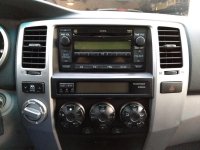
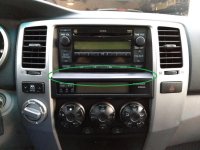
For other folks looking into this, here are two pics with the JBL vs non-JBL difference highlighted.

First pic is MrEMan's pic w/ the extra piece of plastic from JBL 4Runners circled in red.

Second pic is mine w/out the extra piece of plastic from non-JBL 4Runners circled in green.
 

Attachments

  • JBL.jpg
    JBL.jpg
    127.3 KB · Views: 1,179
  • non-JBL.jpg
    non-JBL.jpg
    125.7 KB · Views: 1,376
Nice install with the XTRONS. Very tempted to go that route too.

Does it support Android Auto, either wired or wireless?

I'm sure it can be made to, but it would be a step backwards IMO. I loaded a ROM from the XDA forums (Malayask's 3.2) and really couldn't ask from more functionality.
 

Members online

No members online now.

Forum statistics

Threads
278,310
Messages
3,554,080
Members
248,016
Latest member
Advally Service

Trending content

Back
Top