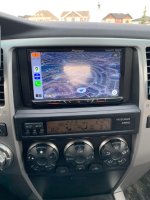
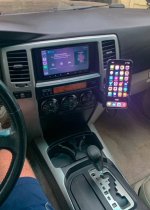
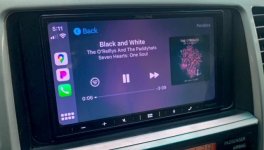
Radio Upgrades... Let see them.

did you have to splice wires with that metra harness? or was it all plug & play?

You only need the Metra TYTO-01 JBL Amplifier Interface if you are keeping the JBL amps etc.
You have to connect the Metra TYTO-01 JBL Amplifier Interface Harness to the wiring harness from the ATOTO. The colors are the same, except I had some confusion with the amp and antenna wires. Blue and blue/white strip. Something like that. Can't remember off the top of my head.
Once its spliced together. You plug it into the factory harness and then the radio.

It's pretty much color coded and if you take your time it's straight forward.

The steering controls are 3 wires. Theres a plug in back that will be left over. It has 4 or 5 wires, but you only need 3.

Double check this on your harness. Going off memory here.
Swc Ground : red/white or white/red
Steering key#+ : purple/white
Steering wheel key + : yellow/black

Mine works and the ATOTO has a menu so you can assign the buttons to do whatever.

Also if you're keeping the JBL amp system, you have to zero out your sound settings and also turn your volume up to about 75% before you disconnect it. It's like a baseline for the Metra adapter.

Hope this helps.
 
Last edited:
Thanks again man, appreciate it! Did you have to splice the SWC as well? or was that just a connection you plugged into the Atoto?

It's arriving today and I decided to order it with just the Metra TYTO in order to keep my factory amp. I'm crossing my fingers this newer Atoto (I went with the F7 Pro XE 10.1") will also retain factory SWC without me needing an additional harness. I also opted not to order the dash kit, since it's a floating 10.1" screen... really don't think the sides will be visible. If they are for myself or passenger, I figure it would be pretty easy to add the dash kit later.

While I'm in there, I was wanting to add a USB extension male to female into one of the blanks next to DAC button/seat heaters. But I am not sure if this Atoto comes with an extension cord, or if I just install it into the side of the head unit since it's floating. They were a little light on pics/details since this is a new model.
 
You only need the Metra TYTO-01 JBL Amplifier Interface if you are keeping the JBL amps etc.
You have to connect the Metra TYTO-01 JBL Amplifier Interface Harness to the wiring harness from the ATOTO. The colors are the same, except I had some confusion with the amp and antenna wires. Blue and blue/white strip. Something like that. Can't remember off the top of my head.
Once its spliced together. You plug it into the factory harness and then the radio.

It's pretty much color coded and if you take your time it's straight forward.

The steering controls are 3 wires. Theres a plug in back that will be left over. It has 4 or 5 wires, but you only need 3.

Double check this on your harness. Going off memory here.
Swc Ground : red/white or white/red
Steering key#+ : purple/white
Steering wheel key + : yellow/black

Mine works and the ATOTO has a menu so you can assign the buttons to do whatever.

Also if you're keeping the JBL amp system, you have to zero out your sound settings and also turn your volume up to about 75% before you disconnect it. It's like a baseline for the Metra adapter.

Hope this helps.

so I'm stuck on the SWC (go figure). are you sure you didn't buy another harness/adapter? can you walk me through exactly what you did?

I am confused as to whether or not I need to cut off the molex connector and splice wires together, or if this should be plug & play. I don't want to assume and start cutting up the factory harness.

I know that the large 16 pin molex will plug into the JLB harness, I already have that spliced up & ready to go. but the other two smaller molex plugs, I am unsure what to do with. I know yous aid you didn't use one (I'm guessing that's from the CD changer which I don't have). but still not sure if this molex that you DID use needs plugged into an additional harness/adapter for SWC, or if it needs sliced off and then spliced to the ATOTO harness.

please help! Lol. Pictures here: Imgur: The magic of the Internet

PS which antenna did you plug in? there's two from the factory and only one slot on the ATOTO. thanks again!

EDIT: I watched some youtube videos and I think I see what I need to do, I do need to splice into the molex connector coming out of the 4Runner next to the main wiring harness. I will attempt that later this week. For now, I got it working and the dash back together since I ran out of time. I've still got a couple of issues to address beyond the SWC -- I need to figure out where to run the two USB cords that plug into the back of the head unit, and also figure out how to raise the 10.1" floating screen a little bit higher. For the USB cords, I'd really like to get them mounted next to the DAC/seat heaters in one of the two blank spots. They don't quite reach there, plus I don't know how I'd mount them there. Might need to buy a USB extension cord, but I'm worried it won't sync up with the Carplay/AA like it's supposed to.
 
Last edited:
EDIT: I watched some youtube videos and I think I see what I need to do, I do need to splice into the molex connector coming out of the 4Runner next to the main wiring harness. I will attempt that later this week. For now, I got it working and the dash back together since I ran out of time. I've still got a couple of issues to address beyond the SWC -- I need to figure out where to run the two USB cords that plug into the back of the head unit, and also figure out how to raise the 10.1" floating screen a little bit higher. For the USB cords, I'd really like to get them mounted next to the DAC/seat heaters in one of the two blank spots. They don't quite reach there, plus I don't know how I'd mount them there. Might need to buy a USB extension cord, but I'm worried it won't sync up with the Carplay/AA like it's supposed to.


Yeah there is a molex connector that's next to the main radio connector. I just soldered the 2 wires from the ATOTO straight to it.

If you see the image I attached, I just soldered Pin 5 and Pin 14 to the wires off the molex. And SWC Ground from the molex to a ground on the frame.
d2805099-98ab-4b19-8d47-b5a9ca46d285.__CR0,0,970,600_PT0_SX970_V1___.jpg


I have the A6 so not sure what the F7 has in it. Mine had 2 usb cable harnesses that plug in back. Think they were 1.5 or 3 feet long. Can't remember. But I routed from behind the stereo down under the center console. reaches to about the coin tray. I bought extension cables and routed it to a blank where you were thinking of doing. You must get good cables. I went through 2 before I found one that actually worked consistently with AA/Carplay.

Here is the one I used that works. It doesn't quite fill the blank spot but it works. I was going to 3D print something up when I get time.
Amazon.com: BATIGE Dual Ports Square USB 3.0 Panel Flush Mount Extension Cable with Buckle for Car Truck Boat Motorcycle Dashboard-3ft : Electronics

I tried the ones that had led lights and fits the blank perfectly, but would only work with AA and didn't work with Carplay. I tried 2 different ones from Amazon and none worked. The BATIGE one worked for me.
Amazon is great, so you might try several of the Toyota style ones that fill the blank and they may work for you. Can always return if they don't.


For the antenna I used a y adapter and an adapter tip for the small end.
I bought this one:
Amazon.com: Scosche MDAB Compatible with 1988-05 GM Micro/Delco Antenna Adapter; Tip only : Electronics


Hope this helps.
 
Here's my submission. Work was completed over an extended weekend, but I'm still working on tuning the DSP. I also picked up a MiniDSP UMIK-1 RTA to assist in tuning, but so far I've only been successful in flattening out the sound profile, I still need to tune it to a curve that actually sounds good.

Parts List:

JBL DSP4086 amplifier/DSP

Pioneer GM-D8601 amplifier

Pioneer DMH-160BT headunit

Infinity Reference 6530CX front components (running them active)

Infinity Reference 6532EX coaxial rear

Kicker 47KSC2704 (2 3/4) center channel

Pioneer shallow 8” sub - (immediately replaced with an Orion XTR 10” I had lying around with a ported box, 8” wasn’t enough for my tastes)

Fastrings and Kilmat sound deadening used throughout

<a data-flickr-embed="true" href="https://www.flickr.com/photos/195290183@N05/51971040571/in/dateposted-public/" title="image3 - Copy"><img src="https://live.staticflickr.com/65535/51971040571_38ae2ab9d8_c.jpg" width="600" height="800" alt="image3 - Copy"></a></script>

<a data-flickr-embed="true" href="https://www.flickr.com/photos/195290183@N05/51971112528/in/dateposted-public/lightbox/" title="image4"><img src="https://live.staticflickr.com/65535/51971112528_84cd7257fe_c.jpg" width="600" height="800" alt="image4"></script>

<a data-flickr-embed="true" href="https://www.flickr.com/photos/195290183@N05/51971604900/in/dateposted-public/lightbox/" title="image1"><img src="https://live.staticflickr.com/65535/51971604900_40f27a7269_c.jpg" width="600" height="800" alt="image1"></script>

<a data-flickr-embed="true" href="https://www.flickr.com/photos/195290183@N05/51971330649/in/dateposted-public/lightbox/" title="image2 - Copy"><img src="https://live.staticflickr.com/65535/51971330649_787c1d1235_c.jpg" width="800" height="600" alt="image2 - Copy"></script>
 
Hope this helps.

Thanks again for all of this! My plan is to just snip the molex connector completely off, and splice the wires by twisting the ends of the radio harness & the Toyota harness together and capping them with crimps. That's how I spliced all the other wires. I don't have a soldering iron.

I came across that USB port but yeah, I was a little thrown off since I figured it wouldn't match the blank. For now, I bought two usb 3.0 extensions so that it's long enough to reach the center console area. I'll either hide them in the center console area, or in the cigarette tray area, or I may bite the bullet and try to modify the existing blank.

Since it's wireless AA/CP, I don't need them to be very accessible, so I'm thinking hidden in the center console is the best option. Someone on reddit mentioned there is a knockout you can use so you don't even have to cut a hole.

edit: and by the way, if you are ever upgrading from the Atoto A6, I definitely am liking this F7 Pro XE. The wireless android auto has worked seamlessly for me so far in about an hour's worth of testing. Plus, I imagine upgrading for you would be a breeze since it'll all be plug & play going forward if you stay within Atoto.
 
Thanks again for all of this! My plan is to just snip the molex connector completely off, and splice the wires by twisting the ends of the radio harness & the Toyota harness together and capping them with crimps. That's how I spliced all the other wires. I don't have a soldering iron.

I came across that USB port but yeah, I was a little thrown off since I figured it wouldn't match the blank. For now, I bought two usb 3.0 extensions so that it's long enough to reach the center console area. I'll either hide them in the center console area, or in the cigarette tray area, or I may bite the bullet and try to modify the existing blank.

Since it's wireless AA/CP, I don't need them to be very accessible, so I'm thinking hidden in the center console is the best option. Someone on reddit mentioned there is a knockout you can use so you don't even have to cut a hole.

edit: and by the way, if you are ever upgrading from the Atoto A6, I definitely am liking this F7 Pro XE. The wireless android auto has worked seamlessly for me so far in about an hour's worth of testing. Plus, I imagine upgrading for you would be a breeze since it'll all be plug & play going forward if you stay within Atoto.

Rather than cut into the factory 20-pin harness for SWC, I ended up finding a $9 harness that plugs into it. You then cut the back end of that harness and splice it into the ATOTO wires. I made a thread which I'll continue to update with more photos & reviews etc. see here: https://www.toyota-4runner.org/4th-...ss-carplay-android-auto-unit.html#post3724162
 
Man, there's an incredible amount of information in this thread. And I'm not much of an audiophile, so I don't understand most of it!

I skimmed most of the thread looking for any mention of this but didn't see it. I have an 03 non-JBL, with the 6-disc CD changer in the center console. I'd like to upgrade the head unit, but if possible I'd like to keep the CD changer as I'm old...and most of my music is still on discs. I have no idea how the CD changer connects to the factory head unit, but does anyone know if it's as simple as an Aux jack? And would a replacement head unit have the same Aux-in jack to keep the CD changer?

Thanks
 
Pioneer. Easy install. Love having gps.
 

Attachments

  • 5D1CC79E-46B1-43B8-A7FC-DD3B0F723B9E.jpg
    5D1CC79E-46B1-43B8-A7FC-DD3B0F723B9E.jpg
    126.8 KB · Views: 906
Best Buy for Radio Upgrades?

I am going to ask a dumb question...
I have a 2008 Limited V8 w/JBL and Nav. I'd like to upgrade the original radio because the AUX button doesn't work, and the CD player doesn't exist anymore (I bought it used and the original manifest says there was a CD player), and well... I'd like to welcome my car to this decade.

Best Buy has free installation if I buy a Sony AX4000 from them, and is the same price that Crutchfields is charging.
What am I missing here? Feels like a pretty good deal given the photos I've seen of the wiring on a JBL stereo.
I mean, it's Best Buy... but why wouldn't I use an expert who does this for a living if it's being offered for free?
 
Expert? Maybe. Are you wanting to keep the steering wheel controls? That's going to require extra parts and money.And you will probably lose the center chanel/dash speaker. I did but I don't miss it.

I just watched a ton of YouTube videos until I learned enough to tackle the job myself but I replaced the head unit, door speakers, tweeters and subs with amp.

As long as they will stand behind the work I don't know why you wouldn't let them do it.
 
I would agree they aren't experts (and my sarcasm didn't come through), but they do have way more reps than I do at replacing the radio. I'd have them do the steering wheel controls and backup camera, which are all in the parts they sell. Their installation work is warrantied as much as a dealer's is, so I kind of think it's work a shot, when it's not costing me anything additional. My dad is an electronics engineer so I have someone to fall back on if it all goes downhill.
 
Alpine iLX-W650
Natika backup camera from Amazon.
JL speakers, amp, and sub yet to be installed.
 

Attachments

  • 24.jpg
    24.jpg
    69 KB · Views: 612
  • 25.jpg
    25.jpg
    46.3 KB · Views: 610
ATOTO A6 Pro for Toyota w/OBDII Bluetooth adapter and Metra TYTO-01 JBL amp harness. Steering wheel controls and OEM backup cam directly wired to the HU. No faceplate needed.

56f6d7f8bb1c385f3258e7f2b9e2eafb.jpg

Digging up an old post but have a question. You didn't have any issues with the factory 6V camera wiring directly into HU? I'm trying to figure out the most "plug and play" solution to add Carplay to my '08 w/ factory Nav while retaining the factory backup camera functionality. This seems like a pretty good option.
 
Digging up an old post but have a question. You didn't have any issues with the factory 6V camera wiring directly into HU? I'm trying to figure out the most "plug and play" solution to add Carplay to my '08 w/ factory Nav while retaining the factory backup camera functionality. This seems like a pretty good option.
That's how I did mine, no issues

Sent from my KB2005 using Tapatalk
 

Members online

Forum statistics

Threads
278,310
Messages
3,554,079
Members
248,016
Latest member
Advally Service

Trending content

Back
Top