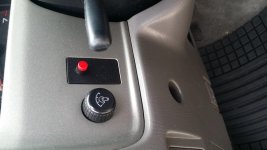
Red Button of Death (Alarm Issue)

Redstains441

New member
Hello all.
I picked up a 2001 4runner SR5 a few months ago and bought a keyless remote from Amazon. Programmed it and everything worked find until yesterday.

While I was cleaning out the garage, I let my 2 y/o daughter goof around in the drivers seat (how much damage could she do without the keys? I thought...).

She must have messed with that red valet button to the left of the steering wheel because ever since then, the "unlock" button on the remote sets off the car alarm and does not unlock the doors. The "lock" button does lock the doors, and only sets off the alarm about once every 5 times I push it. Also, the rear window button does nothing now.

I tried disconnecting the battery for 15 minutes, tried re-programming the remote, and tried some difference red button/ignition sequences that I found searching around online. At one point I was in the car and the alarm and panic alarm were going off, and the car wouldn't unlock from the automatic switch, I had to manually pull the "tab" up to unlock the car.

Any ideas? Thank you! :cheers:
 
Register to hide this ad
With the battery connected...

Open the door by unlocking it with the key. The alarm will go off.

Try turning the key FULLY front to back 3x times.

Only 2 should be necessary but I say 3 just to be sure.

The car will disarm.

On a 97 Limited Factory Alarm this works great.
 
Try this....
•1


Put the 4Runner's key into the ignition and turn it to the "on" position. Find the valet switch near the hood release on the driver's side dash. Turn the valet switch on and off three times quickly. Listen for a short chirping sound coming from the alarm system.

2


Press and hold the unlock/lock buttons on your keyless entry device. When you hear one long beep, release the buttons.


3


Turn the valet switch on and off again quickly. Turn the key in the ignition to the "off" position and then remove it from the ignition. Lock the doors using the remote to test the system
.


Read more : How to Reset an Alarm on the 2000 Toyota 4Runner | eHow
 
Thanks guys, but no effect.

Just to clarify, I can still turn off the alarm by double clicking the "unlock" button after the same button kicks the alarm on.

So strange...
 
Any chance you can post a pic of your light? Going through something similar over here and want to make sure we're both on the same page
 
20150509_173235.jpg
 

Attachments

  • 20150509_173235.jpg
    20150509_173235.jpg
    129 KB · Views: 31,460
That explains why the key method i suggested did no good.


Yup. Well, I would suggest one of two things. Either see if you can find what type of unit they used for the alarm, (follow the wires). Or, take it somewhere and see if they can reprogram it.

I would start by looking under the hood and looking for something obvious that is connected to the battery. Good alarm installs very often want to hide the brain unit in "hidden" area, or completely out of site. So figuring out what you are working with could prove a bit difficult, but not impossible. You could also, for the time being, disconnect the alarm feed from the battery till you figure out what you want to do.

And that big red button screams "PUSH ME" to two-year olds.

Good luck brother!
 
Looks like there's two differen alarm systems installed. I found a box under the driver's dash and unplugged it, but there's still another alarm going off.

They both activate the horn, but the horn beeps at different rates.
 
You need to take off the 4 12mm bolts that hold the dash under the steering wheel on (with the button) and see where that button goes to. And go from there.
 
According to my local Toyota dealer, the alarm button that is pictured is a dealership option that was not installed at the factory, but installed in the local dealerships. Can anyone verify that?
 
According to my local Toyota dealer, the alarm button that is pictured is a dealership option that was not installed at the factory, but installed in the local dealerships. Can anyone verify that?

Not 100%, but I am very sceptical of that claim. I have never seen that type of button on any 3rd gen Toyota 4Runner. The factory Toyota alarm button looks far different. It is not a button fore one. It is a rocker style switch that rocks upward and Donald with a small red light in the middle. It says something like, "Toyota Security " or the like. I believe mine is a little faded off. I can take a better look later when I get off work.
 
Last edited:
Not 100%, but I am very sceptical of that claim. I have never seen that type of button on any 3rd gen Toyota 4Runner. The factory Toyota alarm button looks far different. It is not a button fore one. It is a rocker style switch that rocks upward and Donald with a small red light in the middle. It says something like, "Toyota Security " or the like. I believe mine is a little faded off. I can take a better look later when I get off work.

I have the same button that is pictured above. It is not a Toyota specific alarm system, but apparently it was a dealership option "add-on". They even sold the remotes (which looked different then the Toyota factory remotes). It would have worked for mine, but the module had been removed by the PO.
 
Ripe it all out, alarms are a joke. If your worried about it just put a little blinking LED light inside and slap an alarm sticker on the window lol.

*Sorry no real input on the situation*
 
I have an aftermarket alarm as well. To disable I put my key to the "on" position and then click the red button. Not sure if it will help as mine is different.
 
So I have a 2001 SR5, do I have remote entry as well? Mine came with a crap aftermarket fob that doesn't work, how do I tell if mine came with keyless remote entry?

Thanks
 

Members online

Forum statistics

Threads
278,316
Messages
3,554,111
Members
248,016
Latest member
Advally Service

Trending content

Back
Top