Switch Pro 8100 mounting location

MadeInMaine

New member
I just wanted to see if anyone has mounted the 8100 head unit.

I am thinking I will mount by my left knee, keep it a little out of view, but still accessible.

Just curious what others have done, likes and dislikes.

Cheers
 
Register to hide this ad
I just wanted to see if anyone has mounted the 8100 head unit.

I am thinking I will mount by my left knee, keep it a little out of view, but still accessible.

Just curious what others have done, likes and dislikes.

Cheers

Did you end up mounting your Switch pro by your left knee? I'm trying to decide where to mount it as well. How do you like it?
 
Did you end up mounting your Switch pro by your left knee? I'm trying to decide where to mount it as well. How do you like it?

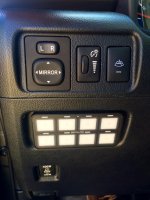
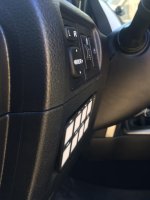
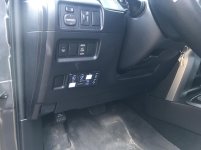
I mounted mine by my left knee where the factory switch blanks were located. I didn't have to cut or drill any of the factory plastic either with the recessed mounting hardware.

I removed the 4 factory switches in this location and relocated 1 to the upper switch location (wiper heater switch needs to be flipped upside down in order to fit this blank) and 1 to the lower single switch blank.

All i used was longer #1.5" x #6 machine bolts (in lieu of the supplied all-thread) and nuts to clamp the mounting brackets to the backside of the plastic.

Pretty satisfied with how clean it looks, although i have yet to install the SP-8100. I was debating mounting it vertically on the left plastic pillar below the stereo, but I didn't think it would look as clean/factory.

Photo Mar 02, 1 21 19 PM.jpg

Photo Mar 02, 1 46 33 PM.jpg
 

Attachments

  • Photo Mar 02, 1 21 19 PM.jpg
    Photo Mar 02, 1 21 19 PM.jpg
    137.1 KB · Views: 6,782
  • Photo Mar 02, 1 46 33 PM.jpg
    Photo Mar 02, 1 46 33 PM.jpg
    113.6 KB · Views: 3,545
Last edited:
Your windshield wiper warmer switch is mounted upside down, if you care about that sort of thing.

Install looks great.

Yeah I intentionally flipped it upside down lol. The wiper warmer switch is "keyed" specifically for it's factory location, so it would not fit in the upper switch blank (or any other switch blanks) unless i flipped it upside down or shaved off the plastic grooves... i chose to just install it upside down since i'm lazy.
 
Yeah. My dumba$$ saw that you stated that in your previous post after I commented on it - sorry.
 
Yeah I intentionally flipped it upside down lol. The wiper warmer switch is "keyed" specifically for it's factory location, so it would not fit in the upper switch blank (or any other switch blanks) unless i flipped it upside down or shaved off the plastic grooves... i chose to just install it upside down since i'm lazy.

I shaved mine down. Now it fits anywhere.
 
I mounted mine by my left knee where the factory switch blanks were located. I didn't have to cut or drill any of the factory plastic either with the recessed mounting hardware.

I removed the 4 factory switches in this location and relocated 1 to the upper switch location (wiper heater switch needs to be flipped upside down in order to fit this blank) and 1 to the lower single switch blank.

All i used was longer 1.5" x #6 machine screws (in lieu of the supplied all-thread) and nuts to clamp the mounting brackets to the backside of the plastic.

Pretty satisfied with how clean it looks, although i have yet to install the SP-8100. I was debating mounting it vertically on the left plastic pillar below the stereo, but I didn't think it would look as clean/factory.

View attachment 242077

View attachment 242078

wow. that looks great. Nicely done.
 
That fits pretty nice right there and kind of stays hidden which is nice. Wondering how the functionality will be being down there.


Sent from my iPhone using Tapatalk
 
I mounted mine by my left knee where the factory switch blanks were located. I didn't have to cut or drill any of the factory plastic either with the recessed mounting hardware.

I removed the 4 factory switches in this location and relocated 1 to the upper switch location (wiper heater switch needs to be flipped upside down in order to fit this blank) and 1 to the lower single switch blank.

All i used was longer #1.5" x #6 machine bolts (in lieu of the supplied all-thread) and nuts to clamp the mounting brackets to the backside of the plastic.

Pretty satisfied with how clean it looks, although i have yet to install the SP-8100. I was debating mounting it vertically on the left plastic pillar below the stereo, but I didn't think it would look as clean/factory.

View attachment 242077

View attachment 242078

You're selling me on this setup the more i think of it. Were you able to get one with the blue backlighting? How closely does it match the factory lighting?
 
You're selling me on this setup the more i think of it. Were you able to get one with the blue backlighting? How closely does it match the factory lighting?

Yeah i got the blue backlighting to match the OEM backlights. I haven't powered it up yet but should have everything hooked up in the next few days (worked on it for a little last night). I'll post some photos once I have it all lit up.
 
I'm bad with pictures, but I mounted mine on the overhead console. Out of the way, not as clean as Shred_Head's install
 

Attachments

  • 239794d1487459520-what-did-you-do-your-5th-gen-today-img_4428.jpg
    239794d1487459520-what-did-you-do-your-5th-gen-today-img_4428.jpg
    131.5 KB · Views: 2,304
  • 239793d1487459507-what-did-you-do-your-5th-gen-today-img_4427.jpg
    239793d1487459507-what-did-you-do-your-5th-gen-today-img_4427.jpg
    124.1 KB · Views: 2,325

Nice! were you able to use the SP to control your anytime backup cam? if so, how did you wire it to the camera harness?

I'm almost finished installing my SP but i've been having the hardest time pushing the control panel wiring harness through the firewall... any tips? I've tried using a coat hanger but the wiring bundle keeps getting stuck when i try and pull it through :frusty:
 
Nice! were you able to use the SP to control your anytime backup cam? if so, how did you wire it to the camera harness?

I'm almost finished installing my SP but i've been having the hardest time pushing the control panel wiring harness through the firewall... any tips? I've tried using a coat hanger but the wiring bundle keeps getting stuck when i try and pull it through :frusty:

If going through a grommet or rubber plug I always used old powered antenna shafts from older cars. You get multiple sizes from each one. Pick the one you like and chuck it in a drill and it'll pull a plug of rubber out for you to feed through. Old installers trick I learned from working at cartoys.
 
Nice! were you able to use the SP to control your anytime backup cam? if so, how did you wire it to the camera harness?

I'm almost finished installing my SP but i've been having the hardest time pushing the control panel wiring harness through the firewall... any tips? I've tried using a coat hanger but the wiring bundle keeps getting stuck when i try and pull it through :frusty:

I have a BriGuyDIY camera harness that I am using, but I haven't hooked it up yet. Been busy with work and a newborn child.

As for the wiring harness, yeh, definitely the hardest part. Trying to be gentle on the port, without cutting up a massive hole in the grommet. I work in the medical field and had a 11 blade scalpel that was perfect for the job. Just take your time, and slowly make a hole larger in the grommet.
I'll post a picture or video after I hook up camera
 
I wanna see one of these lit up. Do the backlight match. I know you can program the switch panel brightness but can it be dimmed with the factory lighting? His looks like a nice solution.

Sent from my Pixel XL using Tapatalk
 
I wanna see one of these lit up. Do the backlight match. I know you can program the switch panel brightness but can it be dimmed with the factory lighting? His looks like a nice solution.

Sent from my Pixel XL using Tapatalk

You can set the 'dimness' level.
The unit also dims when you turn your lights on
 
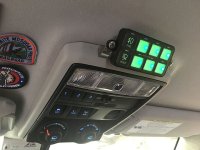
Mounting on Overhead Console.

Here is where I mounted my controller.
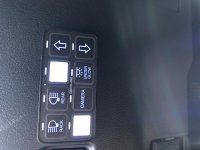
It's a shame I can't change the color of the controller. Would like it to match the blue from the rest of the dash.
 

Attachments

  • IMG_6687.jpg
    IMG_6687.jpg
    101.8 KB · Views: 2,921

Members online

Forum statistics

Threads
278,306
Messages
3,554,045
Members
248,016
Latest member
Advally Service

Trending content

Back
Top