Techstream User Manual?

stevec5000

New member
While there is lots of mention of Techstream, I've not seen anyone mention finding a user manual telling how to use it. Has anyone found a user manual anywhere?
 
Register to hide this ad
A manual isn't really necessary - it's a pretty straightforward program that's easy to learn just by playing with it a little bit.
 
A manual isn't really necessary - it's a pretty straightforward program that's easy to learn just by playing with it a little bit.
Come on and stop the BS! This is supposed to be a tool for dealers!
It does look kind of easy until you try to do something and you can't find any way to do it. All it will do is display data and test a few subsystems but I though it was supposed to do more like adjust door lock, rear window and interior light characteristics, allow turning on or off DRL lights, let you program new keys or tire pressure sensors, etc. but there are no options to do anything like that in the program.
I figure a manual might have a section telling where the "hidden" features are.
 
Come on and stop the BS! This is supposed to be a tool for dealers!
It does look kind of easy until you try to do something and you can't find any way to do it. All it will do is display data and test a few subsystems but I though it was supposed to do more like adjust door lock, rear window and interior light characteristics, allow turning on or off DRL lights, let you program new keys or tire pressure sensors, etc. but there are no options to do anything like that in the program.
I figure a manual might have a section telling where the "hidden" features are.

huh? Calling us Liars on the other thread and BSer's......lol
Obviously YOU are doing something wrong.Maybe ,Drivers for the cable? Wrong Windows OS?Following directions on loading the software if it is the right software?
Bought my cable and cd in the USA from a guy in Florida on Feebay for less then $50.It doesn't update and was expected. Could care less as 99.99% of updates have nothing to do with my truck as Techstream covers all Toyotas. You can view the update changelogs online and see that the only thing that was updated for 4runners is for the 2013's smog pump diagnostics, which I don't have.
It does EVERYTHING the dealers Techstream does and is the full version and not the Lite version!

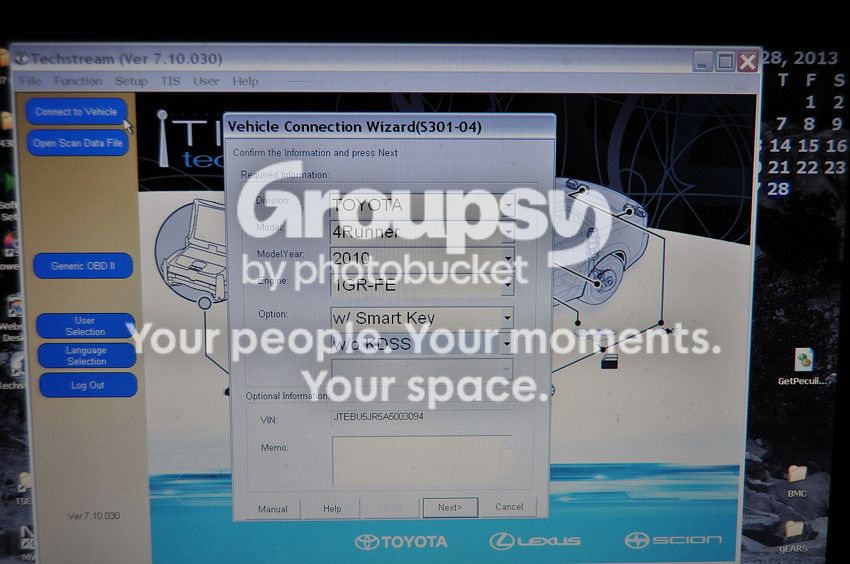
Here's some screenshots I just took for you when I got home and see if yours looks like this. It works 100% the same as the dealers.It's very self explanatory and specific testing/trouble shooting a specific system/component is in a step by step process in the factory repair manual.
Turn on ignition ,plug it in the OBDII port and click "connect vehicle" ,fill in the options and there you go,hit next!
Picture010-14_zpsc0c4bccd.jpg~original

Comes up with this page and you can see the options and systems you can click on and the stored data button to see and clear DTC's.
Picture003-16_zps8cf1af5a.jpg~original

This is clicking on the "Customize Settings" button.
Picture004-17_zps08cbdbb7.jpg~original

This is clicking on the " Wireless Door Lock"
Picture005-14_zps76504968.jpg~original

And the seat one most people want changed...
Picture007-11_zps551c4244.jpg~original

And this is clicking on the "Tire Pressure Monitor" system from the main page.You can see the pressures and TPMS ID's. My left front is a little low!There are other test you can run from within the TPMS system

Picture011-11_zps4451a863.jpg~original
 
Last edited:
Thanks for the screenshots Harper, that does look pretty self explanatory!

On a tangential note, have you used it to program another Smart Key? Lots of threads online about folks using it to program new smart keys for Lexus and Prius, but I haven't seen one for our trucks yet.
 
huh? Calling us Liars on the other thread and BSer's......lol
Obviously YOU are doing something wrong.Maybe ,Drivers for the cable? Wrong Windows OS?Following directions on loading the software if it is the right software?
Bought my cable and cd in the USA from a guy in Florida on Feebay for less then $50.It doesn't update and was expected. Could care less as 99.99% of updates have nothing to do with my truck as Techstream covers all Toyotas. You can view the update changelogs online and see that the only thing that was updated for 4runners is for the 2013's smog pump diagnostics, which I don't have.
It does EVERYTHING the dealers Techstream does and is the full version and not the Lite version!


Here's some screenshots I just took for you when I got home and see if yours looks like this. It works 100% the same as the dealers.It's very self explanatory and specific testing/trouble shooting a specific system/component is in a step by step process in the factory repair manual.
Turn on ignition ,plug it in the OBDII port and click "connect vehicle" ,fill in the options and there you go,hit next!
Picture010-14_zpsc0c4bccd.jpg~original

Comes up with this page and you can see the options and systems you can click on and the stored data button to see and clear DTC's.
Picture003-16_zps8cf1af5a.jpg~original

This is clicking on the "Customize Settings" button.
Picture004-17_zps08cbdbb7.jpg~original

This is clicking on the " Wireless Door Lock"
Picture005-14_zps76504968.jpg~original

And the seat one most people want changed...
Picture007-11_zps551c4244.jpg~original

And this is clicking on the "Tire Pressure Monitor" system from the main page.You can see the pressures and TPMS ID's. My left front is a little low!There are other test you can run from within the TPMS system
Picture011-11_zps4451a863.jpg~original

Good job! I was feeling those other peoples pain...I was not doubting anyone who was saying it works and it's easy but I could just feel the frustration from those who weren't finding it easy.

I don't have Techstream and have been shopping. I guess there are so many bootleg versions out there that this is probably not a plug-n-play proposition. If by chance one get's a "clean", current version with a good interface, the shit works. Is that correct? Also, is it still best to just get an old XP computer?
 
harper7 - Thanks for taking the time and posting the screenshots. I have thought about buying the cable and trying out the software. Right now my only need is to change the ID numbers of my TPMS sensors. But like (I think) Philsey,I just keep parking in the garage next to my other wheels and sensors and the signal is picked up by the 4Runner. The 4Runner resets the dashlight and I am good to go for another day or two before it turns on again.

Anyway, your screenshots have answered a question that I had - if the TPMS sensor id numbers appeared or if the input boxes were blank. It appears as though the id numbers appear and I can write then down. Then I can change id numbers as needed. I have the id numbers for my aftermarket sensors, but not my factory sensors. According to what I saw in your screen shots the active sensor numbers appear.

As always thanks for your contributions to this forum!

Cheers
4BYTOY
 
Good job! I was feeling those other peoples pain...I was not doubting anyone who was saying it works and it's easy but I could just feel the frustration from those who weren't finding it easy.

I don't have Techstream and have been shopping. I guess there are so many bootleg versions out there that this is probably not a plug-n-play proposition. If by chance one get's a "clean", current version with a good interface, the shit works. Is that correct? Also, is it still best to just get an old XP computer?
All I know is mine works on XP Pro and I followed the install directions on the cd except I didn't register for the updates like it said I could.I had to activate it with a key and then swap out out a .dll file in the bin folder and then it said "Days To Expire = 3000".I don't see the seller in FL I bought mine from on ebay anymore.There are a bunch of bootleg versions out there though so who knows how other hackers hacked it.

harper7 - Thanks for taking the time and posting the screenshots. I have thought about buying the cable and trying out the software. Right now my only need is to change the ID numbers of my TPMS sensors. But like (I think) Philsey,I just keep parking in the garage next to my other wheels and sensors and the signal is picked up by the 4Runner. The 4Runner resets the dashlight and I am good to go for another day or two before it turns on again.

Anyway, your screenshots have answered a question that I had - if the TPMS sensor id numbers appeared or if the input boxes were blank. It appears as though the id numbers appear and I can write then down. Then I can change id numbers as needed. I have the id numbers for my aftermarket sensors, but not my factory sensors. According to what I saw in your screen shots the active sensor numbers appear.

As always thanks for your contributions to this forum!

Cheers
4BYTOY
Pretty sure you still have to scan each TPMS sensor and then into the ECU though rather then just input the ID numbers. There is a set sequence for scanning with a Bartec scanner I know,scan LF,RF,RR,LR and then hold the scanner in front of the lower dash and hit enter.
 
Last edited:
huh? Calling us Liars on the other thread and BSer's......lol
Obviously YOU are doing something wrong.Maybe ,Drivers for the cable? Wrong Windows OS?Following directions on loading the software if it is the right software?
Wow, thanks for the extensive reply. Well I finally had some success, sort of. I kept bugging the ebay seller I got the package from until they sent me a new driver. It originally had a Mangoose driver on the CD but that didn't let me get to anything I could change, just look at the data like RPM, voltage, temp, etc. when the engine was running. The new driver is called the XHorse MVCI driver. Now I can get to items that can be changed but I haven't actually been able to change anything yet. I wanted to make the remote dongle beeper louder when the vehicle is locked or unlocked. I can get to the settings but it says Vol is already set to max. so I tried turning it down to see what happens. That didn't make any difference so I guess it only has one set volume. I also wanted to turn on DRL and it says that is already On so I must not have the turn signal relay that's needed to make it work.
The version from the file share site came with the MainMenu.exe file to make it work but it still was worthless even when that was used. The CD version from ebay came with Tiskey and the Mangoose driver instead. Not a bad deal for $25 once you get it working.
 
While there is lots of mention of Techstream, I've not seen anyone mention finding a user manual telling how to use it. Has anyone found a user manual anywhere?

I realize this is an old thread - might help someone else.

The following is a start - no hard copy book - online tutorial.

https://techinfo.toyota.com

Upper right side of screen - look for:

Click here for a tutorial on our Technical Information System - 45 min. discussion that may not offer enough in-depth info, but it's a start.

If things are not intuitive enough, you may need to buy a 2 day subscription to get a better feel for how it works - not sure if doing that would help.

Downloading the 4765 page 2010 5th Gen 4Runner Factory Service Manual by member nashman69 might help as well. SEARCH will bring that up quickly.
 
Last edited:

Members online

Forum statistics

Threads
278,305
Messages
3,554,042
Members
248,016
Latest member
Advally Service

Trending content

Back
Top