TOYOTA TIS Techstream

Latest version: 13.00.022
http://mhhauto.com/Thread-TOYOTA-Techstream-V13-00-022-02-2018-Activation?highlight=techstreAM


I had version 12.30, did the upgrade (not clean install) to 13.00 and works fine. Even with upgrade will require a new key, the one from 12.30 doesn't work anymore.
Still running on a VM with Windows XP, but for me works OK.

Here what's new with 13.00.022: https://techinfo.toyota.com/techInfoPortal/staticcontent/en/techinfo/html/prelogin/tsrss/ts_new_features.html#newfeatures
 
Last edited:
All,
Does anyone have the URL where I can download the Techstream software from ??...just bought an Autel DS808 bi-directional scanner 2 weeks ago but I'd like to have something specific for my 2016 4 Runner. What seems to be the best OS that gives the least issues setting it up ??...THANKS !!!
 
Latest version: 13.00.022
http://mhhauto.com/Thread-TOYOTA-Techstream-V13-00-022-02-2018-Activation?highlight=techstreAM


I had version 12.30, did the upgrade (not clean install) to 13.00 and works fine. Even with upgrade will require a new key, the one from 12.30 doesn't work anymore.
Still running on a VM with Windows XP, but for me works OK.

Here what's new with 13.00.022: https://techinfo.toyota.com/techInfoPortal/staticcontent/en/techinfo/html/prelogin/tsrss/ts_new_features.html#newfeatures
Hi,
I just purchased Ver.13.last week from Ebay and the Mini VCI cable from Amazon...ran the driver CD through my Norton Anti Virus and it quarantined 2 files...Techstream program was OK...I emailed the guy I got the Techstream program from and he gave me a URL where I could get the drivers from...THEY had a virus or malware I think that Norton REMOVED !!...I'm waiting for the seller to contact me...if he ever does...LOL !!...I'll be hopefully running mine on 64 bit Windows 10...will it work OK ??
 
Hi,
I just purchased Ver.13.last week from Ebay and the Mini VCI cable from Amazon...ran the driver CD through my Norton Anti Virus and it quarantined 2 files...Techstream program was OK...I emailed the guy I got the Techstream program from and he gave me a URL where I could get the drivers from...THEY had a virus or malware I think that Norton REMOVED !!...I'm waiting for the seller to contact me...if he ever does...LOL !!...I'll be hopefully running mine on 64 bit Windows 10...will it work OK ??

I've tried on 64 bit without any luck. Always was a problem with the driver. The only one that is working for me is the 32 bit version, other people use the 64 bit version for a long time.
The antivirus always flag it (those Crack files always show some Virus/Malware), but you just ignore it. The best way to run it, a Virtual Machine with only Techstream and nothing else. Even if the program has a virus, you will be OK inside the VM.
 
I have techstream and have not been able to find a way to lock air recirculation from opening the vents. I know theres the trick to hold the button for 3 seconds and that'll lock it but want a more permanent solution.
 
Techstream Question

Hey All,
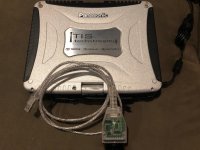
Just purchased a used (Factory) Techstream Panasonic Toughbook. It's version 13 running Windows 7 Pro (32 bit). I get a Fatal Error 0xC0040001 when accessing Engine and ECT Data List....data list works fine in all other systems. Seller is going to send me another Techstream Lite Cable next week. It's a clear cable but does anyone know how to determine if it's a real Techstream Lite cable and if it's a bad cable causing the error ??...there is a red indicator light BTW when it's plugged in... THANKS !!!
 

Attachments

  • IMG_1982.jpg
    IMG_1982.jpg
    137.8 KB · Views: 3,078
Per my post above and subsequent posts, as well as the other confused posts, AND other helpful instructions/pointers posts, I thought I would put up a quick debrief of my experience so that it might help others.

First Attempt:
1. Ordered above package (cable and mini-CD) from above link. Received cable and mini-CD.
2. Copied contents from CD on to Windows 7 32-bit laptop HD.
3. Installed Techstream software, copied getpeculiarid.dll file to Program Files/..../drivers and over-wrote existing getpeculiarid.dll file, started software, entered information including activation key in readme.txt file, got "cannot connect to Internet" and "you have 29 more attempts" messages. All buttons in Techstream available.
4. Plugged in cable; cable light red
5. Windows 7 installed drivers automatically for cable (bad)
6. Tried to install MVCI Driver for TOYOTA-CABLE 2.0.1.msi file and had "rollback" / "error not installed" message.
7. Tried to connect to car; no connection available - "USB failed" type message
8. Yelled.
9. Tried all sorts of combinations of what to install in what order; nothing worked.

Second Attempt:
1. Download MS Windows Virtual PC and XP Mode on to same Windows 7 laptop
2. Performed above steps #2, 3, 6, 4
3. Tried to connect to car; no connection available - "USB failed" type message
4. Yelled.
5. Tried all sorts of combinations of what to install in what order; nothing worked.
6. Yelled some extra

Third attempt:
1. Obtained ancient HP Windows XP laptop with all sorts of weird sticky bits, battery that wouldn't charge, and screen that was so heavy it kept falling over as the hinges were too weak
2. Performed above steps #2, 3, 6, 4
3. Tried to connect to car; no connection available - "USB failed" type message
4. Yelled.
5. Tried all sorts of combinations of what to install in what order; nothing worked.
6. Yelled some extra

Final Attempt:
*Tried all sorts of combinations on the two laptops with the software received and downloaded "newer" versions of Techstream. With and without AV, firewall, etc. running. In every possible order. Exasperated.

Final Final Attempt:
1. All along it was apparent to me that the *.msi file wasn't installing correctly as it kept failing/rolling back. Even though the cable was red and I could attach/detach in Win XP Virtual Mode; it had to be 1) the cable was bad, or 2) the *.msi driver was bad.
2. Re-read homeyclaus post last night and said to myself, F this I must be doing it right and something else is wrong.
3. Then saw a "....I downloaded the software from SkyDrive...." posted on Tundratalk and thought I would try that *.msi file.
4. Using WIN7 laptop with XP Virtual Mode, repeated Techstream install (using original CD software), *.dll copy, used new *.msi file (installed without error), plugged cable in to get red light
5. Launch Techstream and see some buttons not available this time. Good sign!
6. Connect to car, start car - Victory is Mine!!! :beer:

Hope this helps someone. PM me with questions if you'd like.

Hi,
Just purchased a used (Factory) Techstream Panasonic Toughbook. It's version 13 running Windows 7 Pro (32 bit). I get a Fatal Error 0xC0040001 when accessing Engine and ECT Data List....data list works fine in all other systems. Seller is going to send me another Techstream Lite Cable next week. It's a clear cable but does anyone know how to determine if it's a real Techstream Lite cable and if it's a bad cable causing the error ??...there is a red indicator light BTW when it's plugged in... THANKS !!!
 
Hey All,
Just purchased a used (Factory) Techstream Panasonic Toughbook. It's version 13 running Windows 7 Pro (32 bit). I get a Fatal Error 0xC0040001 when accessing Engine and ECT Data List....data list works fine in all other systems. Seller is going to send me another Techstream Lite Cable next week. It's a clear cable but does anyone know how to determine if it's a real Techstream Lite cable and if it's a bad cable causing the error ??...there is a red indicator light BTW when it's plugged in... THANKS !!!

That is definitely not a real cable. The real cables are either blue or green. The green cable is the newer version. Mine is blue and is made by Drew Technologies. DO NOT do any programming with that clear cable. It “might “ work but It can get ugly if it messes up the ECM’s.
That’s a CF-19 Toughbook you have. I have been using them for many years. If you ever have any questions in regards to it let me know.
 
I've tried on 64 bit without any luck. Always was a problem with the driver. The only one that is working for me is the 32 bit version, other people use the 64 bit version for a long time.
The antivirus always flag it (those Crack files always show some Virus/Malware), but you just ignore it. The best way to run it, a Virtual Machine with only Techstream and nothing else. Even if the program has a virus, you will be OK inside the VM.
Hi !!
Just posted today about my Techstream Toughbook I just bought...any help ???...Thanks !!
 
Are you able to see the data lists? I can see the trouble codes and change the customisable options, but get a "fatal error" when I click the data list.
I see this thread is a few years old but just got my Techstream running and got the same message...all other section data lists are OK though !!...did you find a fix ??
 
That is definitely not a real cable. The real cables are either blue or green and yes they said there is a clear cable. The green cable is the newer version. Mine is blue and is made by Drew Technologies. DO NOT do any programming with that clear cable. It “might “ work but It can get ugly if it messes up the ECM’s.
That’s a CF-19 Toughbook you have. I have been using them for many years. If you ever have any questions in regards to it let me know.
Hey !!...thanks for the reply. So the Fatal Error is with the VIM and not the software ??...watched a video by NASTF.org and they said yes either the blue or green Mongoose cable...well, I'll see what the seller sends me...the green Mongoose is $495.00...ouch !!...I just spent $1,100.00 on an Autel 906 for my Corvette and other non-Toyota cars I might be working on...WE also used these Toughbooks in the Airlines for years...we are actually transitioning to Ipads this month. The NASTF Youtube video below...thanks and I'll keep you updated...one other thing...can you install the VIM drivers even after the software is installed ??

https://linksecurity.ual.com/?a=198...=&ck=70795eb1ce2557c0ce1a42c1997c883bed6c9fb1


At 16:30 he talks about the clear cable !!
 
Last edited:
That is definitely not a real cable. The real cables are either blue or green. The green cable is the newer version. Mine is blue and is made by Drew Technologies. DO NOT do any programming with that clear cable. It “might “ work but It can get ugly if it messes up the ECM’s.
That’s a CF-19 Toughbook you have. I have been using them for many years. If you ever have any questions in regards to it let me know.
another question...how can I tell if my software is "factory installed" or a pirated version...thanks again !!!
 
That is lite cable and should work just fine. Most people here used cable just like that. You might want to get another one if yours failed.
 
That is definitely not a real cable. The real cables are either blue or green. The green cable is the newer version. Mine is blue and is made by Drew Technologies. DO NOT do any programming with that clear cable. It “might “ work but It can get ugly if it messes up the ECM’s.
That’s a CF-19 Toughbook you have. I have been using them for many years. If you ever have any questions in regards to it let me know.

Incorrect. The original MongoosePro 1.0 cable was a clear cased cable. The new 2.0 and 3.0 have a different case and color.

MongoosePro Upgrade

Since we don't have a pic of the other side of the cable, I can't tell if it's a real cable or a chinese clone.
 
Incorrect. The original MongoosePro 1.0 cable was a clear cased cable. The new 2.0 and 3.0 have a different case and color.

MongoosePro Upgrade

Since we don't have a pic of the other side of the cable, I can't tell if it's a real cable or a chinese clone.

I stand corrected. I have never seen the clear Drew Technologies clear cable. It's got to be a pretty old one though. I bought mine from DT about 5 years ago and it was blue. If the OP can take a picture of the label we can tell as you stated.
 
another question...how can I tell if my software is "factory installed" or a pirated version...thanks again !!!

Look and see if you have these programs installed on your computer.
Calibration Update Wizard by Toyota Diagnostics
PCS Data Viewer by Toyota Motor Corporation

These programs are installed when you install the "Real' TS. I am not sure if they are installed by the "Pirated" versions. I do know that Toyota is getting more aggressive in trying to stop the use of pirated software. The actual software and TIS is by Snap On.
 
I don't think Toyota supports the TIS Techstream 1.0 units anymore (the CF-19 based system you have), so I am not entirely sure how the software is going to act on that unit if it's still the genuine stuff. Our dealership actually got rid of our only one because it was "obsolete" and we're only using the newer CF-31 based TIS Techstream 2.0 and approved Green Mongoose Cables.

I do recall seeing an early clear cable long long ago, but I believe they have label stickers on them, so I don't know if I entirely trust the one you have pictured.

Post Note-

Your CF-19 is a non-base model. That seems weird to me, all TIS Techstream 1.0 units I have ever seen have all had the proprietary Snap-On base with the extended battery and VIM module in them. I'm guessing your CF-19 was stripped and "Decommissioned" before being sold, I could be wrong on that; but all the units I have ever seen were sold to dealerships as complete packages.
 
Last edited:

Members online

Forum statistics

Threads
278,312
Messages
3,554,084
Members
248,016
Latest member
Advally Service

Trending content

Back
Top