TOYOTA TIS Techstream

Look and see if you have these programs installed on your computer.
Calibration Update Wizard by Toyota Diagnostics
PCS Data Viewer by Toyota Motor Corporation

These programs are installed when you install the "Real' TS. I am not sure if they are installed by the "Pirated" versions. I do know that Toyota is getting more aggressive in trying to stop the use of pirated software. The actual software and TIS is by Snap On.
Hi !!
Thanks for the info !!...the only programs on my Toughbook is the "Calibration Update" but no PCS. There is also a Toyota flash file icon too !!...so maybe mine is 50% legit...LOL !!!..probably be best if I bought a Mongoose cable but I'll see what the seller sends me next week...already shelled out a grand for an Autel MS 906 so really don't want to spend another $500.00 for a cable !!...thanks again !!
 
Hi !!
Thanks for the info !!...the only programs on my Toughbook is the "Calibration Update" but no PCS. There is also a Toyota flash file icon too !!...so maybe mine is 50% legit...LOL !!!..probably be best if I bought a Mongoose cable but I'll see what the seller sends me next week...already shelled out a grand for an Autel MS 906 so really don't want to spend another $500.00 for a cable !!...thanks again !!

I also struggled with installing Tech Stream until I found this thread.

https://forum.ih8mud.com/threads/how-to-techstream-in-5-minutes.1034923/

Essentially you install virtual box then download the "machine" that the original poster has already setup correctly with techstream.

I got it to work very easily on my both my Mac (with a Windows XP virtual machine) and my PC (also with his Windows XP virtual machine).
 
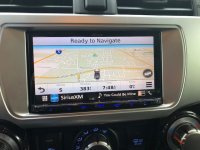
I don't need techstream to change any of these settings. I installed a Kenwood Headunit with the maestro module and it loos like a factory install and the Kenwood radio now shows the menu on the screen to change all the door lock functions. headlight functions. windows up or down with remote key FOB etc.

And the built in Garmin GPS is sooooo much better than the stock headunit and GPS. I can show pics if your interested

 
I also struggled with installing Tech Stream until I found this thread.

https://forum.ih8mud.com/threads/how-to-techstream-in-5-minutes.1034923/

Essentially you install virtual box then download the "machine" that the original poster has already setup correctly with techstream.

I got it to work very easily on my both my Mac (with a Windows XP virtual machine) and my PC (also with his Windows XP virtual machine).
Thanks for the info. The seller who I bought the Panasonic Toughbook with Techstream software loaded sent me another cable yesterday. NO GOOD for this one either. It looks like he sent me one of these "knockoff" cables !!...He insists it is a factory Techstream "lite" cable. I see there were X Horse drivers installed on the original cable. Purchased a Drew Technologies Mongoose cable yesterday. I'm SURE everything will work right now...I got a fatal error message when trying to access the engine "data list" !!
 
I don't need techstream to change any of these settings. I installed a Kenwood Headunit with the maestro module and it loos like a factory install and the Kenwood radio now shows the menu on the screen to change all the door lock functions. headlight functions. windows up or down with remote key FOB etc.

And the built in Garmin GPS is sooooo much better than the stock headunit and GPS. I can show pics if your interested

Model numbers?
 
Look and see if you have these programs installed on your computer.
Calibration Update Wizard by Toyota Diagnostics
PCS Data Viewer by Toyota Motor Corporation

These programs are installed when you install the "Real' TS. I am not sure if they are installed by the "Pirated" versions. I do know that Toyota is getting more aggressive in trying to stop the use of pirated software. The actual software and TIS is by Snap On.
Hi again !!
Just received my Mongoose cable yesterday, installed the drivers and "activated" it and everything works GREAT now...Now I can read the data pids...well, I guess you get what you pay for !!...thanks a lot for your info !!
 
I have version 12.20, my computer read the cable, but techstream gave me an error when trying to connect to car "Unable to connect to VIM".

Any thoughts?

Help!!!
 
I'll try to re-install the driver for VIM.

Also on the menu "VIM Select" my Techstream shows two options:
- XHorse MVCI
- TIS Techstream VIM

If I select TIS Techstream VIM I'll get the same error like you, if I change it to XHorse MVCI works fine. Check to see if you have two options also and change that default option (my default was TIS Techstream VIM).

My setup:
VM with Windows XP
Techstream and MVCI Driver for 32 bit
 
I have Techstream 13.00.22 installed. It can read the ECU but it’s missing the customize button. Any ideas how to fix this? I tried it on my 2006 Tacoma and 2018 4Runner and both have the same problem.
 
Model numbers?

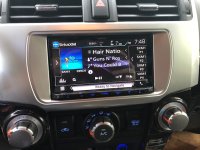
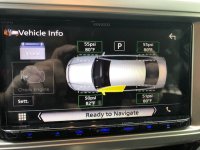
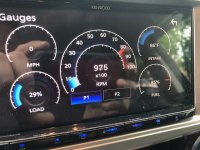
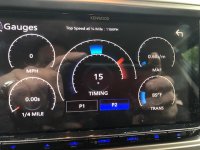
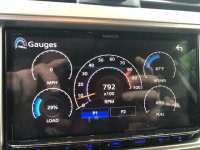
I installed a Kenwood 994s with maestro module wired in, also the Kenwood dashcam that integrates to the headunit. The Headunit shows me tire pressures, tire temps, and I can switch to two full screens with full gauges on them of my choosing from transmission temps to EGT exhaust temps to 0-60 times. Plus gives me the ability to change all the factory settings in the vehicle that a lot of people go to the dealer to have changed. Like windows roll down with remote, the lock beeps, lock when in Drive etc.... Ill get some pics
 
Here are some pics.
 

Attachments

  • headunit1.jpg
    headunit1.jpg
    88.8 KB · Views: 1,822
  • headunit2.jpg
    headunit2.jpg
    87 KB · Views: 1,834
  • tpms1.jpg
    tpms1.jpg
    88.2 KB · Views: 1,864
  • guages1.jpg
    guages1.jpg
    124 KB · Views: 1,839
  • guages2.jpg
    guages2.jpg
    86.6 KB · Views: 1,827
  • guages3.jpg
    guages3.jpg
    88.1 KB · Views: 1,825
Oh man I want that! Really impressive. How long will it be before all that control is standard equipment on all cars?
 
Latest version: 13.00.022
http://mhhauto.com/Thread-TOYOTA-Techstream-V13-00-022-02-2018-Activation?highlight=techstreAM


I had version 12.30, did the upgrade (not clean install) to 13.00 and works fine. Even with upgrade will require a new key, the one from 12.30 doesn't work anymore.
Still running on a VM with Windows XP, but for me works OK.

Here what's new with 13.00.022: https://techinfo.toyota.com/techInfoPortal/staticcontent/en/techinfo/html/prelogin/tsrss/ts_new_features.html#newfeatures

seems like the mhhauto.com site isn't viewable by the public.
 
Ok newbie question... I am new to the 4runner scene as I just got an ‘18.

What options can I modify with techstream? Does it let me diagnose engine codes, etc?


Sent from my iPhone using Tapatalk
 
Ok newbie question... I am new to the 4runner scene as I just got an ‘18.

What options can I modify with techstream? Does it let me diagnose engine codes, etc?


Sent from my iPhone using Tapatalk

Techstream is to change certain default settings for the T4R. Such as door chimes, seat belt warnings, the pesky ECO light, etc.

If you're wanting to see engine codes just get a bluetooth OBD2 connector and get a OBD2 app on your phone. I've been able to read and clear codes with these. Mine is just a $20 one from Amazon and the app is free.
 

Members online

No members online now.

Forum statistics

Threads
278,312
Messages
3,554,085
Members
248,016
Latest member
Advally Service

Trending content

Back
Top