

wfo9
New member
I got tired of calculating my speed in my head.... My tires put my OD, speedometer... off by about 6%. So I ran across this product and decided to give it a try.
UltraGauge OBDII Scan tool & Information Center
It's very similar to the scanGauge II, but the screen is larger and seemed much easier to read. They also have a version MX (which I got) that allows you to target custom extended parameters like transmission temperature... As long as you know the configuration for the data...it can read and display it.
BTW, if someone knows a link to any more extended stuff on the 5th gen (besides trans temp) please provide it.
It's also a little cheaper than the ScanGuage. Think it was less than $95 to my door. Starts at $69 (10 more for MX version and then shipping and mounts put it around 90).
Calibrating it for larger tires is super easy... I just turned on my GPS and drove for about 20 miles. I then entered what my GPS said and it calculated the correction factor. My only complaint (which actually has nothing to do with the product), is that Toyota does not seem to report the fuel level sensor over standard CANSF. This results in the distance till empty... features... not working unless you manually tell the device that you just filled up. There may be a way around that... need to do more research.
There is a ton of configurability to this thing... you can have it scroll pages of gauges automatically and set alarms... My main use was corrected Speed, Odometer, and I threw in transmission temp for kicks. It has all kinds of crap and it can read and clear codes, but my experience with Toyota's shows this is almost useless as they hide everything that typically happens and only expose non emissions related issues under TIS.
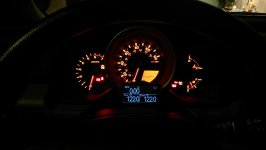
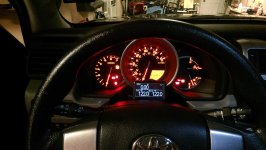
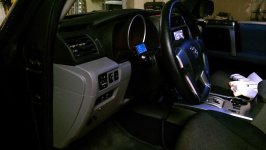
Anyway, here is what it looks like installed. Display is very easy to read in all the conditions I have encountered so far. You cannot change the color, but that is not a concern for me.
Also, they have several mounting options when you order... I got the horizontal mount, but it was too bulky for where I wanted it. So I just used the basic screen holder plastic bracket and fabricated a little aluminum bracket to mount it to the plastic cover with double sided tap. The wire is routed so it cannot be seen... Very easy to do a pretty clean install and the button can still be reached for configuration. One thing that limits installation with this product is the cable is permanently connected to the screen, so that limits routing. It was fine for where I mounted it.
UltraGauge OBDII Scan tool & Information Center
It's very similar to the scanGauge II, but the screen is larger and seemed much easier to read. They also have a version MX (which I got) that allows you to target custom extended parameters like transmission temperature... As long as you know the configuration for the data...it can read and display it.
BTW, if someone knows a link to any more extended stuff on the 5th gen (besides trans temp) please provide it.
It's also a little cheaper than the ScanGuage. Think it was less than $95 to my door. Starts at $69 (10 more for MX version and then shipping and mounts put it around 90).
Calibrating it for larger tires is super easy... I just turned on my GPS and drove for about 20 miles. I then entered what my GPS said and it calculated the correction factor. My only complaint (which actually has nothing to do with the product), is that Toyota does not seem to report the fuel level sensor over standard CANSF. This results in the distance till empty... features... not working unless you manually tell the device that you just filled up. There may be a way around that... need to do more research.
There is a ton of configurability to this thing... you can have it scroll pages of gauges automatically and set alarms... My main use was corrected Speed, Odometer, and I threw in transmission temp for kicks. It has all kinds of crap and it can read and clear codes, but my experience with Toyota's shows this is almost useless as they hide everything that typically happens and only expose non emissions related issues under TIS.
Anyway, here is what it looks like installed. Display is very easy to read in all the conditions I have encountered so far. You cannot change the color, but that is not a concern for me.
Also, they have several mounting options when you order... I got the horizontal mount, but it was too bulky for where I wanted it. So I just used the basic screen holder plastic bracket and fabricated a little aluminum bracket to mount it to the plastic cover with double sided tap. The wire is routed so it cannot be seen... Very easy to do a pretty clean install and the button can still be reached for configuration. One thing that limits installation with this product is the cable is permanently connected to the screen, so that limits routing. It was fine for where I mounted it.
Attachments
Last edited:


