
Use The Oem Nav System While Driving

Register to hide this ad
2nd menu

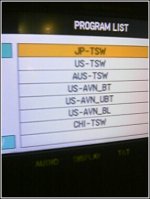
There is a 2nd NAV setup screen:


hold down the INFO button and --->

turn your park-lights on/off 3-5 times...
 

Attachments

  • info1.jpg
    info1.jpg
    24.3 KB · Views: 2,710
you have to do it everytime you turn on the 4runner, but you can do it while driving, only takes 5 seconds.

KEEP YOUR EYES ON THE ROAD!
 
LukeSKY said:
IT WORKS ON THE 4RUNNER!!! MY 2005, FREAK'N AWESOME MOD.

Just go into the service mode, you can do this while driving even, and turn the over-ride button on. Hold it for 5 sec, see it highlight, and hit the back key.....

Now you can enter driving directions while driving!!

ENJOY!

Luke

http://www.clublexus.com/forums/showthread.php?t=171662
If I may add some extra detail to LukeSKY's description.

1. Get to the volume screen
2. Press the speaker icon in the top left of the screen.
3. Then press the bottom left corner of the screen
4. Press the speaker icon for the second time
5. Press the bottom left corner for the second time and the service screen should appear.

6. Now press the "Override" button until it beeps and highlights.

7. That's it, you may now use ALL Dest buttons while the vehicle is moving!

I just did it to my 2003 4Runner with the 2005 Camry Nav unit installed. Wow! Thanks LukeSKY. Great Hack!

BTW, did anyone notice the telephone voice button below the override button?

Also if you go into the documented service screen, there's a BT Setup Screen that's greyed out. I wonder if this could be a cell phone interface for bluetooth-enabled phones. If so, I'll bet it's a software upload.

Any word on this from anyone?

Mark
 
Forget the directions......I know where I am driving most of the time; I'd like to know why Toyota's Navs don't offer video. Having video while the truck is in motion would really be to my liking. Heck, I might even splash down $1700-$2000 for a factory Navi with video in motion!
 
I'd like to know why Toyota's Navs don't offer video

Because then every idiot that was supposed to be driving, who was in fact watching TV, would be smacking into one another....

Jeeze....If we don't have enough distractions already....LOL
 
I agree 100%
the only thing i would like is to be able to turn on my backup camera in the forward gears. Any ideas?
 
AK602 said:
I agree 100%
the only thing i would like is to be able to turn on my backup camera in the forward gears. Any ideas?

search. it's been discussed before. ;):

Basically, what I posted before, was that you can override the rev input to the nav to tell the nav that you're "in reverse" when in fact you are not. The rev line goes +12v when you're in reverse, so it's just as simple as putting a switch with the common terminal the rev input on the nav, one pole the real rev line, and the other pole +12v (best to use from the same source as the stereo). Then when you want to see the backup input, just flip the switch. I use it to back up to a trailer. when driving on the road and you have been overriding the rev input and you flip back to normal mode, it'll take a second or five to get a gps update to relocate you on the map, but that's ok. (it also should be noted that voice directions in navigation won't work while the override is on because the nav things you're somewhere you're not and headed in the wrong direction)

kevin
 
I can confirm the override works like a champ on the 2006 OEM Nav system!! I tried it out on my lunch break and was able to program a destination while the vehicle was in motion.

Then I ran off the road into a telephone pole. :driving:
 

Members online

Forum statistics

Threads
278,307
Messages
3,554,054
Members
248,016
Latest member
Advally Service

Trending content

Back
Top