What cloud service (storage) do you recommend?

CookieRoe

Senior Member
Hey All,

My 6 year old HP is starting to cough blood (freezes regularly now) and I'm getting quite nervous of the photos we have on the hard drive. Got about 500GB of files & pictures. I do have an external drive, but even that is a few years old. I like the idea of uploading our stuff to a "cloud" and not worrying about it. After an afternoon of looking around, I keep seeing JustCloud as a top rated site.

JustCloud is $9.95/month for unlimited data. Upload time (extremely slow) and customer service (no phone) seem to be the only issues. I figure I have a couple/few months until my computer bites the dust so uploading little by little won't bother me.

DropBox: Seems to be popular, but they have a limit of up to 500GB at $49.95 a month (that seems absurd to me).

iCloud: I have a PC and this service isn't open to non-pcs.

AmazonCloudDrive: 500GB for $250/year. ($20/mo).

GoogleDrive: 1 TB for $49/month. Again, that's absurd.

Cloud Storage Comparison Chart - Find The Best Service
Why Do I Need Cloud Storage Backup?
Cloud Storage Reviewed. - Infomation on the Best Cloud Storage Providers

I know these sites seem to be pure propaganda, but just wondering what you guys use/think?

Thanks!
 
Last edited:
Register to hide this ad
How long do you intend to use this service for? Cost wise its probably more beneficial to simply invest in a decent RAID storage setup.
 
Sorry, I refuse to trust cloud services with anything important or sensitive.

For $90 (sometimes $60 if you watch for sales) you can land a Seagate 1TB external on Newegg or Amazon.
 
you can buy a mac and have icloud. thats what i use i have all my pictures from my phone and my computer on icloud but i also have an external hard drive for the backups of my computer. i dont trust cloud storage for my big storage. but i do love my apple products. bought a 2004 mac years ago and it still works just fine. but this last year i got a new mac because i was getting tired off getting made fun of for having a dinosaur.
 

Attachments

  • t4r-77.JPG
    t4r-77.JPG
    106.7 KB · Views: 150
  • t4r-66.JPG
    t4r-66.JPG
    72 KB · Views: 150
Last edited:
How long do you intend to use this service for? Cost wise its probably more beneficial to simply invest in a decent RAID storage setup.

Sorry, I refuse to trust cloud services with anything important or sensitive.

For $90 (sometimes $60 if you watch for sales) you can land a Seagate 1TB external on Newegg or Amazon.

both of these.
theres no way id trust any sensitive, or important data to a cloud service.

get yourself a network server at home.

hard drives are cheap, even if you just bought a couple spares and backed up the data to each every now and then.
 
How long do you intend to use this service for? Cost wise its probably more beneficial to simply invest in a decent RAID storage setup.

Great question. Indefinately. Perferably I would want to upload my data/pics and forget about it. Doesn't sound cheap by the look of things.

Sorry, I refuse to trust cloud services with anything important or sensitive.

For $90 (sometimes $60 if you watch for sales) you can land a Seagate 1TB external on Newegg or Amazon.

I'm playing with the idea of getting a SSD external drive. I'd rather not have a traditional disc drive and they can break. I like the idea of not having any "moving" parts that can fail. Thing is: I back up every once in a while (which is very stupid, I know). The external HD won't be in use very often.

you can buy a mac and have icloud. thats what i use i have all my pictures from my phone and my computer on icloud but i also have an external hard drive for the backups of my computer. i dont trust cloud storage for my big storage. but i do love my apple products. bought a 2004 mac years ago and it still works just fine. but this last year i got a new mac because i was getting tired off getting made fun of for having a dinosaur.

iCloud is very expensive for the amount of data I have. Not sure if you can upload Office files. I do plan on getting a Mac when my HP dies. I've heard too many times they are worth the extra money.

both of these.
theres no way id trust any sensitive, or important data to a cloud service.

get yourself a network server at home.

hard drives are cheap, even if you just bought a couple spares and backed up the data to each every now and then.

I don't work for the CIA or am I ex-KGB, so I don't care about privacy (if that is what you are getting at). The pictures are very important to me. I'd like to keep the pictures of my daughter when I reach old ago, hahahah.

A network server sounds expensive, also I'm not computer savvy. I may do the external drive thing.

If I were to have any kind of disaster at my home (fire/etc) where physically anything I may have will be destroyed, then the cloud service would be peace of mind. Unless of course I get another drive and keep that at my parents house. Could be cheaper too in the long run.

Thanks guys!
 
not security. I just wouldn't trust them to not loose/delete my shit.

I hear ya. If I uploaded to a "no name" company, then I worry. If one uses iCloud or DropBox, then I doubt they would erased. EVEN SO, I would make a backup (physical possession). Trusting just the cloud I'm not sure is very smart. Cheap insurance is always a good idea
 
iCloud is very expensive for the amount of data I have. Not sure if you can upload Office files. I do plan on getting a Mac when my HP dies. I've heard too many times they are worth the extra money.

Thanks guys!

That's why I only put My important photos on icloud and for the rest I have an external hard drive. and They are soooo worth it. my old mac was 9 years old and still works just like I said it was oooolldddd bought it used too. I wont own anything else accept I need obd2 programs soon so im going to dig my ooooooooollllllllldddd pc out and use it for work and that's it. good luck!!
 
SSD isn't really a necessity for a backup drive. I think they still fall into the nice-to-have category. They are great for faster access and laptops, but if you are just going to use the external for back up and put it in a drawer or cabinet, the chances of mechanical failure are very low. I back mine up every 1-2 weeks and once the drive runs out of space it automatically writes over the oldest copies.


Any kind of massive data storage facility seems ripe for picking by hackers or worse, our own defense systems. Even seemingly-innocuous files can prove to be a vulnerability in some cases. It's your stuff though.
 
There's only a couple of server farms that provide the back-end service to these many 'for pay' cloud storage companies.

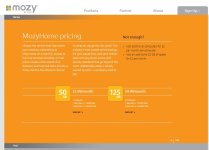
I used Mozy for a few years some time ago and found it to be unusable as far as doing a big restore in a reasonable time period.

Pictures and big stuff I keep on separate drives in different locations, not in the cloud.

I use several free services for smaller files (rather than pictures) wuala, sugarsync, dropbox, skydrive, idrive. (the one called Box failed for me)
Set up a script to encrypt the files before uploading them.
Oh, and I've not been able to make proper use of Win 8's integrated Skydrive app - it is useless, was excellent in Win 7. Skydrive is still useable in Win8 by direct access to it's folder, almost as good as dropbox.

It is important to understand how these services work, some will not let you download files unless you uploaded them from the exact same computer. Not good if you upgrade or it fails. Some run in real-time sync mode, mirroring what's on your local machine. Meaning it is not providing 'backup' but it is a mirror service. Some do the mirror deal but also provide versioning so you can get old copies back.
 
Last edited:
I use Backblaze for online backups.

An old IT saying about data: "if it's not in three places, it doesn't exist"

My backup strategy is to do a local backup via Acronis (drive image) to a secondary internal drive. That image is copied to an external USB drive in case the internal one dies. The same pc backs up everything (encrypted) to Backblaze in the event that everything is destroyed in a fire, stolen, etc.

Choose your level of comfort. Many people just buy an external USB or two, then rotate them offsite (take it to work, safety deposit box, family member's home, etc). I say do both if it's data you want to keep for the long haul.

I also strongly recommend encrypting any external drives via TrueCrypt or even Windows BitLocker at a minimum. For individual files, check out AxCrypt.
 
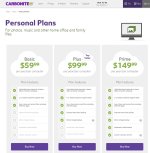
I used carbonate in the past and now use CrashPlan which runs 5 bucks a month. As long as you stay in good standing they will retain every file you have backed up even if you delete from your system. I also run a synology NAS and a HP Microserver.

The ideal backup plan is a 3-2-1 system. 3 copies of your data (original doesn't count) , 2 types of media, and 1 offsite. Using physical drives and cloud backups covers you pretty well. Think about if something were to happen to your home. You really need a backup in an alternate location whether you use the cloud or you rotate external drives between you home and say work or a family members house.
 

Members online

No members online now.

Forum statistics

Threads
278,309
Messages
3,554,071
Members
248,016
Latest member
Advally Service

Trending content

Back
Top