NAV Wire Mod Hack

Can anyone confirm that you can simply open the VSS wire on the 2015+ Limiteds? I have done this on a 2015 Highlander and it works like a charm.

If you have done this, can you provide the color of the VSS wire in the 2015+ Limited model. Thanks for all the help.

Matt-
 
Don't know if you are looking for independent confirmation. That's cool. Just checking in to say it still works as described.
 
Sorry, not looking for confirmation. Just looking for wire color. I'm comfortable with the work but don't have the wiring diagram for the harnesses coming off the back of the Entune unit. If anyone can provide the wiring diagram / colors, I'd appreciate it.
 
I just finished the NAV module as designed by JA. Thanks a ton JA!!!

The 2012 wiring is different than 2010 so I had to find the SPD input wire. I don't yet have the wiring diagram so I can't specify plug/wire #, but have identified it in the pict below. This is a must do mod as there are no longer any lockouts when driving. Total cost for parts is about $15 from Jameco.

Completed circuit
View attachment 69444


Ready for install
View attachment 69448


What is the black piece you used to cover the circuit?
 
I am going to have to man up and say this was completely my fault. I was doing all the mods at one time and I guess my caffeine powered intelligence came to a screeching halt. Appreciate the reply as it made me go back and look through my pictures I took, luckily I saw it right away, soldered a third wire into there. Instead of opening it, the VSS was being sent to ground. Thank god I didn't hurt the ECU. All good now. I actually wired it to have to push the switch to close it it so it works like normal. Love having it off all the time as I never use the nav (GPS works fine) and I can use my dial pad and scroll radio and Pandora stations as if i was sitting in the parking lot. Such a useful mod. Thanks again for reply diddley!

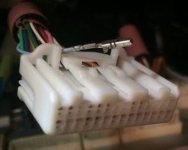
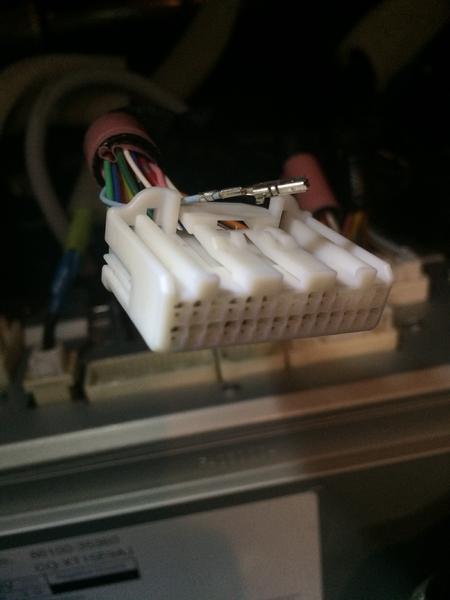
I am working on this mod now. I pulled the light blue wire out of the plastic connector and took it for a quick stroll around the neighborhood. The screen never greyed-out the options, but my map didn't update to show where I was.

I plan to add a switch to temporarily interrupt the signal when I need to, but I wanted to verify I'm on the right track.

This blue pin is on the bottom row, third one in as we are looking at the connector now.
 

Attachments

  • nav hack.jpg
    nav hack.jpg
    18.2 KB · Views: 1,184
I am working on this mod now. I pulled the light blue wire out of the plastic connector and took it for a quick stroll around the neighborhood. The screen never greyed-out the options, but my map didn't update to show where I was.

I plan to add a switch to temporarily interrupt the signal when I need to, but I wanted to verify I'm on the right track.

This blue pin is on the bottom row, third one in as we are looking at the connector now.
How did you take out that specific pin?

Sent from my ONEPLUS A3000 using Tapatalk
 
How did you take out that specific pin?

Sent from my ONEPLUS A3000 using Tapatalk

After you pull the plastic connector out of the radio, there is a plastic "bar/flap" that needs to be raised. It's on the underside in this picture, so I can't circle it for you. I just wedged a small jewelry screw driver under it to pop it up.
sigepbiker-albums-champ+updates-picture44422-img-4266.jpg


Once the plastic "bar/flap" is up, using the same jewelry screw driver, or a safety pin for smaller pins, there is a plastic tab that has to be lifted for the pin to be removed.

Found this video: https://youtu.be/fg1xHMIDcy4?t=1m17s
If a picture is worth a thousand words, then how many is a video worth?

Very easy to do, complicated to explain. I hope this helps.
 
I am working on this mod now. I pulled the light blue wire out of the plastic connector and took it for a quick stroll around the neighborhood. The screen never greyed-out the options, but my map didn't update to show where I was.

I plan to add a switch to temporarily interrupt the signal when I need to, but I wanted to verify I'm on the right track.

This blue pin is on the bottom row, third one in as we are looking at the connector now.

I just confirmed the light blue wire in his photo also works in my 2017.

I've been wanting to do this on my 2017 TRD Pro. Not so I can use Toyota nav, because my phone's nav apps are far superior to the Toyota's nav (that's my $0.02)... but because features like ADDING A BLUETOOTH DEVICE are disabled while driving. Even if a passenger wants to, they can't. Dumb.

Thanks to [MENTION=79237]sigepbiker[/MENTION] I was able top confirm just now that the light blue wire in the bottom row, position 3 is in fact the correct one. I pulled it out (that YouTube video was helpful) and then I drove it around and all features in the head unit were accessible to me. So if you have a 2017, it's still the same wire, or at least it was for me with a nav unit.

I don't think I even need to put in a switch since I don't plan to use the head unit nav app ever. On an unrelated note, I think I'm going to get rid of this head unit at some point because I really want full access to my phone's apps, like via CarPlay.
 
Last edited:
I have read a few of these bypass threads but haven't found anything recent. I see on this thread (thank you!) it was discovered a few models didn't need the signal generator anymore. I found in the Tundra forums they only needed to access the VSS as well ref 2014 Bluetooth/Navigation lockout while in montion - TundraTalk.net - Toyota Tundra Discussion Forum so I have high hopes I can do the same.

Can't even scroll Pandora stations beyond a couple taps on the screen. Ridiculous. Feel like I have been put in Toyota time out. Does anyone know if we only need to access the VSS wire for a 2016 Entune with Nav - non-JBL to enable the bypass?

Wait [MENTION=141742]fastboarder[/MENTION] - how'd you get Pandora? My Entune apps SUCK. iheartradio is the only decent app. I would love to add Pandora - that would at least make this head unit usable.
 
Wait [MENTION=141742]fastboarder[/MENTION] - how'd you get Pandora? My Entune apps SUCK. iheartradio is the only decent app. I would love to add Pandora - that would at least make this head unit usable.

they all used to have pandora, but pandora stopped supporting these things when they got bought
 

Members online

Forum statistics

Threads
278,306
Messages
3,554,046
Members
248,016
Latest member
Advally Service

Trending content

Back
Top