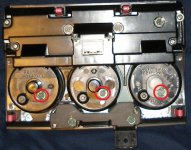
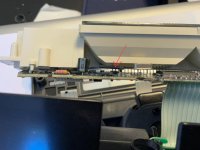
How to take apart the 4th gen A/C controls

this may be a dumb question, but are these white? or do they match the stock bulbs?
No, they are not white. It looks like the factory bulbs.

3 yrs ago, Toyota dealers sold replacement bulbs for $6 each. It comes with socket. So, I ordered and waited 5 days for 2 bulbs..lol! I paid $12. Until I saw those bulbs at radioshack which is a dollar each..I just have to reuse the old socket.
 
Reloaded the pics. For some reason, the pics weren't showing up any more. Hope this helps.
 
Guys don't want to steal the thread but I have lights out and temperature gauge doesn't seem to work. If I take temp up it blasts and then when I move the temp down it just goes low and only blasts when I move it to low. This is on an 03 4runner limited. Thanks for the help!
 
For those wanting to replace the lights behind the multifunction display, the Toyota part number has recently changed (per the dealership). The new parts are blue based and have part number of:
90011-11050
I found them to be a bit of a tight fit, but they do work.
 
Hey all, thaks for this thread, it has been a lot of help! So far, I have replaced the bulbs, and have gotten the clock display to show. However, I am still noticing that the labels on the dials (ie: Lo, Hi, all of the various fan positions) still arent illuminated. The orange triangles at the end of the various selections light up, but the labeling itself doesnt.

Does anyone know which bulb specifically controls these? Or is it possible that it is a fuse issue?

Thanks very much!
 
Hey all, thaks for this thread, it has been a lot of help! So far, I have replaced the bulbs, and have gotten the clock display to show. However, I am still noticing that the labels on the dials (ie: Lo, Hi, all of the various fan positions) still arent illuminated. The orange triangles at the end of the various selections light up, but the labeling itself doesnt.

Does anyone know which bulb specifically controls these? Or is it possible that it is a fuse issue?

Thanks very much!


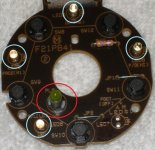
Hey there. I've included a pic here to help. The bulb circled in RED is for the lettering on the panel switches. The lights (actually, they are LEDs) circled in BLUE are the arrow illumination. These very rarely, if ever go bad. Some of us have changed the LEDs out for different colors, and added an LED to the "OFF" position, but that's covered in another thread.

AC Control Switch Labeled 03.jpg

AC Control Switch Labeled 04.jpg
 

Attachments

  • AC Control Switch Labeled 03.jpg
    AC Control Switch Labeled 03.jpg
    80.9 KB · Views: 1,892
  • AC Control Switch Labeled 04.jpg
    AC Control Switch Labeled 04.jpg
    112.5 KB · Views: 5,787
Last edited:
Hey there. I've included a pic here to help. The bulb circled in RED is for the lettering on the panel switches. The lights (actually, they are LEDs) circled in BLUE are the arrow illumination. These very rarely, if ever go bad. Some of us have changed the LEDs out for different colors, and added an LED to the "OFF" position, but that's covered in another thread.

View attachment 177619

View attachment 177640

Thread revival !!! Im assuming all the LEDs circled in blue must be changed by soldering....and even then there is still hotspots since the LEDs don't project light all around?
 
Last edited:
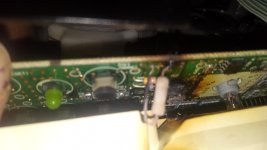
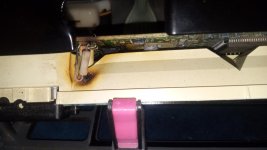
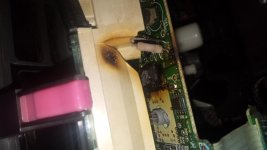
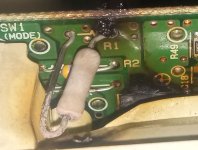
I had the wrong bulb behind mine and it melted the plastic and other stuff I'm trying to figure out from taking these pics what I need to do. I have the correct bulbs but now the whole display doesn't light up
 

Attachments

  • IMG_20250225_155032216.jpg
    IMG_20250225_155032216.jpg
    114.2 KB · Views: 1,388
  • IMG_20250225_112640506.jpg
    IMG_20250225_112640506.jpg
    122.8 KB · Views: 1,388
  • IMG_20250225_155350342.jpg
    IMG_20250225_155350342.jpg
    118.2 KB · Views: 1,382
OK, first I think you're confusing "bulbs" with "LEDs".
They both illuminate but are totally different things.

In your top pic the green 'thing' on the right is an LED and the clear 'thing' on the right with a light blue base appears to be a normal incandescent 'bulb'.

The tan thing in the middle by the dark brown overheated/burned area is a resistor (although the resistor itself doesn't look burned/overheated).

Not sure which you changed but my guess would be something you changed caused an overcurrent condition which overheated the resistor and damaged one or more surrounding components.

If you changed the (green) LED you may have installed it backwards (it's polarity (+/-) sensitive) or the bulb (not polarity sensitive) was the wrong one and drew too much current.

Either way this is just a guess based on the little info to go on.

Good luck.
 
OK, first I think you're confusing "bulbs" with "LEDs".
They both illuminate but are totally different things.

In your top pic the green 'thing' on the right is an LED and the clear 'thing' on the right with a light blue base appears to be a normal incandescent 'bulb'.

The tan thing in the middle by the dark brown overheated/burned area is a resistor (although the resistor itself doesn't look burned/overheated).

Not sure which you changed but my guess would be something you changed caused an overcurrent condition which overheated the resistor and damaged one or more surrounding components.

If you changed the (green) LED you may have installed it backwards (it's polarity (+/-) sensitive) or the bulb (not polarity sensitive) was the wrong one and drew too much current.

Either way this is just a guess based on the little info to go on.

Good luck.

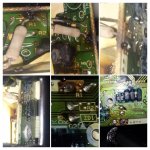
I'm not confusing LEDs and bulbs I didn't do anything to the green bulb it's the actual bulbs for the back light of the clock in the range display that I changed out and with those stupid little bulbs that you can get online like the ones from radio shack and it overheated and started smoking while I was driving and I had to unplug it while I was driving and this is the damage it did and I know that's a resistor I just don't know what the resistor look like before it swell up and turn colors. Also every time I plug it back in it does the same thing so I don't know what to do but I need to be able to control my air conditioner
 
Last edited:
I'm not confusing LEDs and bulbs I didn't do anything to the green bulb it's the actual bulbs for the back light of the clock in the range display that I changed out and with those stupid little bulbs that you can get online like the ones from radio shack and it overheated and started smoking while I was driving and I had to unplug it while I was driving and this is the damage it did and I know that's a resistor I just don't know what the resistor look like before it swell up and turn colors. Also every time I plug it back in it does the same thing so I don't know what to do but I need to be able to control my air conditioner

More pics of the damage. I wud really like someone supposed to picture of their circuit board so I can see what that resistor looks like before mine swell up so I can order another one thank you
 

Attachments

  • IMG_20250225_154839275~2.jpg
    IMG_20250225_154839275~2.jpg
    94.3 KB · Views: 1,221
  • InShot_20250227_102212873.jpg
    InShot_20250227_102212873.jpg
    121.2 KB · Views: 1,231
More pics of the damage. I wud really like someone supposed to picture of their circuit board so I can see what that resistor looks like before mine swell up so I can order another one thank you

From looking at your photos, I would think you need to replace the entire circuit board with one from a salvage yard, I could be wrong.

If you do get photos of what it should look like I think you need to post the year and specifics of your T4R, i.e. is it a Limited, SR5, etc, since there are differences in the controls and hince that circuit board!
 
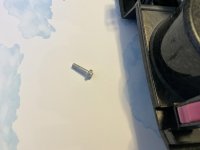
Help! Great post. I was looking for pics on this topic. I need some additional help. I started out planning to change one bulb and it has become a headache for me and much bigger job. The little plastic cover on old bulb came off when trying to remove bulb. Then it fell down into opening completely. I started removing some screws, then more screws then down to the board in attempt to shake the piece out. It came out along with this silver piece which I have no idea where it goes. Does anyone know what this part is and goes? I saw another piece inside but i think it got loose too in my shake. So there are 2 pieces I need to reposition. HELP!
 

Attachments

  • IMG_5014.jpg
    IMG_5014.jpg
    135.5 KB · Views: 145
  • IMG_5020.jpg
    IMG_5020.jpg
    127.6 KB · Views: 147

Members online

Forum statistics

Threads
278,316
Messages
3,554,106
Members
248,016
Latest member
Advally Service

Trending content

Back
Top