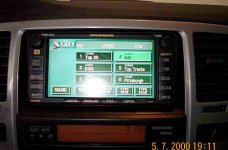
2005 Factory Nav w/XM integrated.

irpete - nice documentation on the install. Thanks for the plug also. Give me a call. 877.885.2900. I've got a question about the y adapter.

Thanks.
 
The XM kit was really plug and play. Just press the AM button once for AM, again for SAT1, SAT2, SAT3.... There was no other wiring issues to deal with. I'll try to take pictures tonight when I get home from work.

There was one small snag I just remembered. When you remove the rear panel you have to pull out the plug (the part that the cargo net attaches to). Apparently, I didn't do it right because when it came time to put it back it wouldn't stay in. It looks like pulling it out trimmed the plastic so that it doesn't fit well now. To fix this I just ordered a new plug from my local dealer for $8.80.

I 've also installed the microphone kit and steering wheel switch ( from a landcruiser) now when I say SAT1 it will switch to the XM.:D
 
Last edited:
gRunner3, thanks a lot for the diagram. I will take that along with me to where I will have the ipod interface installed. I am just wondering, does your truck have the rear seat audio? If so, which port would it be plugged into?
 
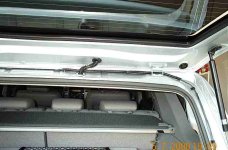
For those interested here are a couple of pictures of my antenna install:
This one shows how I routed the antenna cable along the weather stripping.
 

Attachments

  • antenna.jpg
    antenna.jpg
    45.3 KB · Views: 1,531
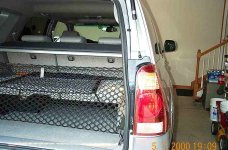
Here is another picture that shows the antenna wire leading down to the tail light assembly. I made sure to have the wire enter the tail light from the bottom and included a drip loop to help prevent leaks.
 

Attachments

  • antenna2.jpg
    antenna2.jpg
    56.5 KB · Views: 846
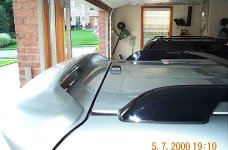
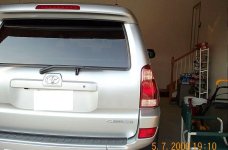
Here's a view from the rear with the hatch closed. Doesn't show much but I guess that's the idea! No wires visable.
 

Attachments

  • rearview.jpg
    rearview.jpg
    53 KB · Views: 778
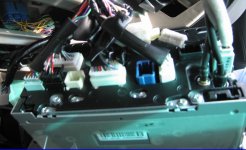
Mark86, I do have the rear seat audio. In the thread where I posted the picture, I thought that the CD changer port was the small, white, unused connector to the bottom-left of the fan. From the other link in this thread with the detailed labels, I think the rear seat audio/cd changer port are the same thing and is the black used port to the left of the unused white one. So I'm assuming that Y adapter will be neccessary to keep the rear audio and add XM, cd changer, or IPOD.

I attached another pic where you can see this black port better... this is angled looking upward from the bottom of the unit. The port I'm thinking is the cd changer and rear seat audio port is the black port that is 2nd from the left.

 

Attachments

  • nav05.jpg
    nav05.jpg
    92.6 KB · Views: 693
grunner3,
You are correct. The Black one is the cd changer/RSA/XM and the small white one is for the Microphone should you want to add voice activation to your Nav.
 
gRunner3 said:
Mark86, I do have the rear seat audio. In the thread where I posted the picture, I thought that the CD changer port was the small, white, unused connector to the bottom-left of the fan. From the other link in this thread with the detailed labels, I think the rear seat audio/cd changer port are the same thing and is the black used port to the left of the unused white one. So I'm assuming that Y adapter will be neccessary to keep the rear audio and add XM, cd changer, or IPOD.

I attached another pic where you can see this black port better... this is angled looking upward from the bottom of the unit. The port I'm thinking is the cd changer and rear seat audio port is the black port that is 2nd from the left.

Thanks a lot! This is really helping me a lot! I think that white unused port is for the microphone (voice command navigation). There is definitely not an open port for the CD changer because when I ordered it for the dealer to install it, they said it can't be done because there is nowhere to plug it in. I just found out today that the dealer forgot to order the y-adapter that allows the changer to plug into the navigation unit. :mad: Well, now I am only waiting for them to release the ipod interface, which would be more useful for me.
 
We can do voice activation on our nav's??? Never heard of this one. Or is it an open port that other vehicles use for voice nav but that we cannot make work?
 
Well I finally got the Rear Seat Audio to work with my XM kit install. I followed the great advice from the guys at the sienna forum:
http://www.siennaclub.org/forum/index.php?showtopic=8544&pid=69342&st=0&#entry69342

Since I had to order 2 y adapters, I decided to modify their instructions and I left one of the larger molex connections on for a future cd changer. This way I could have XM, RSA and cd changer. Of course you can't play the XM or cd changer over the RSA, but you can listen to the radio or single cd on the RSA while listening to the XM or hopefully the future cd changer.

Total cost = 2 Y adapters at $17 each
 
Wow, that is a good score finding a way to get the RSA going again....

Just completed my XM install and it went fairly smooth. I just printed out the best internet price I could find for the Solara XM kit and got my local dealer to match the price...they even had it in stock!

The kit comes with no instructions so it is mildly useful to subscribe to techinfo.toyota.com for a day to download the solara XM kit installation instructions and see any other technical info desired.

The only unknown for me was exactly how to secure the xm unit under the right rear panel...others here gave good advice so i was able to figure out the 'wedge' trick of placing it under the metal mounting bracket....the unit is sitting at about a 45 degree angle in the wedged position and it is not going anywhere! ..no screws required.

Also, an XM wake up call...it doesn't work in the garage so after you complete the install and subscribe to XM online you'll have to drive around for about 45 minutes listening to that dang preview channel until your radio becomes authorized....then Ohhhh, so sweet.

One thing I don't get though...why do they talk between some songs on XM....i want commercial and talk free tunes! anyone subscribe to Rhapsody internet music?...that's the way radio should be.

Many Thanks to all those who provided the info to make this installation a breeze.
 
I just want to say thanks to everyone on here. I completed the XM install this weekend with irpete's y-adapter modification and all the other instructions and everything works great.

Scott
 
I thought, from the posts above, that is was and someone here had it. Further more I thought, from above, that their responce to customers was very good. I am still in the dark though as I have never received information. Maybe they ran into issues since their "it will be out very soon" on their website is from a long time ago??
 

Members online

Forum statistics

Threads
278,316
Messages
3,554,107
Members
248,016
Latest member
Advally Service

Trending content

Back
Top