2014 Entune problems

I've had my entune+nav for about 4 months now and for 3 months it never rebooted. But on a long drive the other week I had it on full screen map and zoomed WAY out (Like 300 miles across the screen) so I could just keep an eye on my progress from start to end of trip.

Having the map zoomed out that far rebooted it constantly.

I think it's a specific usage scenario that causes it to reboot and in my case it's the maps and being zoomed out "too far". Hopefully they will fix that soon...
 
Thanks NoDak. I'll give that a whirl!
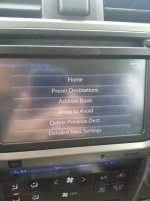
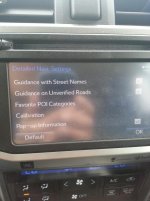
Any ideas as to why I'm missing the second page of Detailed Nav settings? Does yours not show all of them that page 250 does in the navigation owner's manual? (bottom image)
 
Thanks NoDak. I'll give that a whirl!
Any ideas as to why I'm missing the second page of Detailed Nav settings? Does yours not show all of them that page 250 does in the navigation owner's manual? (bottom image)

on the 2nd page are you accessing this while moving? I know a lot of otions grey out while moving, but become accessible when stopped (like a red light)

ie: I an edit Pandora stations while stopped at a light, as soon as I start moving the edit button greys out.
 
At a complete stop, gear in park in the garage. The second page just doesn't exist. No option to scroll down to it either. The scroll bars are grayed out. I think the low gas pop-up would be cool when traveling while using GPS.
 
I had a similar problem a couple of weeks ago. My phone is a Samsung Galaxy Nexus and for weeks I have had no problem automatically connecting via bluetooth.

I deleted all my bluetooth connections and re-connected to the Entune. It has worked since, but I also stopped using the bluetooth connection. My phone will get very hot if it is on for long periods of time.
 
I am having the same entune restart issue on my 2014 limited. I brought it in for the 10,000 mile service today and they say there is no tickets in the system for this issue. They said to take a picture of it. I wish I could show them this thread as proof I am not full of it.

IronManKansas - Did you go to Eddy's to have it looked at? If so, I have an appointment for this same thing on Friday. Perhaps that will put a bug in their ear to get this fixed.
 
Just got back from the dealership - yes - there was a big update.

I'll won't know until I use it over the next month if the system reboot issues are taken care of, though.
 
Entune 3.2 is the latest update as of 04/02/2014. My 2013 Trail had 1.7 :( before update.
 
Just got back from the dealership - yes - there was a big update.

I'll won't know until I use it over the next month if the system reboot issues are taken care of, though.

if you are running a HD radio the entune update on the board will not work.

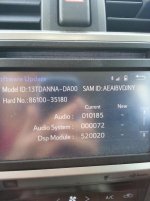
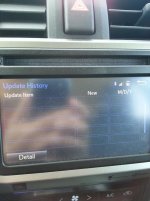
if the dealer did update your software goto

Setup > General > Software Update

in there you will see 2 options

software update and software update history. if your software update history has NO entries, then they didn't update it.
 

Attachments

  • 2014 4Runner Software Screen 1 Cropped.jpg
    2014 4Runner Software Screen 1 Cropped.jpg
    58.5 KB · Views: 1,472
  • 2014 4Runner Software Screen 2 Cropped.jpg
    2014 4Runner Software Screen 2 Cropped.jpg
    58.2 KB · Views: 1,430
IronManKansas - Did you go to Eddy's to have it looked at? If so, I have an appointment for this same thing on Friday. Perhaps that will put a bug in their ear to get this fixed.

I got everything done at Hendrick Toyota up by KC. I checked the software version and it is the same as NoDak's. What version are you on now after the update? I know my radio updated after I first hooked up my cellphone but I haven't seen anything since then.
 
I've had my entune+nav for about 4 months now and for 3 months it never rebooted. But on a long drive the other week I had it on full screen map and zoomed WAY out (Like 300 miles across the screen) so I could just keep an eye on my progress from start to end of trip.

Having the map zoomed out that far rebooted it constantly.

I think it's a specific usage scenario that causes it to reboot and in my case it's the maps and being zoomed out "too far". Hopefully they will fix that soon...

I also think it is tied to the Nav system. It seems like when I had set the destination shortly thereafter it started the random rebooting. I did take it to the dealership and they said they did a software update... It was just the one Saturday that it rebooted several times. I have under 2000 miles on it.
 
E-Tune, NAV, Etc.

2014 SR5-4WD. Manufacture date Japan: March 2014. No problems
with E-Tune, Phone, NAV etc. Two phones paired to system.
LS
 
I got everything done at Hendrick Toyota up by KC. I checked the software version and it is the same as NoDak's. What version are you on now after the update? I know my radio updated after I first hooked up my cellphone but I haven't seen anything since then.

Mine was upgraded to 101A5

I noticed that Nodak's was 10185.. I'm not sure what is different. So far, no problems, no slow down in transfer of contacts/other data. But, after about 3 or 4 weeks I'll know for sure.

If I had to guess, it's probably a memory leak in a program.
 
Thanks NoDak. I'll give that a whirl!
Any ideas as to why I'm missing the second page of Detailed Nav settings? Does yours not show all of them that page 250 does in the navigation owner's manual? (bottom image)


Night time map problem solved! Thanks NoDak! But I can't figure out how to get to all of the options in the bottom image on page 250. At a complete stop, in park I've tried to access the options both with and without a route programmed. Odd. Not a big deal, but if there are options in the manual then I want to be able to have access to those options!
 
Night time map problem solved! Thanks NoDak! But I can't figure out how to get to all of the options in the bottom image on page 250. At a complete stop, in park I've tried to access the options both with and without a route programmed. Odd. Not a big deal, but if there are options in the manual then I want to be able to have access to those options!

as you can see, there is no scroll bar for mine either.


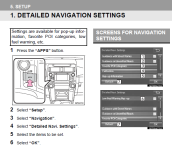
pic 1 from the owners manual, the instructions on pg 250 say you need to goto setup > nav > detailed settings

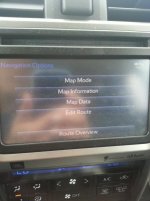
pic 2 is the option button on the actual nav map

pic 3 is from setup > navigation

pic 4 is from setup > navigation > detailed navi settings

.
 

Attachments

  • 2014 4Runner Nav Setup pg 250.png
    2014 4Runner Nav Setup pg 250.png
    81.3 KB · Views: 1,241
  • 2014 4Runner Nav 1 Cropped.jpg
    2014 4Runner Nav 1 Cropped.jpg
    49.5 KB · Views: 1,129
  • 2014 4Runner Nav 2 Cropped.jpg
    2014 4Runner Nav 2 Cropped.jpg
    54.5 KB · Views: 1,223
  • 2014 4Runner Nav 3 Cropped.jpg
    2014 4Runner Nav 3 Cropped.jpg
    53.7 KB · Views: 1,211
Last edited:
lol I just noticed this.

the extra entry #6 is the low fuel warning AND the list scrolls to the top of the list to entry #1.

the low fuel warning I think was remove in production units since its redundant with the low fuel warning light in the dash by the fuel gauge. I would trust the bingo light more than the nav notification.
 
Last edited:
I also think it is tied to the Nav system. It seems like when I had set the destination shortly thereafter it started the random rebooting. I did take it to the dealership and they said they did a software update... It was just the one Saturday that it rebooted several times. I have under 2000 miles on it.

Well even after the Audio update it has started doing it again. Just random reboots. It was mainly doing it when I had a location set in Nav and the voice over was about to talk... then reboot.

It did it 7 times on me the other day so I was sure it was tied to nav. But the next morning driving to work listening to the radio in the split screen with 1/2 map it rebooted again. Odd thing is once I set the appointment up with the dealership it has stopped rebooting, But there is definitely something wrong and it needs to be addressed.
 

Members online

Forum statistics

Threads
278,306
Messages
3,554,044
Members
248,016
Latest member
Advally Service

Trending content

Back
Top