2020 latest entertainment firmware

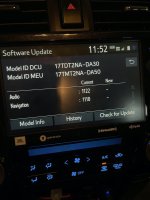
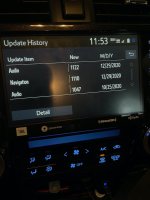
I went to the dealer yesterday and they updated my entertainment & nav software on my 2020 AG TRD Pro. The audio version is now 1122 and nav is 1110. I'd previously done the 1047 update myself.

IMG_1803.jpeg
IMG_1804.jpeg
 

Attachments

  • IMG_1803.jpeg
    IMG_1803.jpeg
    121.2 KB · Views: 1,897
  • IMG_1804.jpeg
    IMG_1804.jpeg
    114.6 KB · Views: 1,867
I wonder if there is a download web site for the new updates like there was for 1047 and 1030? Anyone? Toyota website ofc says mine is up to date and I can't download the new versions either.
 
Last edited:
Can you help to get the software update for audio:1122 and Navigation 1110? It shall be a file named"17TDT2NA-DA30_000X.kwi", and we can save it and install it VIA USB connection. From "https://securedp.toyota.com/download-app/getHeadUnits", can only get the update files released on Nov.19th,2019, the audio is 1047,which is not up-to-date. Tks

 
I had a bit of trouble installing the firmware updates via usb. Below is what worked for me. Hopefully, this will save someone some time.

- Download the firmware updates from Toyota's site: Home | Toyota Software

- For my 2020 head unit with navigation there were two files that I downloaded. One for the operating system and one for navigation. They were both .kwi files.

- I used a 4GB Sandisk usb drive. It had to be formatted as fat32 with a partition style of Master Boot Record. If you are on a mac, format the usb as MS-DOS (FAT) with the scheme "Master Boot Record". No other format types worked nor did the GUID partition style (which showed up as an EFI bootable drive in the source list).

- Save both of the .kwi files mentioned above to the root of the USB.

- Turn on your vehicle

- Go to Menu > Setup > Software Update > insert the usb > "Update Software" in the bottom right should no longer be greyed out if the USB works.

- Select "Update Software" to begin the process and accept all the obligatory warning messages and agreements. The update took about 10-15 minutes to complete.

- You will be prompted to turn off your vehicle when done. Do so and restart.

- You're done.
 

Members online

Forum statistics

Threads
278,316
Messages
3,554,111
Members
248,016
Latest member
Advally Service

Trending content

Back
Top