4Runner Startup/Display Off Images

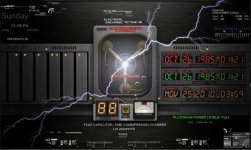
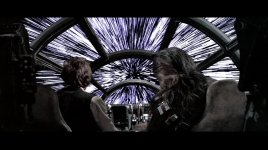
I stole these two images to use as my new "off" image. I also grabbed the non-pirate thin blue line but it was too "bright". Something to consider when you upload these is how they will look at night. I prefer a darker image so it won't kill your vision during night time driving. Both the Back to the Future and the crumpled American flag are nicely subdued.

As soon as [MENTION=149288]twhigham[/MENTION] put what his image was I instantly thought of Back to the Future, but I want the Flux Capacitor as the image. Has anybody rendered that as their start up image?
 
Got it! But haven't installed it yet. It's set at 1000x530 like [MENTION=149040]5280 TRail-Runner[/MENTION] said his was at. Feel free to steal :cheers: Flux Capacitor.JPG
 

Attachments

  • Flux Capacitor.JPG
    Flux Capacitor.JPG
    85.4 KB · Views: 4,443
Got it! But haven't installed it yet. It's set at 1000x530 like [MENTION=149040]5280 TRail-Runner[/MENTION] said his was at. Feel free to steal :cheers:View attachment 252446

Ok, I will! That's a great graphic.

In addition to the one I posted earlier, I made a couple more, since I'm allowed to have 3 options for StartUp and 3 for DisplayOff.

Start Up (a bit racy because it only flashes for a second):

Inspired by WW2 nose art, I decided to give my Stormtrooper 4runner a name. It started out as:


And then when the Stormtrooper moniker was decided, it became:


Sticking with a theme, my Display Off images are:


Currently, I'm using the Targeting Computer graphic shown above. Dark enough to not be blinding at night, and looks just as good during the day as it does at night. When I get tired of it, I'll switch over to the X-wing schematics for a bit.
 
Good grief

Glad I found this thread here - lots of useful info on this. Finally had success in changing my startup graphic and display off graphic to a TRD themed pic to match the truck type thing.

Anyway - followed the manual and all of these suggestions many many times. Tried every damn USB stick I had in the house from 4, 8, 16, 32 gb, all different brands. What finally worked was an old piece of crap I had in a drawer, it too was 4 gb but it was some off brand piece of junk I got from a trade show.

I'm thinking that the speed of the device matters, it has to be old and slow for these head units to recognize them through that USB port. In any case - if you are having the same issues - try to find a stick as old as can be, it worked immediately for me. Some of the new ones I was using had LED's on them too, it was like the port could not keep power to the device because it turned off as it was trying to read it. Bizarre. :confused:
 
Glad I found this thread here - lots of useful info on this. Finally had success in changing my startup graphic and display off graphic to a TRD themed pic to match the truck type thing.

Anyway - followed the manual and all of these suggestions many many times. Tried every damn USB stick I had in the house from 4, 8, 16, 32 gb, all different brands. What finally worked was an old piece of crap I had in a drawer, it too was 4 gb but it was some off brand piece of junk I got from a trade show.

I'm thinking that the speed of the device matters, it has to be old and slow for these head units to recognize them through that USB port. In any case - if you are having the same issues - try to find a stick as old as can be, it worked immediately for me. Some of the new ones I was using had LED's on them too, it was like the port could not keep power to the device because it turned off as it was trying to read it. Bizarre. :confused:
That is bizarre. I just picked up first usb stick i could find and it worked.

Sent from my SM-G930V using Tapatalk
 
So, my startup graphic works ... but the silly Toyota graphic still shows first, and it shows longer than my image which displays for like 1 second or so. Is that normal? If so, then what's the point?
 
well since no one has thought to start a thread to track, trade or share your StartupImage or DisplayOffImage

here are the instructions for those that want to make yours unique

.


I just followed your instructions and everything worked well on the Startup Image, but I did not see the DisplayOffImage when I turned off the radio.
 
I just followed your instructions and everything worked well on the Startup Image, but I did not see the DisplayOffImage when I turned off the radio.

DisplayOffImage does not come on when the radio is turned off.
That is selected when the radio is on and you want to display that image instead of the radio/nav screen...

Hope that makes sense.
 
DisplayOffImage does not come on when the radio is turned off.
That is selected when the radio is on and you want to display that image instead of the radio/nav screen...

Hope that makes sense.


Thanks Saker! So how can I display my image instead of the radio/nav screen?

Hey Saker! Never mind I just figured it out! Have a Happy 4th of July!
 
Last edited:
1. Hit the home button on the left.
2. Then tap the settings gear wheel in upper right of screen.
3. Tap ‘screen off’ at the bottom.

This will leave the screen off until you touch the screen and change. Will stay off when using the steering wheel buttons.


Sent from my iPhone using Tapatalk Pro
 
Last edited:

Forum statistics

Threads
278,312
Messages
3,554,089
Members
248,016
Latest member
Advally Service

Trending content

Back
Top