
You are using an out of date browser. It may not display this or other websites correctly.
You should upgrade or use an alternative browser.
You should upgrade or use an alternative browser.
A New version of "Entune" is available!
- Thread starter rigtec
- Start date

rigtec
New member
That would speed up the process by disconnecting the battery. Would it help?
Hi young,
Not quite sure if I'm understanding your question... our objective isn't necessarily to speed things up but rather, to clear out 'damaged temporary files' that may be preventing permission of Entune O.S. freeware updating to take place... hope this answers your question!
rigtec

Jimmy_D
Member
Downloaded the file from the link provided in the email Toyota sent me. Formatted a new thumb drive on my iMac with Apple's Disk Utility to MS-DOS format (named it Entune). Unzipped the downloaded file and dragged the swdl.iso file into the thumb drive. Started my 2013 TE up and turned on the head unit. Hit the App button and inserted the thumb drive. Followed the prompts and the update went flawlessly.
rigtec
New member
Downloaded the file from the link provided in the email Toyota sent me. Formatted a new thumb drive on my iMac with Apple's Disk Utility to MS-DOS format (named it Entune). Unzipped the downloaded file and dragged the swdl.iso file into the thumb drive. Started my 2013 TE up and turned on the head unit. Hit the App button and inserted the thumb drive. Followed the prompts and the update went flawlessly.
Hi Jimmy-D,
Thank you for contributing your 'Entune update' experience to this thread, many will benefit; especially those using Apple's iOS Products! I'm sure the guys here that have had less than favorable results have followed the 'Toyota-entune' recommendations to the letter! There are MANY threads on this forum about the endless entune system flaws... I'm hoping that this entune thread (in conjunction w/ Toyota software Research and development), will conclude with the phrase... 'PROBLEM SOLVED'! Once again, thanks much for your input; it's greatly appreciated!
Greg

Cartuner11
New member
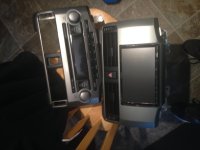
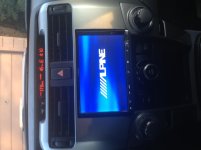
rigtec
New member
"...Also, after plugging in the flash drive, it didn't recognize it nor it's .iso file..."
Just a thought...
Hate to be redundant, but was the vehicle running at the time of the 'failed update'? Also, after you downloaded the swdl iso.file, did you "right-click" while hovering over the swdl file? If so, did you see the option; >send to>'F-drive'? and, were you able to observe the swdl file transfer (i.e., graphics of the '0 to 100%' of the file exchange progress?). PS: I don't mean to undermine or to diminish your unquestionable technical capability... but as I'm reading through the posters that have had some success, I'm looking for a missed or perhaps, an improperly executed step somewhere... something small that may have gone unnoticed. I believe that one poster, having a 2014 4Runner did in fact, have the 5.1 download install successfully! So that's good news, and make's me even more determined to find out what's preventing your download from initializing!
I want to leave this link here for everyone to use as a guide or "Checklist" because I think that your late model truck isn't the problem... but rather, the file transfer 'BEFORE' the attempted usb install e.g., file conversion from C DRIVE to F DRIVE! https://securedp.toyota.com/download-app/toyotaHeadUnits
Cheers!
whiteblazer01
New member
Awesome! What bracket is that?I found a great alternative to the shitty Entune setup...
Now I can upgrade Entune to this http://www.carjoying.com/joying-bes...b-memory-airplay-obd-wifi-bluetooth-html.html
rigtec
New member
Hi cartuner11,
Alpine systems make some great audio equipment; top shelf stuff! However, our objective and reason for this thread is not to replace this equipment; plenty of threads on great aftermarket alternatives, and how to install audio systems. But this is an on-going problem that NEEDS to be addressed and we are all working to help eradicate some of these problems that our beloved 4Runners have been plagued with from day one. Thank you for your post! Rgds
Alpine systems make some great audio equipment; top shelf stuff! However, our objective and reason for this thread is not to replace this equipment; plenty of threads on great aftermarket alternatives, and how to install audio systems. But this is an on-going problem that NEEDS to be addressed and we are all working to help eradicate some of these problems that our beloved 4Runners have been plagued with from day one. Thank you for your post! Rgds
Cartuner11
New member
Thanks, I will stay more on topic. To answer the last question, however, I just used the ISO bracket from the stock radio to mount the nav unit. The trim kit is the Metra 99-8227S. It has to be modified to allow the 8" screen to fit in the double din space. You can see my cut lines kind of suck so I am in the process of trimming a replacement one.

KostyaK
New member
I am questioning what you call conversion from c to f drive here. Instructions on the website simply state drag and drop iso file on the flash drive. I do realise you can, 'unzip' iso file to a drive but I don't think that's the intention here. Hope we get this sorted out but it's not looking great for 2014+ owners.Just a thought...
Hate to be redundant, but was the vehicle running at the time of the 'failed update'? Also, after you downloaded the swdl iso.file, did you "right-click" while hovering over the swdl file? If so, did you see the option; >send to>'F-drive'? and, were you able to observe the swdl file transfer (i.e., graphics of the '0 to 100%' of the file exchange progress?). PS: I don't mean to undermine or to diminish your unquestionable technical capability... but as I'm reading through the posters that have had some success, I'm looking for a missed or perhaps, an improperly executed step somewhere... something small that may have gone unnoticed. I believe that one poster, having a 2014 4Runner did in fact, have the 5.1 download install successfully! So that's good news, and make's me even more determined to find out what's preventing your download from initializing!
I want to leave this link here for everyone to use as a guide or "Checklist" because I think that your late model truck isn't the problem... but rather, the file transfer 'BEFORE' the attempted usb install e.g., file conversion from C DRIVE to F DRIVE! https://securedp.toyota.com/download-app/toyotaHeadUnits
Cheers!

USKTog
New member
I am questioning what you call conversion from c to f drive here. Instructions on the website simply state drag and drop iso file on the flash drive. I do realise you can, 'unzip' iso file to a drive but I don't think that's the intention here. Hope we get this sorted out but it's not looking great for 2014+ owners.
I've tried both just the swdl.iso file on a clean, formatted USB drive as well as unpacking the .ISO file to a clean, formatted USB drive.
My Entune will not play nice (i.e., I never get the first update screen), so I'll just wait til my next service at the dealer and have them do the Entune update...


Saker
Senior Member
Just a thought...
Hate to be redundant, but was the vehicle running at the time of the 'failed update'? Also, after you downloaded the swdl iso.file, did you "right-click" while hovering over the swdl file? If so, did you see the option; >send to>'F-drive'? and, were you able to observe the swdl file transfer (i.e., graphics of the '0 to 100%' of the file exchange progress?). PS: I don't mean to undermine or to diminish your unquestionable technical capability... but as I'm reading through the posters that have had some success, I'm looking for a missed or perhaps, an improperly executed step somewhere... something small that may have gone unnoticed. I believe that one poster, having a 2014 4Runner did in fact, have the 5.1 download install successfully! So that's good news, and make's me even more determined to find out what's preventing your download from initializing!
I want to leave this link here for everyone to use as a guide or "Checklist" because I think that your late model truck isn't the problem... but rather, the file transfer 'BEFORE' the attempted usb install e.g., file conversion from C DRIVE to F DRIVE! https://securedp.toyota.com/download-app/toyotaHeadUnits
Cheers!
I've tried WinRAR, 7zip and Winzip and it does not give me the option to "right hover and choose the option; >send to>"F-drive". I have copied and pasted it un extracted and also, extracted it onto the drive, it seems to make no difference at all.
So after reading this, I will use Winzip, when hovering over the iso file it doesn't give me an option, but if I right click it it gives me the option to Extract it.
I will try to drag it into the Flash drive. I will see if it moves the iso intact or either it will unzip or extract it....
Last edited:
rigtec
New member
"I am questioning what you call conversion from c to f drive here. Instructions on the website simply state drag and drop iso file on the flash drive..."
Hi KostyaK,
You're 100% right about that! It's just that I clicked on the download button on the Toyota downloads website. Doing that directed me to a downloaded file on my computer, which I was instructed to OPEN. When I opened it, I saw an Un-zipped file i.e., swdl.iso. At that point I hovered the arrow over it, right-clicked and then selected>>send to; and chose the 'F-drive': I had a freshly purchased 8-gig flash drive; which was already plugged into the usb on my lap-top. So I never 'Dragged and dropped' the file but rather, used the 'send-to' option for my transfer. Upon doing this, I was able to watch the process take place from start to finish!
PS: I'm so glad that you're paying attention to these small details... this is why I started to refocus my attention more on the original download procedure to the 'C-drive', and the steps from there to the 'F-drive'. The more I think about it, the more I become convinced that the problem ISN'T with the ((XM)) HD or a newly designed 4Runner... So glad you guys are willing to explore, to research, to think outside of a 'cooky-cutter' mentality that's so prevalent these days; tis' immensely refreshing!!!
Saker
Senior Member
Ok, So I still have a "No-go".
After at least 15hrs of no power to the HU, tried multiple times of re-formatting the Flash Drive, either extracting or dragging the iso file to the Flash Drive with different programs after downloading it to the desktop, installing the file directly to the Flash Drive, then unzipping it there and dragging it from the zip folder into the Flash Drive location directly and/or extracting it to the Flash Drive location. None of it has worked for me.
After at least 15hrs of no power to the HU, tried multiple times of re-formatting the Flash Drive, either extracting or dragging the iso file to the Flash Drive with different programs after downloading it to the desktop, installing the file directly to the Flash Drive, then unzipping it there and dragging it from the zip folder into the Flash Drive location directly and/or extracting it to the Flash Drive location. None of it has worked for me.

NoDak
Senior Member
I re-read thru the posts and unless I missed it ...
1. format the usb as FAT32
2. the iso you mentioned "swdl.iso" looks to be the same file that was in the entune 3.2 update thread, which also came with another file in addition to the "swdl.iso".
3. this 3.2 update only applied to certain head units.
3a. one of the head units not included in the 3.2 updates was the limiteds as they had a HD radio which in the 3.2 update states specifically didn't apply.
1. format the usb as FAT32
2. the iso you mentioned "swdl.iso" looks to be the same file that was in the entune 3.2 update thread, which also came with another file in addition to the "swdl.iso".
3. this 3.2 update only applied to certain head units.
3a. one of the head units not included in the 3.2 updates was the limiteds as they had a HD radio which in the 3.2 update states specifically didn't apply.


Saker
Senior Member
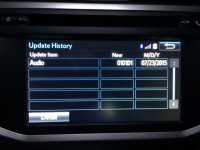
[MENTION=464]clin9383[/MENTION] & [MENTION=83083]rigtec[/MENTION]
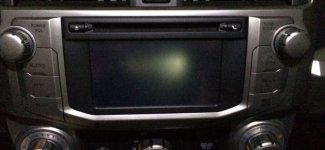
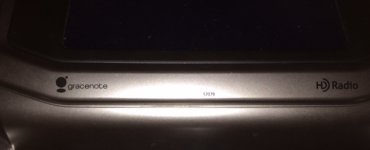
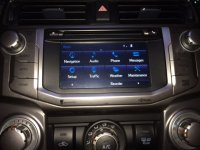
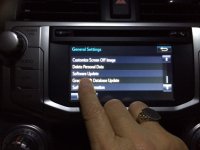
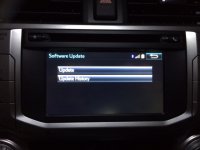
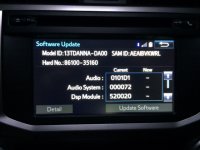
Here you go guys, this is what my HU and Apps screen looks like as well as the Software Update Screens.
Hope this helps!
Here you go guys, this is what my HU and Apps screen looks like as well as the Software Update Screens.
Hope this helps!
Attachments
Last edited:
Similar threads

- Replies
- 19
- Views
- 6K
