Arrrggg!!! replacing headunit

GrantK

New member
Just venting...:rant:
I'm swapping out my basic (no Nav/Entune etc) single DIN head unit with a Alpine NAV20 system and it seems like I'll never finish soldering, routing and figuring out the wiring. Almost makes me wish I had ordered my tuck with a full Nav system.

I've got to route the new mic cable, backup camera video and reverse indicator from the overhead console. I have to route the pre-out lines and remote turn-on to the back of the truck. I have to route a A/V cable from the back to the front for ham radio hook up. I have to install the PAC-audio steering wheel interface, and PAC-audio trigger box to allow in-motion access to items that can normally only be accessed when parked. I have to install the GPS antenna, new cable for USB (thumb drive for MP3s). I have to temporarily hook up the Alpine's front speaker lines so I have some sound while I work on the new amps, equalizer and speakers.

Fishing wires, unwrapping factory wires, going back and forth between the PAC-audio docs, Alpine docs and Toyota wiring diagrams. Soldering in areas where I can hardly see let alone get my hands in. Installing shrink wrap tubing and wrapping other wires with electrical tape. Cable tieing wires so they're out of the way and won't interfere with anything.

I've put in about 8hrs so far and am probably about 1/2 done. I'm quickly loosing what little of my mind I have left!~!!!:reddance:
 
Register to hide this ad
I like the planning, finding/accumulating the parts, the final steps of putting things back together, testing and the results.

I hate working under and behind the dash. I'm too old and have too many back problems to be lying half out out of the truck and half in the foot wells without lower body support. I wish I had a creeper that would allow me to adjust the height to match the truck.
 
Bet the labor would have been over $1000 to have it done and they probably would not have soldered anything.
 
634798639221257881.jpg


I've not driven my car in over a month already because I tore it apart to install an alarm/remote start. Practically my entire dash/center console area is sitting in my living room right now :)

I'm attempting to completely integrating into the factory wiring as good as possible by: unwrapping factory harnesses, de-pinning the factory plugs to slide heat shrink tubes over wires to cover the soldered joints, re-looming all the added wires into braided wire loom, and of course routing them around in such tight spaces and securing it all back into place.

I've put in countless hours, but the bright side is knowing it's done right. So hang in there!

One tip that may or may not help you depending on the height of your truck is: I put a step stool right next to the door opening and piled a bunch of old pillows up and across bridging into the foot well area. Basically allowing me to lay on it comfortably. My back and neck damn near gave out till I figured that one out.

Good luck!

PS: I love my stock navigation system :hello:
 
My tip--Remove 4 bolts and take out the drivers seat. Takes 5 minutes and then you sit comfortably on the carpeted floor with plenty of room to work.

Do it like this once and you will never go back to "upside down on your back in the footwell".
 
I totally gutted the interior when I did my stereo install. Sure made things easier to get to.
Put in some sound deadening stuff too.
 
Antman, Desert Fox,

Thanks for the suggestions. Trouble is, right now I'm taking a break from finishing the driver's side. The passenger side is only routing 2 pre-amp out cables through the door sill so it's not worth pulling the seat. After that is just cleaning up the wiring behind the head unit and putting everything back together. Isn't that the way things always go, you learn the easy way just as you finish doing it the hard way? :sobbing:

I'll be pulling the seats when I install the sound deadening of course.
 
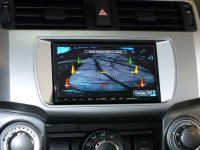
Got the head-unit install competed and all features/functions are working. It even auto switches the display to the backup camera when I put it in reverse. :trophy:
I still need to route the preamp-out lines behind the glove box and through the door sill channels as well as update my USB drive (it was for a Kenwood and the play lists won't work with Alpine).

I know, I know... pics. I take a pic or 12 soon and update this posting.
 
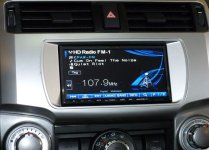
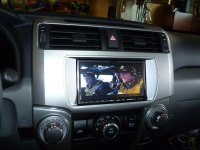
Here's the pics.
A view from radio mode, backup camera mode and the movie Memphis Belle

Almost forgot... The NAV is picking up over the air (FM radio) traffic updates for construction, weather alerts and accidents for FREE!!! I don't know if it is also picking up info on heavy traffic or not but this is cool, no Sirus or Bluetooth and it's getting traffic info and routing around them.
 

Attachments

  • Alpine_radio.JPG
    Alpine_radio.JPG
    53.4 KB · Views: 1,842
  • Alpine_camera.JPG
    Alpine_camera.JPG
    51.7 KB · Views: 1,508
  • Alpine_dvd.JPG
    Alpine_dvd.JPG
    49.9 KB · Views: 1,971
Last edited:
That looks real good.
I bet you are feeling pretty good about it now that it is in and working, you should, it is a lot of work. :cheers:
 
What a small world! I just installed a INA-W910 in my '13 SR5 last week! Placement is PERFECT IMO!!! I got a "Scracth and Dent" model from "Crotchfield" for $799 and included the factory wiring harness and Scosche installation kit. Not too shabby IMO. The PXA-H800 DSP is going in soon, as is the RUX-C800 and the remainder of the A/V system.

FYI - You can tap a reverse trigger directly from the fuse box! Both 10 Amp Reverse Fuses (regular and trailer fuses) offer switched +12v Reverse voltage. Sweet. I used one of those ATM "Add-a-Circuit" fuse taps for this (had to remove the fuse box cover - no biggie IMO).

If you plan on doing the PAC Steering Wheel Adapter for your radio - you can modify an ATX Computer's 3-Pin Fan Header (with male pins) to directly plug into the factory harness! No cutting or splicing of factory wires is needed! I have yet to modify a single factory harness or connection - but that is bound to change soon. (See my pics in the thread below)

http://www.toyota-4runner.org/5th-g...nna-lic-plate-back-up-camera.html#post1238302

Plenty more to come for my build...
 
Last edited:
I have that hu in my camaro and love it...does the phone stuff on the steering wheel work still?

I'm using the PAC Audio adapter for the steering wheel and set the mic button as the mute function since I don't use a cell phone, the other two aren't supported by the PAC audio unit.
 
Before you get all comfy with it, I might suggest looking at Krylon flat or satin for that dash kit. I found the Metra and the Scoshe to both be better looking when hit with flat black Krylon. I used 4 coats or so, and it hasn't scratched or faded in a year. It matches the dash pretty well. I have some pics in the big aftermarket stereo thread for a preview of what it will look like. They're towards the end.
 
Very nice and clean job!

I wanted to read up on your particular head unit, but I couldn't find the "NAV 20" on Alpine's webite. Older model?

Thanks!
 
Very nice and clean job!

I wanted to read up on your particular head unit, but I couldn't find the "NAV 20" on Alpine's webite. Older model?

Thanks!

Thanks for the kudos.
Early '12 model, same as their W910 just labeled differently.
 

Members online

Forum statistics

Threads
278,309
Messages
3,554,067
Members
248,016
Latest member
Advally Service

Trending content

Back
Top