Backlight in Info Panel flickering!

I too had a flickering bulb on the passenger side of the display. If you can change the oil in you car or synch an iPhone to your computer, or are breathing, you can easily fix this problem.

If the bulb is flickering, it's not bad, you don't need a new one. The problem is with the electrical connection. Once I removed the panel (took all of one minute), i removed the two bulbs, lightly cleaned the contacts with a pencil eraser and applied a pinhead of dielectric grease to the contacts on the bulbs. Problem solved.
 
I had one of these lights go out on my info panel on my 2005 limited. My dealer wanted $150 to replace the bulb. I about fell over. After reading this forum I bought this cheap plastic pry bar set from Harbor Freight for about $5. Hopped in the front seat and opened the drop down clutter catcher box just below the temp controls. You can see a phillups screw that is sort of recessed under the panel. Just unscrew that and remove the screw. Now the panel is held in with pink teflon fingers. Don't be shy because these are pretty hefty and you can't break them unless you really yank on it. I just slipped one of the pry bars under the lower finger and it just "pops" out. Sounds like you broke something but that is the sound it makes. Then pop the other side up and then carefully slide your hand under the panel and yank the top fingers straight out. Don't bend it up but pull straight out. Once it is out you'll say "Geez that was easy". I disconnected the whiter connector by pushing in the release tab and pulling the cable loose. This takes a bit of muscle as they are pretty tight. Take the whole panel in the house and under a good light you will see 3 lamps behind the info panel. Take a small screwdriver blade and turn them counter clockwise until they stop. Then using a pair of tweezers, pull them out. They will not fall out if you turn it upside down, you have to use tweezers to remove them. Slip the replacement in and turn clockwise until it stops. Sooooo easy. Plug the white connector back in and carefully align the fingers back in the holes, starting at the top. Just push the panel in until you feel it snap in place. Insert the phillups screw and your done. I took me about 10 minutes. Piece of cake.

Thanks... This was a huge help. This forum rocks! Now - I just need to find a bulb at one of the local dealers tomorrow.
 
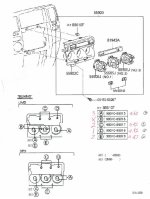
Replacement bulbs diagram

Attached is the diagram that will help you in replacing the bulbs behind your clock/info pannel/ac control in your dashboard.

This diagram shows where you can find the 8 bulbs behind the unit, the parts number, and how many you need of each part. I got this helpful guide from the folks at Don Mcgill Toyota Dealership in Houston. They were extremely helpful and I will most certainly use them again for my service/parts need.

Good luck everyone!
 

Attachments

  • Dash and AC Control Lights.JPG
    Dash and AC Control Lights.JPG
    54.4 KB · Views: 6,851
Hello, can you tell me wich part number is for what location ? I need the bulbs behing the info/clock panel

Attached is the diagram that will help you in replacing the bulbs behind your clock/info pannel/ac control in your dashboard.

This diagram shows where you can find the 8 bulbs behind the unit, the parts number, and how many you need of each part. I got this helpful guide from the folks at Don Mcgill Toyota Dealership in Houston. They were extremely helpful and I will most certainly use them again for my service/parts need.

Good luck everyone!
 
Thanks

Hi - I really appreciate the details in this post. My fan light control bulb burned out and drove me crazy. I thought it was a LED but was a bulb. I got the dash unit out in 5 minutes, replaced the bulb and was good to go (after putting the bulb in partway, and thinking it was a bad LED). A few dollars later and it is perfect.
 
So ive tried searching and this is all I came up with. When I bought my 4runner in november one half of my backlight was already out. I looked around and saw it was just a bulb so no big deal Ill change it sometime. So i bought new NEOx 4's leds from superbright LED's.(https://www.superbrightleds.com/mor...led-bulb-high-power-instrument-panel-led/221/) They installed fine but when I go to plug in the harness to the back of the unit they come on to the brightness level theyre supposed to but kind of flicker as im wiggling the plug back on, but as the plug gets closer to clicking and locking in place they go dim. I tried just leaving it halfway off and not fully locking the plug but since its loose it just flickers. I thought maybe the connection was dirty so i bought some contact cleaner and dielectric grease but when I put it back together again it still comes on up untill the plug is fully seated. Anyone have ideas? Dont really want to buy another one on ebay to have it do the same thing to that one when I try it.
 

Members online

Forum statistics

Threads
278,307
Messages
3,554,050
Members
248,016
Latest member
Advally Service

Trending content

Back
Top