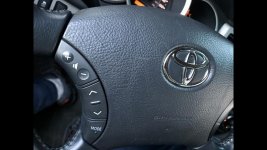
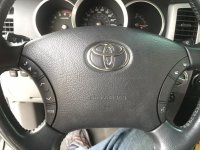
DIY Bluetooth/Voice Command steering wheel button install (pics)........for REAL

Maybe it will wire right up and work, except for that "parking sensor thingy" which of course our rigs don't have. I'm sure someone can figure out if they work by looking some some schematics. Whatever, it would be nice to know if this is a good low cost alternative to getting the factory buttons (cheaper).

Ok I gotcha. I was thinking this might have been out of another Toyota that may work. It does say OEM and shipping from Japan and says used. it has the same wiring colors and silver stripes so thought may have been legit. It may just be a knock off. I’ll continue to look and see if I can find one second hand OEM. If not successful I’ll probably just break down and order the OEM parts. Thank you for the help once again!
 

Attachments

  • 288D3409-A53F-4B24-9E01-B684CD8F5D15.jpg
    288D3409-A53F-4B24-9E01-B684CD8F5D15.jpg
    123.6 KB · Views: 794
Last edited:
Ok I gotcha. I was thinking this might have been out of another Toyota that may work. It does say OEM and shipping from Japan and says used. it has the same wiring colors and silver stripes so thought may have been legit. It may just be a knock off. I’ll continue to look and see if I can find one second hand OEM. If not successful I’ll probably just break down and order the OEM parts. Thank you for the help once again!
It should be an easy plug and play. Also way cheaper than OEM. I bought one from Aliexpress for $40 or so shipped and it hooked up easily and works perfectly. The ground was different so I just swapped out the wire harness from my factory left-side buttons and hooked it up to the new left-side buttons then connected the new right buttons...done. 10 min job.

And Cookie is right, the middle "sensor" button on the right doesnt work at all. Mine has it too. I know for certain it isnt connected as I can manually program all the buttons to work however I want for my phone/Carpc via Joycon (hooks up via USB) and it doesnt sense any resistive inputs from that middle button. I didn't bother with wiring them to work either.
 
Last edited:
It should be an easy plug and play. Also way cheaper than OEM. I bought one from Aliexpress for $40 or so shipped and it hooked up easily and works perfectly. The ground was different so I just swapped out the wire harness from my factory left-side buttons and hooked it up to the new left-side buttons then connected the new right buttons...done. 10 min job.

And Cookie is right, the middle "sensor" button on the right doesnt work at all. Mine has it too. I know for certain it isnt connected as I can manually program all the buttons to work however I want for my phone/Carpc via Joycon (hooks up via USB) and it doesnt sense any resistive inputs from that middle button. I didn't bother with wiring them to work either.

Interesting. As far as the grounds being different, how so? Would be helpful as this would be a reasonable alternative to getting the OEM buttons.

To get that middle button to work, someone is going to have to provide a "pinout" (schematic) and a how-to instructions to get it to work. I imagine the clock spring wiring is different. I'm willing to bet that is an OEM part only available overseas so that probably makes it close to impossible to make that button function (to make it a trigger for anything you want really, if I had an Android head unit and had this "extra button" it would be neat). Otherwise, the extra "button" is just bling.

Thanks for sharing!
 
It should be an easy plug and play. Also way cheaper than OEM. I bought one from Aliexpress for $40 or so shipped and it hooked up easily and works perfectly. The ground was different so I just swapped out the wire harness from my factory left-side buttons and hooked it up to the new left-side buttons then connected the new right buttons...done. 10 min job.

And Cookie is right, the middle "sensor" button on the right doesnt work at all. Mine has it too. I know for certain it isnt connected as I can manually program all the buttons to work however I want for my phone/Carpc via Joycon (hooks up via USB) and it doesnt sense any resistive inputs from that middle button. I didn't bother with wiring them to work either.

I appreciate your response and experience. I’d hoped maybe that the button could be programmed for whatever, but maybe not. Worst case it’s just “Bling” (I like that response lol), it does make it look less empty. Sounds easy enough to put it and set up. Thanks again gentleman!

Edit: Ah crap, somebody else bought it. That’s what I get for dragging my feet haha, and what I get for posting it up lol. Hopefully someone on here at least that can post up and let me know how well it works.
 
Last edited:
I appreciate your response and experience. I’d hoped maybe that the button could be programmed for whatever, but maybe not. Worst case it’s just “Bling” (I like that response lol), it does make it look less empty. Sounds easy enough to put it and set up. Thanks again gentleman!

Edit: Ah crap, somebody else bought it. That’s what I get for dragging my feet haha, and what I get for posting it up lol. Hopefully someone on here at least.
Try this one

Lexus LX470 Phone & Voice Command Switch 84244-60060-B0 2004-2007 Gray OEM | eBay

Notice its gray though
 

I went ahead and pulled the trigger, I didn’t come across that one in my searches. Thank you. Not sure if I need the BO or B1 though. Mine certainly looks like dark charcoal (B1 I would’ve thought), guess I’ll find out when it gets in haha. That would have been one nice thing about buying both sides, they’d match. Here’s a pic taken at night which looks darker than it is......hopefully
 

Attachments

  • A9047DBD-D74B-4491-9166-4E47578BA57B.jpg
    A9047DBD-D74B-4491-9166-4E47578BA57B.jpg
    136.6 KB · Views: 825
Last edited:
Got my part in and installed tonight. Thank you for that find Crimson! Great price, in good shape, works great and matches, I was worried it wouldn’t match.

CookieRoe thank you for starting this and updating the pictures! Super easy to follow and only took about 30 minutes total. My torx screws were on pretty tight and had trouble finding the angle, had to use a socket ratchet for more leverage.

Only bummer is the lights are white while the rest are orange. Maybe it’s a start to my orange to white transformation for the interior lol. I’m using this with my brand new Pioneer avh-2550nex I just installed last night. The buttons are actually dual function. If I push the talk button it makes my radio go to attenuation which I love! Was wanting a volume knob and this head unit doesn’t mute quickly, it with the button it makes it the icing on the cake!

One push of the talk button-ATT
Hold the talk button and goes to Bluetooth Microphone
Push the hang up button-single channel up, hold -it seeks (actually triple function!)
Answer button press once-next single channel down, hold-seek down
Incoming call-buttons will answer or hang up.

However when iPhone is plugged in for Carplay the only button that works is the Attenuation button. Honestly it would have been worth installing just for the mute/ATT function. Maybe there’s a setting somewhere on my HU for that. I’m super stoked, what an easy upgrade and finding second hand in good shape is a total bonus.
 

Attachments

  • 191F8D57-3143-4864-8272-D5C952AA3B62.jpg
    191F8D57-3143-4864-8272-D5C952AA3B62.jpg
    130.8 KB · Views: 808
  • 1073FB7C-CA6D-4381-B7E6-890FB4CCA7B9.jpg
    1073FB7C-CA6D-4381-B7E6-890FB4CCA7B9.jpg
    61.9 KB · Views: 737
Glad to help, but wow, now we know why the difference in part numbers. So functionally, the same, but the back light is different. That would drive me nuts. BUT, you can replace the LEDs in there, so WIN!
 
Glad to help, but wow, now we know why the difference in part numbers. So functionally, the same, but the back light is different. That would drive me nuts. BUT, you can replace the LEDs in there, so WIN!
Just an excuse to do an LED swap. Lol. Mine actually came all white because I got both buttons new with mine. I've grown to like the orange glow again if only for the contrast with my all black interior (painted all the lower gray bits a while ago).
 
Last edited:
OK, this subject has been covered ad nauseum, however many complain of the lack of pictures. It's really quite simple. Hope this helps anyone.

…..

EDIT: fixed the photos, sorry. Also, if you add these buttons, if you get an Android head unit, you can totally use them without any PAC kit.

I picked up a 2008 SR5 and just used your pictures to validate I was inserting the steering wheel controls ribbon cable properly. Thank you so much! Now begins the fun stuff…
 
I picked up a 2008 SR5 and just used your pictures to validate I was inserting the steering wheel controls ribbon cable properly. Thank you so much! Now begins the fun stuff…

Cool! Glad to see this old thread continues to help others. Also, neat to see Toyota still has the part available, I would think this part (others like it) would've been discontinued long ago. Enjoy your controls!
 

Members online

No members online now.

Forum statistics

Threads
278,310
Messages
3,554,078
Members
248,016
Latest member
Advally Service

Trending content

Back
Top