Entune Update Email

'15 here, nothing on my phone or my headunit today. Although I never connect/use entune so maybe that's why :shrug:
 
15 here

15 here and update went well. Quick and painless. Love entune, I guess because I came from a Tacoma with nothing.
 
As if on cue, just got the update on my phone. Will I need to connect the app tomorrow to update the head unit?
 
Updated Entune on phone. Turned key to acc in the vehicle. Launched App from phone. Went to the update page on the HU, downloaded update and installed. All is well.
 
Updated this morning, car shut down on the interstate and spontaneously combusted :violin:

This is not factual
 
"Your Head Unit got harshed, right, 'cause your system heaps at the wrong Parameter. So l toasted the data directory, tweaked the P-RAM...and reglazed your subroutine."

- Pauley Shore....Tier 3 Entune Support
 
got it installed on my way home last night.
went well and quick.
It feels like search is working better/faster now
 
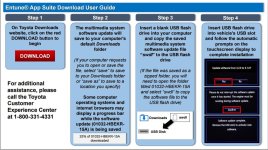
here is a direct link for the file you will need (if you don't want to use your data on your phone) - I'll leave it up for awhile - https://dl.dropboxusercontent.com/u/2191949/swdl.iso

Just put it on a fresh USB Fat32 formatted. I think some people were having a problem because the file at the original link has to be unzipped. If copied from zipped it is 275MB if unzipped it is 312MB.

Instructions - https://securedp.toyota.com/static/toyota/pdf/SoftwareDownloadPortalQuickStartGuide.pdf

Direct link page - https://securedp.toyota.com/download-app/toyotaHeadUnits
 

Attachments

  • Untitled.jpg
    Untitled.jpg
    134.2 KB · Views: 4,130
Last edited:
My only complaint is that I use a USB for my source of music which has worked perfectly, if I turn off the truck halfway through a song, when I turn the truck back on, it would pickup playing right where it was when it shut off.

Now with the update it restarts from the beginning of the song. Which annoys me on short drives.

Not a huge problem, just an annoyance I guess.
 
I noticed that googlemaps and notification sounds thru bluetooth works. Before I would get texts and could not hear the turn by turns.
 
I have never connected my iPhone6 via USB. MY WEATHER APPs work just fine on both my 15' LE's. The new one has dropped my Bluetooth 2x now in a month not sure why. I am running a beta on my iPhone so that could be it too. Anyone else keep loosing blue tooth connectivity?

I really wish Toyota would allow the iPhone to use SIRI with the talk button
 
I've had my 4 runner for almost 3 weeks and an S6 for nearly 2 months. The bluetooth has had connection issues 3 or 4 times at least. I'm not impressed with this system!
 
My bluetooth has had no issues connection for phone calls and audio, but the Entune apps haven't connected once in the 2 weeks I've had my t4r.
 
My bluetooth has had no issues connection for phone calls and audio, but the Entune apps haven't connected once in the 2 weeks I've had my t4r.

I am just guessing here that you have an entune account and a account on those apps you want to use?
 
I am just guessing here that you have an entune account and a account on those apps you want to use?

That would be correct. I open the Entune app suite on my phone (iPhone 6, up to date firmware), wait until the bluetooth has connected fully, then try the different apps that I have accounts with (logged in through the entune app on my phone, of course).

It's not a major deal for me though, as long as I can use the backup camera/satellite radio/bluetooth audio for podcasts and spotify/occasional nav I'm fine.

 
That would be correct. I open the Entune app suite on my phone (iPhone 6, up to date firmware), wait until the bluetooth has connected fully, then try the different apps that I have accounts with (logged in through the entune app on my phone, of course).

It's not a major deal for me though, as long as I can use the backup camera/satellite radio/bluetooth audio for podcasts and spotify/occasional nav I'm fine.

just taking a wild stab in the dark there. otherwise, the only option is to remove the app from the phone, phone from the vehicle and vehicle from the phone, reboot the phone and then re-install the app, and re-pair the phone and vehicle from scratch.


How to restart/reboot iphone :

  1. Press and hold the Sleep/Wake button until the red slider appears.
  2. Drag the slider to turn your device completely off.
  3. After the device turns off, press and hold the Sleep/Wake button again until you see the Apple logo.
 

Members online

Forum statistics

Threads
278,309
Messages
3,554,068
Members
248,016
Latest member
Advally Service

Trending content

Back
Top