...got bass?

Hey [MENTION=128]jeff[/MENTION],

Looking at what you have provided it doesn't look as if you have a problem. The JL amps don't need an LOC as they have a "Front-end" buffer circuit on the inputs. Seems that you were using the loc just to provide rca lines to your sub's amp; is that correct? I have no rca outs on my stock hu. I'm just tapping into the speaker output lines on the hu. From there I'm going straight into the miniDSP module (as it is capable of handling 2vac) for processing, and then right into the amps; that's it! You should be able to go straight into your 500/1 mono-block and choose the "Low sensitivity" inputs. The amp is capable of receiving a wide range of input voltages from 200mv to 8 volts. There's an 'input selector' switch on the amp's control panel with 'Hi' and 'Low' positions. The 'Low' is for 200mv to 2v. The 'High' is for 800mv to 8v. This is to accommodate RCA line level signals from a hu or the high level speaker outputs from an amplifier, so you should be good! If you're going straight from the head unit, try using the "Low" position on the amp's control panel. Here's a link to the "set-up" page from JL audio "Knowledge base"/ support.
JL Audio » header » Support » Tutorials » Tutorial: Input Sensitivity (Gain) Setting Hope this will be helpful to you!
 
Last edited:
Excellent post Greg. This is not a project I would ever do but your explanation of subwoofer physics is spot on even for a complete novice. Excellent!

Hi 1eng'r

I wanted to thank you for all of your support; totally appreciated! "That's what makes the time spent writing, really worthwhile!"

Best to you!
 
Hey [MENTION=128]jeff[/MENTION],

Looking at what you have provided it doesn't look as if you have a problem. The JL amps don't need an LOC as they have a "Front-end" buffer circuit on the inputs. Seems that you were using the loc just to provide rca lines to your sub's amp; is that correct? I have no rca outs on my stock hu. I'm just tapping into the speaker output lines on the hu. From there I'm going straight into the miniDSP module (as it is capable of handling 2vac) for processing, and then right into the amps; that's it! You should be able to go straight into your 500/1 mono-block and choose the "Low sensitivity" inputs. The amp is capable of receiving a wide range of input voltages from 200mv to 8 volts. There's an 'input selector' switch on the amp's control panel with 'Hi' and 'Low' positions. The 'Low' is for 200mv to 2v. The 'High' is for 800mv to 8v. This is to accommodate RCA line level signals from a hu or the high level speaker outputs from an amplifier, so you should be good! If you're going straight from the head unit, try using the "Low" position on the amp's control panel. Here's a link to the "set-up" page from JL audio "Knowledge base"/ support.
JL Audio » header » Support » Tutorials » Tutorial: Input Sensitivity (Gain) Setting Hope this will be helpful to you!


Hi rigtec,

Thank you very much for taking the time to look over that and helping me out with getting the amp wired up to the HU. I truly do appreciate it!

I'm going to spend some time reading through the JL link you provided as well as getting more familiar with the amp itself. Sounds like I was making things more complicated than need be as my wants have changed to simply adding the sub. The Audiocontrol is a nice unit and I may hang onto it if I change my mind later on and want a full on system with more control and new front comps with an amp.

I'm a lot more comfortable with installing the actual hardware and basic wiring so being able to go directly into the amp without having to mount and mess the Audiocontrol box would be great.

Thank you again for taking the time look that over for me. I've got a busy next 2 weeks but after that I'm hoping to start working on getting everything installed and will certainly post the results.

Thanks again and have a great weekend!
- Jeff
 
[MENTION=102748]Jeff614[/MENTION],

Glad you feel relieved about setting up your system, it should be "FUN", first and foremost! Setting the input gain on an amp is no big deal; provided you understand why it has to be done. If you have any trouble during the process, chime in here again... we'll be glad to help out! Best to you!

Greg
 
I'm waiting for someone to give me a simple upgrade to my JBL sub with EVERYTHING being hidden and no lost space.
 
I'm waiting for someone to give me a simple upgrade to my JBL sub with EVERYTHING being hidden and no lost space.

Hi Neauxla

It can be done. It would involve replacing the stock 8 inch sub with a higher level aftermarket sub (plenty of them out there), and disabling the existing jbl amp and replacing it w/ one better. Should be easy, most of the wiring is already there. You would likely need to pull one larger 'fused' "Hot" line from the battery to accommodate the beefier amp but that should be it! Regards
 
Regardless your system looks great, congrats on a good job and excellent right up! LoudRunner, yours looks great as we'll. Love the W7's and I'm sure that JL box sounds perfect. How has mounting the amp to the seat back worked out?

- Jeff

Thanks Jeff. Mounting the amp on the seat does not work well. The vibration from the sub rattles the screws out every time. What does work for me is mounting a piece of wood to the seat, and then mounting the amp on the wood. I have no issues when I do it this way. I put small rubber washers between the amp and the wood so there is as gap.


Thanks Jeff. Mounting the amp on the seat does not work well. The vibration from the sub rattles the screws out every time. What does work for me is mounting a piece of wood to the seat, and then mounting the amp on the wood. I have no issues when I do it this way. I put small rubber washers between the amp and the wood so there is as gap.

Hi Loud Runner,

That 13W7 is an excellent set-up; Not too many single driver subs can touch it! When I got my first JL sub and amp, when I bought the truck, I only had one (got the second one a few months later). The installer placed it behind the rear passenger side seat, and affixed a metal bracket to the top of the box and seat back as you have done w/the amp:

rigtec-albums-%26quot%3Bmy+new+white+chick%26quot%3B%21-picture12079-jl-audio-w6-110-sub-woofer-designed-handle-extreme-sound-pressure-levels%3B-just-one-can-used-large-professional-home-theatre-ht-applications-two-driven-jl-audio-750-watt-digital-mono-block-religious-experience.jpg


The problem was that the back of the seat is made of "chipboard" and lacks the density to support screws; mine would even squeak very loudly when driving and was difficult to catch while driving. If you do ever have a problem, the W7 is a perfect place to mount the amp! regards

PS: That HD-1200/1 is a real BEAST!!!
 
Rigtec, yea now that I've got a better handle on getting the amp wired up to HU the project will be more fun, well once the temps stay below 90* that is lol.

Loud Runner, I like the seat back idea and hear ya on mounting the amp to either plywood wood or mdf then that to the seat back. I was initially looking at mounting it under one of the rear seat sections but the latches and overall curvature of the floor back there might make me change to the seat back.

I pretty much envision placing my equipment in roughly the same place you have yours, just with a smaller sealed enclosure for the thin-line sub. I'd love to go ported but even with the thin-line sub I'd most likely be giving up more trunk room than I can.

Thank you both for all your help, PM's might be headed your way once I get fully into the install!

- Jeff
 
Hey [MENTION=102748]Jeff614[/MENTION], [MENTION=80668]Loud Runner[/MENTION]

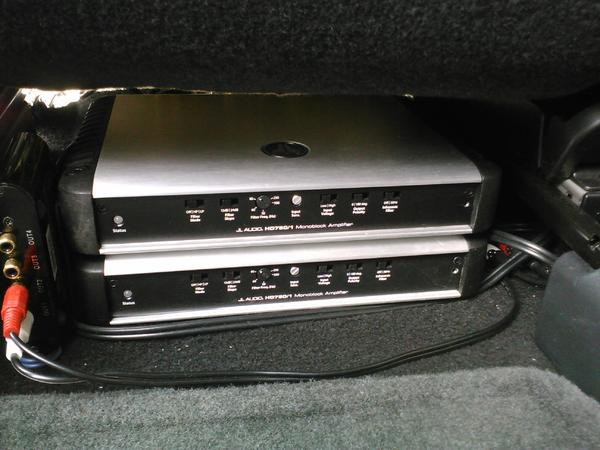
Both "HD-750/1's" neatly fitted underneath the driver seat...

rigtec-albums-%26quot%3Bgentilmen+prefer+redheads%26quot%3B-picture27331-all-cell-pix-june-2014-032.jpg


Howsabout that(?)!
 
Last edited:
[MENTION=83083]rigtec[/MENTION],

VERY nice! I was hoping for underseat due to protecting the amps best. I generally have a decent amount of tools and possibly soon a dog that could be riding back there so I'd prefer to keep both those seperate from an amp. I can at least put a grille on the sub.

Think I really need to get out in the truck with the amp and wiring I have to make sure all will work. This thread has made me want to get moving on this project. I've got the time today but woke up to rain and a forecast for storms in N. Va....

- Jeff
 
That is awesome man! Love the stackable design. If my 4 channel amp wasn't the old slash series I would really consider that. Maybe I will get the hd 600/4 down the road and stack up :) anyways, great work man! Lovin this thread. Lots of good quality info.
 
[MENTION=83083]rigtec[/MENTION],

This thread has made me want to get moving on this project. I've got the time today but woke up to rain and a forecast for storms in N. Va.... - Jeff

Hey Jeff,

Glad to see you getting inspired to "set it off" in your truck, the same happens to me whenever I get an idea for an upgrade! As far as the weather, don't feel bad. When my new 270-XP alternator finally arrived, 'old man winter' decided to dump 29 inches of snow on top of the 21 inches we already had. Needless to say it was a few months before I could do anything with the new alternator. I finally decided to have it installed by a local Good-year shop; no sign of winter ever ending :pray:

Glad to see that the spirit of 'diy' here on this forum has given you "the itch"! Oh, and congratulations on your new pooch coming to ride-a-long with you and hearing the new sub, hahaha, that's perfect!
 
Hi mugenrios,

The "R series" subs are at the top of the heap right now; and may even be a margin better than the JL audio subs. I wouldn't count on seeing more than a nominal increase of spl @1w/1m though. (rigtec)

ya man the sensitivity is not that great but being a 8" you can only expect so much..
No one has the T/S parameters for the stock 2014 8" JBL sub... :bash: wish they did so I could run the simulations with one of multiple programs I have. Bass box pro is my fave for simple enclosures like the stock sealed volume.
 
Last edited:
ya man the sensitivity is not that great but being a 8" you can only expect so much..
No one has the T/S parameters for the stock 2014 8" JBL sub... :bash: wish they did so I could run the simulations with one of multiple programs I have.

Hi mugenrios,

Those numbers would be good to have on hand. Have you removed the 8'' driver and looked for a model number on the magnet assm? There may be a number that can be crossed over to a driver that does have it's specs/parameters published. Also, you can try to identify the driver by it's physical profile and match it up with one that has a tag. You can even take a look at the ''Eminence'' inventory just to see if you see your driver there. Sometimes a company will 'source' their products out because it may be cheaper for them to do it that way rather than build it themselves; not sure if jbl does this but it may be worth a look.

Bass box pro is my fave for simple enclosures like the stock sealed volume.

Yeah Bass box pro is a great box builder tool/calculator program. I'm using winISD and another software program by Ishtek for ported alignments which is pretty simply to use. Best of luck and let us know how you made out; I'm sure there are others here that will appreciate your efforts!

rigtec, cheers
 
got subs? pt ll

Hi gang,

I think one of the things I'm most passionate about is when a person, product, or company, sets out to exploit the hard working, innocent shopper that's trying to take care of their family while managing a budget; t'is the reason that I started my own comm'l/indus'l h.v.a.c. service company a while back; just tired of seeing my "X-Bosses" get rich on the lack of understanding of their loyal customers!

And the same applies wrt buying speakers, or anything else for that matter. There are just sooo many tricks (loop holes and semantics) around marketing their products that the general public won't pick up on because of dishonest sales people, industry brotherhood or... SHHHHH, hush hush! So I wanted to shed some light on a subject where I believe part of the problem lies: people not understanding... The Spec Sheet, "I live by them"!

Probably 7 out of ten speaker manufacturers are (for the most part) honest companies trying to make an honest buck. But it's the other three that we're talking about here so there are a few things that you should know so you won't be so vulnerable. When buying a speaker or an amp, most people do the very same thing when choosing a product... they look to the wattage! And the reason is because they really aren't familiar with too much else about speakers, but that's probably the LEAST important factor regarding it's build.

So the exploitative manufacturers have picked up on this as a weakness among the general public and has capitalized on that to the fullest. Here's a classic example: You go to an auto parts store, let's say... Pepboys (a very fine company). A speaker in a fancy package has the words "bass-o-matic 7500" on the box. The '7500' really has nothing to do with the product, it's wattage or power handling, it's just there to grab your attention. A glance at the back of the box reveals a list of features, still with no real information about the speaker in the box; just a bunch of 'weasel words (phrases that the company made up themselves) like, "This component driver features "APOS technology"!, which in reality stands for: "A Pile of S%#T"!

But you buy it anyway because you think that, that 'APOS' means something highly technical, above your head, so rather than research the acronyms, you ask the goofy kid behind the counter what this means, who tells you that "it's just the way the speaker's made"... and adds... "my cousin's buyin' four of them when he gets paid on Friday"; because he don't know what it means either! Okay, below is a typical spec sheet from one of the drivers that I use for my 'concert stage' bass rig (not the "Thiele Small parameters", which I won't go into now); just keeping it simple here.

SPECS


The first thing is usually it's size (diameter) shown in mm and/or inches. Next, the speaker's operating impedance expressed in ohms which I won't discuss now either; I'm planning to go into that in depth in my next initiation to this thread. Okay, looking at the spec sheet above, the next four lines describe the power handling data. It says: 1000 watts continuous pink noise A.E.S. (Audio Engineering Society). What this is, is the result of a 'Real World' (mimicking an actual music program) scenario, meaning that the amplified signal is 1000 watts using a random pink noise filter with an equal amount of energy in all frequency bands. It specifies a 6 decibel crest factor over a 10 decade bandwidth e.g., 50-500 hz. The driver is placed in a "Free air" environment (no speaker box). The pink noise signal is not constant in time but has a dynamic element, inherent in it's structure. This type of stress test has a continuous duration of 2 Hrs and is designed to try the speaker's thermal and mechanical attributes w/o any appreciable damage to it's moving suspension, it's voicecoil, or bobbin (former).

The next figure listed below is the I.E.S. (International Electrotechnical Society) and reads, 700 watts "Continuous power". This is a different kind of test baring an IES pink noise program filter and tries to approximate a frequency content of a real music like signal with a high and low frequency reduction, having a 6 decibel crest factor (A 6 db crest means there is four times the energy than that of an average music signal; 3 db is only twice the energy of the average signal). This test is run continuously for 100 hours w/o signs of any appreciable damage to the driver.

Using the same amount of power (700 watts) as in the IES stress test, a speaker manufacturer may choose to use another standard method to validate it's driver's capabilities, with a test protocol known as the "E.I.A. (Electronic Industries Association) 426A". This test places the subject (driver) in a "worst case scenario" environment and tests the speaker's thermal attributes first and foremost. The generated pink noise signal is saturated with a frequency bandwidth that reaches from 500 Hertz/cycles per sec (HZ / cps) all the way down to 50 HZ/cps (10 decade frequency bandwidth). This is a standard test and is run 'continuously' for a full period of 8 full hrs. It allows a dynamic range of a 6 db crest factor, but has a far more saturated content than it's 100 hr cousin; the IES, and, must cause no appreciable damage to the driver.

The next power spec below (Continuous Program) says 1400 watts (a 3 db increase). Now this program test is not as punishing as the EIA 426A, but more represents a "real world" performance situation. 1400 watts is double that of the 700 watts continuous sinewave test because they use a very different program signal, also called 'pink noise' which has a lot of 'rests or holes' in it's signal (remember disco... thump, thump, thump...), which enables the driver to cool between pulses. It is primarily designed to test the driver's ability to excurse (move in and out), so it's mechanical limitations are pushed to it's boundaries. This figure is the a 'middle ground' specification, and is the one that you and I should use when choosing a new driver. It's also the one to match power with the amplifier that will be used!

And then the last standard power rating is p/p or peak to peak. The spec sheet says: 7000 watts peak. What this reveals is how much power a driver can handle for a split second BTW: this is a 10 decibel crest factor (700 to 7,000 and considered extraordinary); someone drops a mic during a performance or suddenly disconnects a microphone... ever hear that LOUD buzzzzzz!? So the driver must be able to withstand that kind of torture even for a second or two. Note: If you're very careful, you should use an amp that is more than capable of destroying a low frequency driver or sub, BUT must prevent the amp from doing so. Using an amplifier that is under powered is more likely to blow a speaker than an amp that's over powered because when an amp is turned all the way up and runs out of power, it starts to generate what's known as square waves; a signal cycle pattern that has it's curved tops/bottoms cut-off (hence the term, square wave). A driver cannot reproduce sq waves efficiently (un-natural wave pattern) so becomes distorted and disfigured in it's effort to reproduce them, and is usually damaged as a result!

Now that I've tried to explain what some of the power rating specs mean, you can glance at a typical data sheet and know how to compare "Apples to Apples", so BEWARE! Some manufacturers will list the p/p (peak to peak) rating as the Power handling. A mere play on words but negates the standard order, making their product appear to be superior or equal to the competition when in fact, it's not even close. Imagine... you buy a speaker rated at 700 watts (in a fancy box) believing it's just as capable as the one described above; but in reality this is the speaker's p/p rating. It's true rms rating is only 175 watts rms. Remember 175 watts x 2 (or 3 db's) = 350 which is their program rating, and then x 2 (or 6 db's) = 700 watts which they'd have you believe is their continuous sinewave rating. So be careful, buy smart, and most of all... HAVE FUN! Happy trails!

rigtec, cheers

 
Last edited:
Don't know how I missed this thread, those 4 type R's must get pretty damn loud, but why did you choose to only run 1500W? You could easily pull off 3k with your set-up.
 
Don't know how I missed this thread, those 4 type R's must get pretty damn loud, but why did you choose to only run 1500W? You could easily pull off 3k with your set-up.

Hi UnderFire,

There are two ways to increase apparent volume. The first is to go up in the power realm; which I did when I went from using a vented two 10 box alignment to a (sealed) two 10 infinite baffle... lost an audible ton of spl when I sealed the 2 ducts, so I doubled my power to compensate. That's the cheapest, and the most "space conservative" way to do it. The other way to increase the apparent spl is to increase driver surface area. Two 15's have about 25% more surface area than four 10's. But four 15's have 150% more, (surface area = efficiency = sensitivity = SPL) so I'm getting way more spl this way than I would by increasing power again. Plus with car audio, you have to budget your power supply; not an infinite supply like w/ pro-audio systems. Thanks for your reply! best regards.
 

Members online

Forum statistics

Threads
278,307
Messages
3,554,054
Members
248,016
Latest member
Advally Service

Trending content

Back
Top