Here's Some Help with Navigation Install

petegaz

New member
To All:

I recently installed the Toyota Navigation system from oemvalue.com in my 2003 4Runner Sport. There were a few issues I had in getting the system to work 100% (speed & reverse sensor, antenna amplifier). After a lot of research, the job is complete and I put together some instructions/downloads for anyone looking to complete the same.

Since there is a lot of data from the Shop Manuals, I put a link to my website so you can download.

Good luck and let me know what you think.

http://www.norgetech.com/navsup.htm

Pete
 
Register to hide this ad
Wow! You really did your homework. I have a connector on the way, and I am going to do the splicing next week! Thanks for posting this info...
Mark
 
Navigation install

Hi Pete,

When installing your navigation system, did you you have any problems with no sound. Oemvalue told me that it will work but without sound. He told me to do some research on a 20 pin connector to power the amplifier. I was wondering if you can give me some input on this situation. Thanks

Nick
 
Hey Pete,
Great job on the nav installation!!!!
I just purchased a system from the oem folks, but I have a 2004 4runner ...do you think the installation will be much different?
thanks

Juan
 
It will be different in that I believe the 2004 is based on the all in-one-NAV system instead of the ECU being in the back of the truck. This is for the better though as your connections should be all up front. I can't stress enough that it is important that you either buy the Toyota Electrical Manual for your truck or make friends with someone who does

Pete
 
petegaz said:
To All:

I recently installed the Toyota Navigation system from oemvalue.com in my 2003 4Runner Sport. There were a few issues I had in getting the system to work 100% (speed & reverse sensor, antenna amplifier). After a lot of research, the job is complete and I put together some instructions/downloads for anyone looking to complete the same.

Since there is a lot of data from the Shop Manuals, I put a link to my website so you can download.

Good luck and let me know what you think.

http://www.norgetech.com/navsup.htm

Pete

Hey Pete,

Your write-up is simply great. I've been trying to figure out why my radio reception stinks for quite a while and the missing antenna amp is clearly the answer. However I couldn't quite tell which wires you were talking about in the picture on your site. I was wondering if you could take a quick look at the pictures and then tell me which colors I should be looking for. My system was replaced by a pro so I didn't have the experience of taking every thing out. Now that I've done some smaller projects behind the dash I'd like to take this one on, but without having the old connections to examine, I'm not quite sure which wires I'm looking for and was hoping you could help point me in the direction of the two antennas and the the wire that needs power.

Thanks a lot!!
 
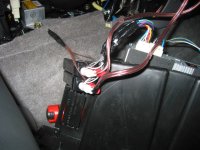
Actually it is pretty easy on this one. You should remove the radio (I think you will have to in order to get to the antenna signal cables). Then you should notice two antenna signal plugs that plug into the radio (one bigger than the other). I believe this is for diversity signal reception. Follow those two cables back about 6 inches and you will see that they combine together inside of a cable cover. You should also notice a third cable that is in that same cover. It will be a black, approx 18-20awg cable with a white, single connector on it. That is the cable going to the antenna amplifier. You will need to get power to this. If there is another connector attached to this, you may need to trace that to the radio and make sure where it is terminating there is power. In either case you can tap into this cable and apply 12v. After doing this the reception should be restored. It was in my 4Runner.

There should be a picture of this in my directions, but it may be a little zoomed in.

Good Luck.

Pete
 
That is tempting, but for $1700? Would it be nicer than the best Garmin or Magellan has to offer?

I have a small Garmin I use on my bicycles and in the cars. Doesn't talk to me or anything, but it works quite well.
 
I emailed you, but perhaps it didn't get to you...How exactly did you hook up an external amp? I am trying to figure out how to get more juice to the rears and maybe power a small sub...Did you create rca line outs? Just curious...I just got the wiring stuff from oem and I will tackle the voice nav and antenna booster project next week sometime...Thanks again for sharing the fruits of your hard work!
Mark
 
SpyderDoc:

For the amp/speakers work, I brought it to a stereo place because they have done this a lot more times than me. I had done too much work on it to screw it up with the amp and speakers. They installed a line unit that converts from a cable to RCA input and that went to the amp. They tapped the signal inputs from the NAV to the amp. Now, the only reason the JBL amp is in the car is for the power inputs, ground, etc. See the pics below that might help.
 
Not sure why the pic didn't get attached.

Here is the pic:
 

Attachments

  • x-35.jpg
    x-35.jpg
    128.5 KB · Views: 19,402
Thanks for the info...I hear ya...I guess it's time to suck it up and bring it in to have someone else do some work on it...
Mark
 
Nice write up! There is one thing that I'm still confused about. Why did you end up putting the JBL amp in the glove box? Isn't there a factory mounting point for it somewhere under the dash?
 
On the '03, like I have, the amp goes in the back of the truck. That wouldn't have worked out well with the 2004 Camry Nav System install from Oemsales.com. I tried to find another place in the dash, but it is real tight in that dash. I didn't want to cause any problems with the passenger airbag either. The '04 might be different.
 
I just installed the OEM unit on a 04. Pete's instructions are exactly right. The amp needs to go in the glove compartment as well...there's no room anywhere else upfront. One thing that is different is that I did not have to supply power to the antenna, the reception is perfect without it!
 
I wonder how your installs differ from a stock 04 runner with factory NAV. Anyone with 04 NAV or the 04 Shop manuals have an idea?
 
petegaz,

This is just what I have been looking for. I want to install the oemvalue in my '03 LTD but have been sceptical as to weather it would look professional when completed. Thanks for the great pictures and copies of the appropriate pages from the Manual to assist those, like myself, that are a bit leery about getting down and dirty.

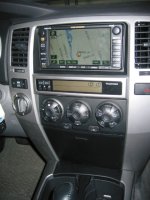
Could you post some pictures of the finished product installed in the dash with the trim on. That would be very helpful and me to see how it looks.

One more question. T4R04LTD asked it but I did not see the response, sorry if I missed it but are you getting the voice directions and do all of the navigation and radio/CD functions operate as they should.

I live in Canada where the Navagation System is not available at this time so I need to be reassured that all functions are working before I make the plunge.

Thanks in advance.
 
With the connection to the speed and reverse sensor made, it functions perfectly. It recalcuates and provides voice navigation.


See pics attached.

Pete
 

Attachments

  • img_4483.jpg
    img_4483.jpg
    118.6 KB · Views: 4,284
I just tried installing a 2004 Camry navigation unit into my 2004 4Runner equiped with the 10speaker JBL stereo...

The connectors look right but doesn't seem to work. Doing some research, I had a buddy from Toyota print off a copy of each wiring diagram.

2004 4Runner with JBL 10 Speaker Diagram

2004 Camry Wiring w/Nav

On the factory headunit (10 speaker) it has 2 extra wires going to the amplifer labeled TX+ and TX-, which I think controls the "surround" sound that the 10 speakers have, which the Camry nav does not. Plus there was no remote lead to turn on the amplifier.

Looking at the Camry diagram I noticed that the outputs can be used as Pre-Outs and tested and successfully used instead of going to the included Camry JBL amp, then converting back from HI-level (speaker output) back down to Low-Level, (thus causing less distrotion) I tested this, and it works fine.... I used a Pheonix Gold PLD (Line Driver) to make the output higher since the stock unit gives out maybe .200V wheras new head units (aftermarket)give 4V, to boost the line level sound. The only thing you lose, "which i found so far", is that you do not get the "Beep" sound when hitting buttons, since you are not connecting the beep wire from the Camry headunit.

After playing with that... Im still undecided if I am going to keep this unit, since I would have to use a seperate external amplifer, and lose the 10 speaker system.

Also! The factory JBL unit does not have a trim bezel, like the ones in the SR5's so you would have to order the silver dash piece to make the unit look good, since there are 1cm spaces around the left and right edges of the unit.


Anyone, have any other ideas?


j0.
 

Members online

Forum statistics

Threads
278,307
Messages
3,554,051
Members
248,016
Latest member
Advally Service

Trending content

Back
Top