How did you mount your iPAD, Nexus 7, other Android Tablet ect? (PICTURES!!!)

BrianSD_42

New member
Hi,

I am wondering how did you all mount your iPAD, Nexus 7, other Android Tablet ect in a 3rd Gen?

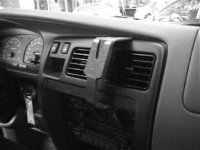
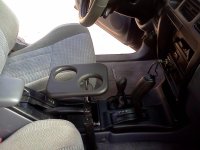
So far I have seen two valid examples. One is how RickAshey did which is using an arm that connects to a seat mount and the other is using a mount from ProClips..

I am really interested on advice and pictures of how it is mounted. Links for purchase / model numbers would be great as well.

The ProClips mounts are expensive but I am considering getting one.
Proclipusa.com ---> *ProClipUsa.com Car Mounts for Mobile Phones, Tablet, and Handheld Devices


Piece #1 ($50)
Google Nexus 7 (Asus) - Holder with Tilt Swivel*-*ProClip Car Mounts for Mobile Phones, Tablet, and Handheld Devices

Piece #2 ($20)
ProClip Center Mount*-*ProClip Car Mounts for Mobile Phones, Tablet, and Handheld Devices


:jump:


This is ABLMs mount.
 

Attachments
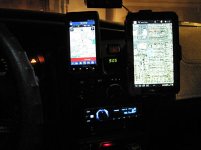
  • proclip1.jpg
    proclip1.jpg
    60.1 KB · Views: 7,550
  • 852399-4.jpg
    852399-4.jpg
    77.2 KB · Views: 8,837
Last edited:
Register to hide this ad
RAM Mounts http://www.rammount.com makes some really nice mounts for just about everything you can think of. I used it for my Garmin GPS and my SPOT locator. I could easily mount a small tablet to it with the right adapters.

DSCN1331.jpg~original


IMG_0859.jpg~original


IMG_0860.jpg~original


Speaking of tablets, I just picked up a Samsung Galaxy Tab 2 (7.0) that i'm going to use for navigation out in the woods. I bought the Backcountry Navigator app for $10, and upgraded to the AccuTerra map set for another $25. I thought about installing a dedicated mount in the 4Runner for it, but I decided against it. I have a pretty good idea where I'm going for the most part, and I will mainly use it to see where side trails/forks in the road go, and where exactly I am on a given trail. I decided to just get a nice leather case for it instead.
 
I have carpeted this and attach my iPad to it with small bungy. swivels and lowers...etc.
 

Attachments

  • IMG_20120903_092632.jpg
    IMG_20120903_092632.jpg
    130.4 KB · Views: 6,917
Do the tablets you guys use have GPS capabilities?

My Nexus 7 doesn't. It can still show me maps, but I lose the navigation and route tracking abilities. Maybe I can use these same apps with my android phone.

I was checking out the "backcountry navigation" one that [MENTION=67615]Dirtco[/MENTION] suggested, seems really useful.
 
Last edited:
Not a 4Runner.... but my buddy made an in-dash setup for the I-pad in his CRV! He still needs to relocate his temp controls... but has a plan for this, and should be done soon!

602034_603018499711687_180251558_n_zps65a1db5d.jpg~original


Turned out pretty sick! He uses his as a Head Unit, and has it hooked up to his subs and amp.
 
I'm pretty sure the N7 has navigation functionality as long as you have WiFi either through a hotspot modem or teathering via 3G/4G.
 
Yeah but with my limited data plan I can't use the mobile hotspot thing very long. I think I'm still gonna get that maps pack though. Just want the summer needs.
 
I know with my Android phone, I can download maps for offline use with the stock Maps app, and I don't need a data connection to navigate or use the maps then. I would think this would also be an option for the Nexus 7, as long as you're on the latest version of Android?

Edit: Although the link that jrm gave up there seems to indicate that you would still need to have connection to start the navigation, so sounds like that backcountry navigation app is probably still your best shot.
 
Last edited:
Do the tablets you guys use have GPS capabilities?

My Nexus 7 doesn't. It can still show me maps, but I lose the navigation and route tracking abilities. Maybe I can use these same apps with my android phone.

I was checking out the "backcountry navigation" one that [MENTION=67615]Dirtco[/MENTION] suggested, seems really useful.


My Samsung Tab 2 10.1 has GPS. I use BCN and cache the maps so I don't need internet in the field.
 
Turns out the nexus 7 does have GPS haha. Score!

I got the back country navigator app and its awesome. Just gotta download the areas I'm going to for offline use.
 
Turns out the nexus 7 does have GPS haha. Score!

I got the back country navigator app and its awesome. Just gotta download the areas I'm going to for offline use.

I thought it did, I looked at the Nexus 7 but I went with the Galaxy Tab 2 because it has a Micro SD card slot for additional memory. The Backcountry Navigator maps take a ton of memory; for Colorado I downloaded a map of (North to South) Steamboat to Canon City, and (East to West) the edge of Denver to just past Glenwood Springs, and it took an entire 32GB Micro SD card. It also took 36 hours to download! That is my core wheeling area, and I have another card that i will use to download smaller maps when I'm in Moab, expedition style trips, etc.

I love my Backcountry Navigator. Tell me about this AccuTerra?

X2. I wanna know what its like..

It's just a different upgraded topo map layout, I like it a lot better than the recommended default map it comes with. It's a lot easier to read and seems to be more detailed. I figured for the price of the BCN app, I could justify upgrading to the AccuTerra map set. I can post a picture of the map if you guys want, just let me know.
 
So do any of you recommend a comparable navigator app for the iPad? Sorry. Kinda a Mac guy and not usually willing to stray.
 

Members online

Forum statistics

Threads
278,316
Messages
3,554,120
Members
248,016
Latest member
Advally Service

Trending content

Back
Top