iPad mounting options?

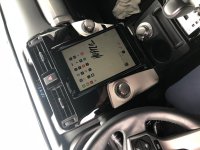
I love my setup, it's rock-solid. It's a Pro-Clip console mount that snaps onto the passenger side of the console, have a 1-inch Ram Mount ball bolted onto it. From the ball is a little Ram Mount arm that holds a Ram Mount EZ-Roll'r iPad cradle. I have a little cradle for my iPad Mini and a bigger one for my iPad Pro.

Neither of them get in my wife's way, and the arm easily pops off the ball for storage. She can easily swivel the iPad to do the navigating as well.

I will say that I prefer the smaller iPad as it stays out of the way of everything a little better.

iPad cradle:
RAM Mount EZ-Roll'r Cradle f/Apple iPad Mini 4

Adjustable connector arm between base and cradle:
Ram Mount Double Socket Arm for 1-Inch Ball Bases RAM-B-201U

Ball-mount on base:
Ram Mount 2 x 1.7 Inches Base with 1-Inch Ball that Contains the Universal AMPs Hole Pattern for the Garmin zumo/TomTom Rider/Urban Rider (Discontinued by Manufacturer)

Base:
ProClip Toyota 4Runner Console Mount - ProClip Console Mount 2010-2018 Toyota 4Runner Item: 834492

Does this get in the way of the transfer case shifter?
 
Does this get in the way of the transfer case shifter?

Yeah, a little bit, but all of the little Ram Mount arms swivel so easily. Kind of a non-issue for me personally. I tend to use the iPad when I'm in 4-lo for the most part. Maybe a longer or additional arm would get it out of the way completely? Just so many options with their parts.
 
Heres my setup
 

Attachments

  • IMG_2826.jpg
    IMG_2826.jpg
    127.9 KB · Views: 2,636
Yeah, a little bit, but all of the little Ram Mount arms swivel so easily. Kind of a non-issue for me personally. I tend to use the iPad when I'm in 4-lo for the most part. Maybe a longer or additional arm would get it out of the way completely? Just so many options with their parts.

I've got a different set up with RAM parts, but it's not as stable as I would like. Do you think that with a longer arm like the RAM-201U-D and 1.5" balls it would still be rock solid? I'd like for it to be higher up.
 
Last edited:
I've got a different set up with RAM parts, but it's not as stable as I would like. Do you think that with a longer arm like the RAM-201U-D and 1.5" balls it would still be rock solid? I'd like for it to be higher up.

Just guessing, but I would imagine it being a little taller would just make the iPad shake a little more. I'm obviously rarely (never?) looking at the iPad while in motion offroad so not sure that would bother me. This is also where the lighter the iPad, the better. Love my Mini for this. My Pro is a little silly.
 
I've got a different set up with RAM parts, but it's not as stable as I would like. Do you think that with a longer arm like the RAM-201U-D and 1.5" balls it would still be rock solid? I'd like for it to be higher up.

Swellrunner has a good youtube video on his setup and he ends up doing a two post mount to make it more stable since he has it a bit higher up.
 
Thanks for all the replies. Sounds like Ram has the best solutions. Turns out my iPad doesn’t have a GPS, so for now the iPhone will be used for navigational purposes.
 
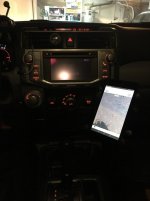
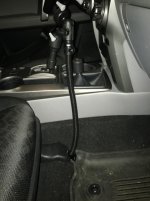
Not an Ipad but this is how my tablet is mounted
 

Attachments

  • thumbnail_56982784595__65A2619E-B31D-4454-8304-BF5FEA710648.jpg
    thumbnail_56982784595__65A2619E-B31D-4454-8304-BF5FEA710648.jpg
    80.6 KB · Views: 2,341
  • thumbnail_56982891017__6A728274-4F93-44AC-A59E-E9C9286FAD58.jpg
    thumbnail_56982891017__6A728274-4F93-44AC-A59E-E9C9286FAD58.jpg
    119.4 KB · Views: 2,383
Which gooseneck is that? How stable do you find it?

I installed it last night so I haven't taken it off road but the few trips around the block it seems relatively stable. If I find I need to stabilize it, I'll figure out a way to secure the aluminium rod to the center kick panel.

Heres a link to amazon but I was lucky enough to find one on ebay for $25 including the 7-8" tablet X-Grip

https://www.amazon.com/dp/B006ZOW1U2/ref=sxbs_sxwds-stvp_1?pf_rd_p=03dd84f0-0dd9-4d32-b6cb-02a32e0ba336&pd_rd_wg=R0Ptg&pf_rd_r=N9XRJJSZYQWWV2P329XA&pd_rd_i=B006ZOW1U2&pd_rd_w=RXMlc&pd_rd_r=91e8ac36-349d-495c-a824-2a542abbdcf1&ie=UTF8&qid=1548203395&sr=1
 
Thanks for all the replies. Sounds like Ram has the best solutions. Turns out my iPad doesn’t have a GPS, so for now the iPhone will be used for navigational purposes.

My Garmin inReach on my windshield in the earlier photo is what I use as my GPS antenna for my iPad. It's also a satellite messaging system that can get me out of a jam if I get into trouble by myself. But there are other antennas out there that can talk to your iPad via Bluetooth as well.

Check this out.
 
My Garmin inReach on my windshield in the earlier photo is what I use as my GPS antenna for my iPad. It's also a satellite messaging system that can get me out of a jam if I get into trouble by myself. But there are other antennas out there that can talk to your iPad via Bluetooth as well.

Check this out.

Interesting...I am getting ready to buy an InReach mini. Sounds like I have some research to do to better understand it's capabilities. What app do you use as a GPS with your iPad?
 
Interesting...I am getting ready to buy an InReach mini. Sounds like I have some research to do to better understand it's capabilities. What app do you use as a GPS with your iPad?

Oh, that's perfect. You're all set then. I use Gaia GPS. Took a while but I got the hang of it. It really paid off for an excursion I did near Lake Tahoe where the trail had really changed from the map but I was able to make my way without too much worry and understand the lay of the land.
 
Oh, that's perfect. You're all set then. I use Gaia GPS. Took a while but I got the hang of it. It really paid off for an excursion I did near Lake Tahoe where the trail had really changed from the map but I was able to make my way without too much worry and understand the lay of the land.

I've got Gaia aslo. I haven't used it much yet. I have the regular $20 version, not sure if I'll upgrade to the premium $40 one.
 
I've got Gaia aslo. I haven't used it much yet. I have the regular $20 version, not sure if I'll upgrade to the premium $40 one.

Yeah, you'll just connect your InReach to your iPad via Bluetooth and Gaia automatically senses the GPS connection. I went ahead and went for the premium version of Gaia last summer because I did this huge trip from Austin to Washington and all the mountains in between, by myself. The extra features were nice to have, but I think I would be fine without them most of the time.
 

Members online

Forum statistics

Threads
278,305
Messages
3,554,043
Members
248,016
Latest member
Advally Service

Trending content

Back
Top