lets see your interior mods

That looks amazing!

Random question. Does your headunit have a setting to automatically turn off the screen after 15-30 seconds of inactivity? My old alpine unit in a previous 4Runner had this feature, which was really convenient for driving at night. The glare from my screen is almost blinding at night (I know you can turn it off manually, but not very user friendly).

Thanks!

Thank you!

The screen doesn't turn off automatically, but it does dim down to your preferred setting when you have your headlights on, then back to full brightness (or your preferred brightness) when you turn the headlights back off. It works great and I've never thought twice about it being any level of distracting at night.

CarPlay now supports Google Maps and Waze as well, which both have automatic night modes that further lessen the glare on long drives requiring navigation.
 
Thank you!

The screen doesn't turn off automatically, but it does dim down to your preferred setting when you have your headlights on, then back to full brightness (or your preferred brightness) when you turn the headlights back off. It works great and I've never thought twice about it being any level of distracting at night.

CarPlay now supports Google Maps and Waze as well, which both have automatic night modes that further lessen the glare on long drives requiring navigation.

That is nice. I like that! I never thought much of upgrading the Entune system until this week. I drove a fully loaded Raptor this week and my perception on features has completely flipped. Having Carplay would be great. Having the maestro system displaying relevant vehicle information would be amazing. Wouldn't need to get that Scangauge II I was thinking about!

If I PM'd you, would you be willing to send the specifics on your system?
 
That is nice. I like that! I never thought much of upgrading the Entune system until this week. I drove a fully loaded Raptor this week and my perception on features has completely flipped. Having Carplay would be great. Having the maestro system displaying relevant vehicle information would be amazing. Wouldn't need to get that Scangauge II I was thinking about!

If I PM'd you, would you be willing to send the specifics on your system?

Or ask here! Some of us may have the same questions. :peep:
 
Right... which is what I was getting at. If you cannot get to your drivers seat, or are being mauled/attacked, why are you going to be able to open your trunk and unhinge your shotgun?

I think it's kinda tacticool, but definitely not for me. And, I say that as a CCW/hunter/gun owner.

Guy why you hate freedom? :rofl:

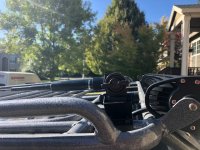
That rack is awesome! I'm getting one.. personally as for the bear? That is what locked 4 lo is for..drive into then over the bear..
 
Or ask here! Some of us may have the same questions. :peep:

Ask and you shall receive!

Thank you!

The screen doesn't turn off automatically, but it does dim down to your preferred setting when you have your headlights on, then back to full brightness (or your preferred brightness) when you turn the headlights back off. It works great and I've never thought twice about it being any level of distracting at night.

CarPlay now supports Google Maps and Waze as well, which both have automatic night modes that further lessen the glare on long drives requiring navigation.

Could you go into more detail on what Pioneer head unit that is along with the Maestro system? I know there are some threads about head units that are compatible with the maestro, but I am so technologically disabled it is kind of sad. At heart I am very far away from being a techy :confused:
 
That is nice. I like that! I never thought much of upgrading the Entune system until this week. I drove a fully loaded Raptor this week and my perception on features has completely flipped. Having Carplay would be great. Having the maestro system displaying relevant vehicle information would be amazing. Wouldn't need to get that Scangauge II I was thinking about!

If I PM'd you, would you be willing to send the specifics on your system?

Or ask here! Some of us may have the same questions. :peep:


I'm using the Pioneer AVH-W4400NEX, which I believe is the only Pioneer unit with wireless Apple CarPlay. I took a chance on this not knowing if the wireless variant would be glitchy or gimmicky, but to my pleasant surprise, it has been 99% problem free. I'm a big fan of Pioneer for their headunits so I didn't try looking at other brands' offerings, but Maestro will outline which headunits will or won't work with their module.

This headunit's screen can tilt to avoid glare from the sun, but with the Scosche dash trim, the mechanism to tilt the screen is blocked. This isn't a problem for me because I don't use CDs or SD cards, whose slots are hidden behind the screen. And in the 4Runner I don't get too much sun glare coming off the screen. Another thing to note id that this unit, using the factory mounting brackets that came off the stock unit, would not fit in the Scosche trim piece opening at first. I had to cut slots in the holes of the factory mounting brackets so that the unit could be set further into the dash. This sounds worse than it really was though.

I opted to use the Maestro iDatalink ADS-MRR interface for the extra features and factory integration. It makes it easy to retain the factory backup camera and steering wheel control functionality. It also allows to you to program different functions to the steering wheel controls such as "long press Vol Down to mute music". This module also allows you to view data such as RPM, voltage, speed, engine load, temps, etc. and will calculate gas mileage. You can also change vehicle settings like you would with the Toyota Techstream, like opening all windows by long pressing unlock on the key fob. Using Maestro's HRN-RR-TO2 harness, everything between the headunit and factory wiring is plug and play. You do not need to cut/splice any factory wiring, just have to solder/crimp connections between the Maestro harness and headunit harness.

Full list of parts in my system (not everything here is necessary just to get CarPlay in your rig):

Pioneer AVH-W4400NEX - Headunit
Maestro iDataLink ADS-MRR - Factory integration module
Maestro HRN-RR-TO2 - Toyota specific integration harness
PAC USB-TY1 - Retains factory USB port functionality (AUX port no longer works though)
Scosche TA2106B - Dash trim piece (got it paint matched at a body shop)
Focal IS 690 TOY - Front door component speakers with dash tweeters
Focal IC 165 TOY - Rear door 2-way speakers
Alpine KTP-445U - 4CH 45w per channel amp for door speakers (went with this as it doesn't require its own separate wiring kit)
Rockford Fosgate P3D4-10 - 10" subwoofer
Alpine MRV-M500 - 500w monoblock amp for the sub
Rockford Fosgate RFK4X - 4ga amp wiring kit
Subwoofer enclosure, custom built

You will need to buy a factory radio antenna harness to retain FM/AM radio but I never listen to radio so I decided not to bother with it. Additionally, this system unfortunately does not use the factory GPS antenna or phone mic, so the new ones provided with the headunit need to be routed through the interior to your desired places. I have the GPS antenna simply loosely sitting behind the radio in the dash with no issues. The phone mic is on my A pillar by the sun visor. Note that these are both required; CarPlay won't use the mic on your phone for calls or voice commands, nor will it use the phone's built in GPS for navigation.


Let me know if you have any follow up questions!

 
I'm using the Pioneer AVH-W4400NEX, which I believe is the only Pioneer unit with wireless Apple CarPlay. I took a chance on this not knowing if the wireless variant would be glitchy or gimmicky, but to my pleasant surprise, it has been 99% problem free. I'm a big fan of Pioneer for their headunits so I didn't try looking at other brands' offerings, but Maestro will outline which headunits will or won't work with their module.

This headunit's screen can tilt to avoid glare from the sun, but with the Scosche dash trim, the mechanism to tilt the screen is blocked. This isn't a problem for me because I don't use CDs or SD cards, whose slots are hidden behind the screen. And in the 4Runner I don't get too much sun glare coming off the screen. Another thing to note id that this unit, using the factory mounting brackets that came off the stock unit, would not fit in the Scosche trim piece opening at first. I had to cut slots in the holes of the factory mounting brackets so that the unit could be set further into the dash. This sounds worse than it really was though.

I opted to use the Maestro iDatalink ADS-MRR interface for the extra features and factory integration. It makes it easy to retain the factory backup camera and steering wheel control functionality. It also allows to you to program different functions to the steering wheel controls such as "long press Vol Down to mute music". This module also allows you to view data such as RPM, voltage, speed, engine load, temps, etc. and will calculate gas mileage. You can also change vehicle settings like you would with the Toyota Techstream, like opening all windows by long pressing unlock on the key fob. Using Maestro's HRN-RR-TO2 harness, everything between the headunit and factory wiring is plug and play. You do not need to cut/splice any factory wiring, just have to solder/crimp connections between the Maestro harness and headunit harness.

Full list of parts in my system (not everything here is necessary just to get CarPlay in your rig):

Pioneer AVH-W4400NEX - Headunit
Maestro iDataLink ADS-MRR - Factory integration module
Maestro HRN-RR-TO2 - Toyota specific integration harness
PAC USB-TY1 - Retains factory USB port functionality (AUX port no longer works though)
Scosche TA2106B - Dash trim piece (got it paint matched at a body shop)
Focal IS 690 TOY - Front door component speakers with dash tweeters
Focal IC 165 TOY - Rear door 2-way speakers
Alpine KTP-445U - 4CH 45w per channel amp for door speakers (went with this as it doesn't require its own separate wiring kit)
Rockford Fosgate P3D4-10 - 10" subwoofer
Alpine MRV-M500 - 500w monoblock amp for the sub
Rockford Fosgate RFK4X - 4ga amp wiring kit
Subwoofer enclosure, custom built

You will need to buy a factory radio antenna harness to retain FM/AM radio but I never listen to radio so I decided not to bother with it. Additionally, this system unfortunately does not use the factory GPS antenna or phone mic, so the new ones provided with the headunit need to be routed through the interior to your desired places. I have the GPS antenna simply loosely sitting behind the radio in the dash with no issues. The phone mic is on my A pillar by the sun visor. Note that these are both required; CarPlay won't use the mic on your phone for calls or voice commands, nor will it use the phone's built in GPS for navigation.


Let me know if you have any follow up questions!

Super in depth, great post. I really appreciate it!
 
I'm using the Pioneer AVH-W4400NEX, which I believe is the only Pioneer unit with wireless Apple CarPlay. I took a chance on this not knowing if the wireless variant would be glitchy or gimmicky, but to my pleasant surprise, it has been 99% problem free. I'm a big fan of Pioneer for their headunits so I didn't try looking at other brands' offerings, but Maestro will outline which headunits will or won't work with their module.

This headunit's screen can tilt to avoid glare from the sun, but with the Scosche dash trim, the mechanism to tilt the screen is blocked. This isn't a problem for me because I don't use CDs or SD cards, whose slots are hidden behind the screen. And in the 4Runner I don't get too much sun glare coming off the screen. Another thing to note id that this unit, using the factory mounting brackets that came off the stock unit, would not fit in the Scosche trim piece opening at first. I had to cut slots in the holes of the factory mounting brackets so that the unit could be set further into the dash. This sounds worse than it really was though.

I opted to use the Maestro iDatalink ADS-MRR interface for the extra features and factory integration. It makes it easy to retain the factory backup camera and steering wheel control functionality. It also allows to you to program different functions to the steering wheel controls such as "long press Vol Down to mute music". This module also allows you to view data such as RPM, voltage, speed, engine load, temps, etc. and will calculate gas mileage. You can also change vehicle settings like you would with the Toyota Techstream, like opening all windows by long pressing unlock on the key fob. Using Maestro's HRN-RR-TO2 harness, everything between the headunit and factory wiring is plug and play. You do not need to cut/splice any factory wiring, just have to solder/crimp connections between the Maestro harness and headunit harness.

Full list of parts in my system (not everything here is necessary just to get CarPlay in your rig):

Pioneer AVH-W4400NEX - Headunit
Maestro iDataLink ADS-MRR - Factory integration module
Maestro HRN-RR-TO2 - Toyota specific integration harness
PAC USB-TY1 - Retains factory USB port functionality (AUX port no longer works though)
Scosche TA2106B - Dash trim piece (got it paint matched at a body shop)
Focal IS 690 TOY - Front door component speakers with dash tweeters
Focal IC 165 TOY - Rear door 2-way speakers
Alpine KTP-445U - 4CH 45w per channel amp for door speakers (went with this as it doesn't require its own separate wiring kit)
Rockford Fosgate P3D4-10 - 10" subwoofer
Alpine MRV-M500 - 500w monoblock amp for the sub
Rockford Fosgate RFK4X - 4ga amp wiring kit
Subwoofer enclosure, custom built

You will need to buy a factory radio antenna harness to retain FM/AM radio but I never listen to radio so I decided not to bother with it. Additionally, this system unfortunately does not use the factory GPS antenna or phone mic, so the new ones provided with the headunit need to be routed through the interior to your desired places. I have the GPS antenna simply loosely sitting behind the radio in the dash with no issues. The phone mic is on my A pillar by the sun visor. Note that these are both required; CarPlay won't use the mic on your phone for calls or voice commands, nor will it use the phone's built in GPS for navigation.


Let me know if you have any follow up questions!
I was looking at the head unit on Crutchfield and the video review states that the 4400 doesn't have built in Nav and you use your phone for Navigation. Is that true with yours? The 6400 and 8400 will have built in Navigation.
 
I was looking at the head unit on Crutchfield and the video review states that the 4400 doesn't have built in Nav and you use your phone for Navigation. Is that true with yours? The 6400 and 8400 will have built in Navigation.

That is correct. That's okay with me though as I prefer to use Google Maps or Waze which works through CarPlay only. I believe the map service on the 6400 and 8400 is called Here.

And after looking into this I saw that I was incorrect earlier -- it seems as though the 6400 and 8400 also offer wireless CarPlay (not just the 4400).
 
That is correct. That's okay with me though as I prefer to use Google Maps or Waze which works through CarPlay only. I believe the map service on the 6400 and 8400 is called Here.

And after looking into this I saw that I was incorrect earlier -- it seems as though the 6400 and 8400 also offer wireless CarPlay (not just the 4400).
Good to know Chris..Thank you for sharing. Looks like a killer setup. Would you have done anything different?
 
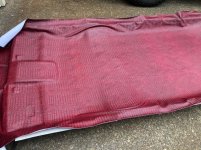
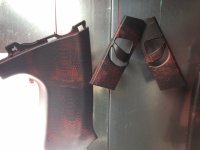
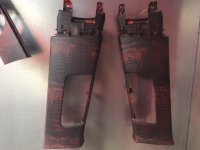
Im working on getting rid of the ugly tan interior pieces. Hydro Dipping the plastics and wrapping the headliner in some alligator skin.

these pics of the hydro dip without clear coat on them yet
 

Attachments

  • fabric layed 1.jpg
    fabric layed 1.jpg
    67.8 KB · Views: 5,500
  • rear pieces1.JPG
    rear pieces1.JPG
    87.8 KB · Views: 5,454
  • rear pieces2.JPG
    rear pieces2.JPG
    102.5 KB · Views: 5,477
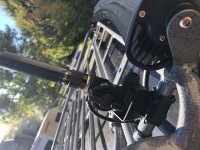
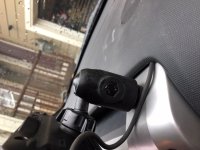
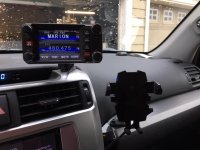
And here is my HAM radio install on dash. and also my antenna which I mounted on a diamond mount that has a pivot to lay it over when I need to in the car wash or whatever.
 

Attachments

  • mount down.jpg
    mount down.jpg
    109.7 KB · Views: 5,454
  • mount up.jpg
    mount up.jpg
    100.9 KB · Views: 5,448
  • haminstall1.JPG
    haminstall1.JPG
    101.1 KB · Views: 5,447
  • haminstall2.JPG
    haminstall2.JPG
    103.9 KB · Views: 5,498
are you a pimp? i'm dying. but seriously, that is so effing gross its awesome! i love it! and, so much work too! just know, you will never sell it, lol.
 
Hacked the front and rear cubby holes to be a wee bit more functional.

f9jQEYih.jpg


UxBV4xHh.jpg
Very impressive. What is the purpose for the water tank? Also, where is it located? Love the setup you have. A lot of wiring and hard work. Do you happen to have any write ups on your work?
Again great job!!!
 
are you a pimp? i'm dying. but seriously, that is so effing gross its awesome! i love it! and, so much work too! just know, you will never sell it, lol.

I think paying for a black leather interior and getting half of it as TAN is gross LOL When people see it in person they are amazed how good it looks and want to do something like it themselves. Cant wait to get the plastics finished up.
 

Members online

Forum statistics

Threads
278,309
Messages
3,554,071
Members
248,016
Latest member
Advally Service

Trending content

Back
Top