Low profile XM (shark fin) antenna swap

Yes I now have a small crease up there but wtf ! Not looking up there a lot when I'm driving ! Might bug me when sleeping back there but again my eyes will be closed !!

 
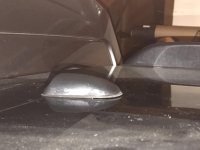
I just finished this swap today. Definitely would be easier with slim spaghetti arms, but I was able to do it without creasing my headliner.

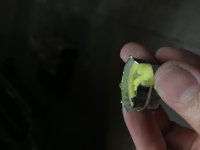
I got my antenna used off eBay, and it had a metal post I had to dremel off. It doesn't plug back into the original plug, but I never use xm anyway.

My question is tho, after I screwed it all the way down, I noticed there's a gap in the front. I poured water to see if it would leak and it didn't but it doesn't sit well with me long term. Anyone else have this issue?
 

Attachments

  • IMG_3445.jpg
    IMG_3445.jpg
    129.3 KB · Views: 1,289
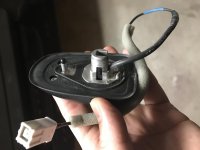
Here's a look at the underside. There is an inner o-ring but I'd still feel better if it sealed better and sat flush.
 

Attachments

  • IMG_3438.jpg
    IMG_3438.jpg
    113.7 KB · Views: 1,320
I just finished this swap today. Definitely would be easier with slim spaghetti arms, but I was able to do it without creasing my headliner.

I got my antenna used off eBay, and it had a metal post I had to dremel off. It doesn't plug back into the original plug, but I never use xm anyway.

My question is tho, after I screwed it all the way down, I noticed there's a gap in the front. I poured water to see if it would leak and it didn't but it doesn't sit well with me long term. Anyone else have this issue?


Mine sits flush all the way around. I would probably try to loosen it up, and mov it around some to see if you can't get it sit flush.
 
Mine sits flush all the way around. I would probably try to loosen it up, and mov it around some to see if you can't get it sit flush.

So I took it all apart again. I thought it might be the little post I dremeled down might not be ground down enough. So I ground it down to non existence. I tried remounting the antenna and there is still a gap.

Did you guys use the bolt that came with the new antenna? It doesn't seem to sit well because of those raise bumps around the ring. What did you guys do? Thanks.
 

Attachments

  • IMG_3446.jpg
    IMG_3446.jpg
    109.2 KB · Views: 1,154
I don't think it is the nut, the one I took off mine looks the same.

Is the base plate for the antenna bent ?

Well, after trying to mount it forward, back, left, right, jiggling it side to side etc and it still having the gap, I finally cursed at it and threatened to super glue it and some how it mounted flush.....

I think what it is, is first the antenna needs to be moved all the way forward. Second, the issue with the nut is its diameter is only a few mm wider than the rectangular hole. So you need to get it perfectly centered from underneath AND those 4 bumps on the nut need to all align outside of the rectangular hole to grip onto the roof metal.

I guess I finally got them all to align somehow. Hope this helps anyone in the future who attempts this mod.
 
I have a 2010 4runner with the crappy XM reception that started about 2 years ago. I'm thinking something electronic in there probably iodized or got corroded.

I found this 10-11 Camry XM antenna on ebay but it doesn't have a picture of any of it so I can't tell whether this will work or not.
 
The XM in my 2010 stopped working about 6 months ago, with a "no signal" on the display. After a 20 minute conversation with XM and multiple refresh signals sent, it was determined to be hardware related. I found this thread on a Prius forum - https://priuschat.com/threads/siriusxm-radio-stopped-working-no-signal.157464/

It looks like the same antenna to me, and if you scroll down to halfway, the problem appears to be corrosion due to moisture intrusion. I haven't replaced mine yet.
 
Replaced my shark fin antenna with a flat Camry one. Problem solved. XM now works in dense forest, under bridges, etc. Works better than the shark fin ever did. Here are my details.

I have a 2010 4runner Trail non-KDSS without nav, JBL, or SOS.

I have had an XM subscription on the T4R since day 1. The shark fin antenna worked reasonably well, especially around my normal stomping grounds. It would fail in and out of forests like in Eureka, CA or in Yosemite National Park, but wasn't awful. However, beginning in 2015, it slowly degraded in quality. Lots of fuzzing in and out at normal driving places where it had long worked. By 2016 it was getting hard to listen to anything because signal would drop and static every 30 seconds or so. By January 2017, I realized I could only listen to XM radio if I was driving due South, or sometimes West. It never worked driving North and was intolerable driving East.

Last month, based on this thread, I sucked it up and ordered part number 86960-33010-B1 from Lakeland Toyota for $61.16. This is the Camry antenna, color matched to my dark metallic gray 4runner. The last two in the part code tell you color.

I installed it after receiving it. It works. Completely fixed all signal problems and works amazingly well. Opened the shark fin up and the flat satellite antenna chip inside it had a black grime/dust all over it. Not sure whether that was the cause of the problem or not, but it was completely oxidized. The thing isn't sealed from water or moisture.

Steps:
1) Remove the three headliner clips along top rear of headliner near tail gate.
2) Loosen and partially remove the two rear pillar trim pieces.
3) Remove the coat hooks on either side of headliner in rear cargo area.
4) Gently drop down the headliner, being careful not to crease headliner.
5) Unclip satellite antenna now exposed beneath the headliner.
6) Use a 22mm socket to loosen and remove nut holding shark fin to truck roof.
7) Lift out the unattached shark fin from top of roof (outside of roof).
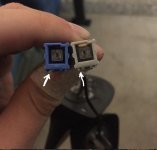
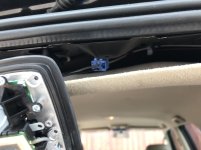
8) Mine had blue square connector. Replacement flat Camry antenna has very similar gray square connector, but not a perfect match. See photo. That tiny difference prevents you from being able to connect the Camry antenna to the 4runner wire. So just swap the connectors.
9) Swap connectors. Very easy to do. Gently pry up white plastic piece from top, removing completely. Then slide tiny flathead screwdriver into square boxy piece and lift tongue. With tongue lifted, slide wire out of it, being careful not to slash finger/thumb on metal blades. (I did. It bled. A lot. And hurt.)
10) Follow same procedure and reverse it to move blue square connector to the new replacement flat Camry antenna.
11) Install on roof by threading through and tightening 22mm threaded hex nut up against roof.
12) Insert blue square connector into wire beneath headliner.
13) Gently push headliner back into place.
14) Reattach coat hooks and rear pillar trim pieces.
15) Enjoy a working satellite reception for first time in years.

Also, I have monkey arms forearms as big as calves. (too much lifting) I definitely creased my headliner, but it disappeared for some reason.

Thanks to [MENTION=19984]simple[/MENTION] for photo I borrowed and drew on.
 

Attachments

  • Screen Shot 2017-06-07 at 2.46.53 PM.jpg
    Screen Shot 2017-06-07 at 2.46.53 PM.jpg
    96.3 KB · Views: 5,122
  • IMG_4228.jpg
    IMG_4228.jpg
    59.2 KB · Views: 4,140
  • IMG_4229.jpg
    IMG_4229.jpg
    57.9 KB · Views: 4,226
I removed the sharkfin from my 2017 today and thought I'd upload some clearer pictures of the connectors in case someone recognizes a low-profile replacement.

wSR3iJQl.jpg

pT1hswIl.jpg

lLA28GVl.jpg

co4kYQKl.jpg
 
Replaced my shark fin antenna with a flat Camry one. Problem solved. XM now works in dense forest, under bridges, etc. Works better than the shark fin ever did. Here are my details.

I have a 2010 4runner Trail non-KDSS without nav, JBL, or SOS.

I have had an XM subscription on the T4R since day 1. The shark fin antenna worked reasonably well, especially around my normal stomping grounds. It would fail in and out of forests like in Eureka, CA or in Yosemite National Park, but wasn't awful. However, beginning in 2015, it slowly degraded in quality. Lots of fuzzing in and out at normal driving places where it had long worked. By 2016 it was getting hard to listen to anything because signal would drop and static every 30 seconds or so. By January 2017, I realized I could only listen to XM radio if I was driving due South, or sometimes West. It never worked driving North and was intolerable driving East.

Last month, based on this thread, I sucked it up and ordered part number 86960-33010-B1 from Lakeland Toyota for $61.16. This is the Camry antenna, color matched to my dark metallic gray 4runner. The last two in the part code tell you color.

I installed it after receiving it. It works. Completely fixed all signal problems and works amazingly well. Opened the shark fin up and the flat satellite antenna chip inside it had a black grime/dust all over it. Not sure whether that was the cause of the problem or not, but it was completely oxidized. The thing isn't sealed from water or moisture.

Steps:
1) Remove the three headliner clips along top rear of headliner near tail gate.
2) Loosen and partially remove the two rear pillar trim pieces.
3) Remove the coat hooks on either side of headliner in rear cargo area.
4) Gently drop down the headliner, being careful not to crease headliner.
5) Unclip satellite antenna now exposed beneath the headliner.
6) Use a 22mm socket to loosen and remove nut holding shark fin to truck roof.
7) Lift out the unattached shark fin from top of roof (outside of roof).
8) Mine had blue square connector. Replacement flat Camry antenna has very similar gray square connector, but not a perfect match. See photo. That tiny difference prevents you from being able to connect the Camry antenna to the 4runner wire. So just swap the connectors.
9) Swap connectors. Very easy to do. Gently pry up white plastic piece from top, removing completely. Then slide tiny flathead screwdriver into square boxy piece and lift tongue. With tongue lifted, slide wire out of it, being careful not to slash finger/thumb on metal blades. (I did. It bled. A lot. And hurt.)
10) Follow same procedure and reverse it to move blue square connector to the new replacement flat Camry antenna.
11) Install on roof by threading through and tightening 22mm threaded hex nut up against roof.
12) Insert blue square connector into wire beneath headliner.
13) Gently push headliner back into place.
14) Reattach coat hooks and rear pillar trim pieces.
15) Enjoy a working satellite reception for first time in years.

Also, I have monkey arms forearms as big as calves. (too much lifting) I definitely creased my headliner, but it disappeared for some reason.

Thanks to [MENTION=19984]simple[/MENTION] for photo I borrowed and drew on.

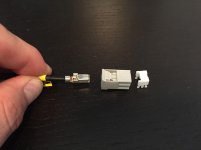
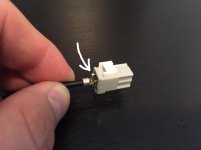
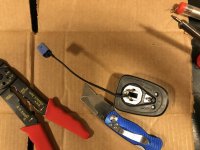
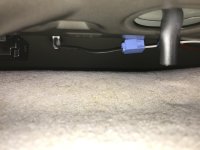
Awesome write up, just a note to those attempting this. Remove your antenna to find out what connectors you have. I didn't and ended up having to remove the connector from the old antenna and connecting it to the new one that I bought. It was not too hard but I might have been able to just buy one that is a direct connection. (I have a 2010 SR5, so the extra stuff in the antenna was not connected to any wires in the car)

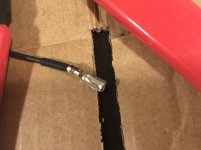
See the attached pictures for some explanation, I was too lazy to cut and completely re-crimp the adapter so I just soldered the wire in the middle to the old middle adapter.

But it worked, hopefully my haphazard job holds up.
 

Attachments

  • IMG_1339.jpg
    IMG_1339.jpg
    119.3 KB · Views: 3,914
  • IMG_1341.jpg
    IMG_1341.jpg
    131.2 KB · Views: 3,489
  • IMG_1342.jpg
    IMG_1342.jpg
    127.3 KB · Views: 3,840
  • IMG_0217.jpg
    IMG_0217.jpg
    130.7 KB · Views: 3,417
  • IMG_1343.jpg
    IMG_1343.jpg
    133.5 KB · Views: 3,458
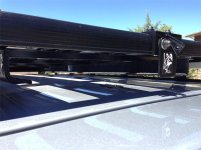
:wave: Hey man! I bought a low-profile roof rack that interferes with it. I think I'm going to have to do this ghetto mod if I can't find a replacement.

Did someone document that "ghetto" mod in a how-to? I might choose to do something similar unless there's a low-profile alternative antenna for a 2016 4Runner. I'm ready to install my k9 rack and I want to leave room for the table tray as a future upgrade.
 

Members online

Forum statistics

Threads
278,316
Messages
3,554,120
Members
248,016
Latest member
Advally Service

Trending content

Back
Top