
You are using an out of date browser. It may not display this or other websites correctly.
You should upgrade or use an alternative browser.
You should upgrade or use an alternative browser.
Photobucket Update
- Thread starter 99 sr5 highlander
- Start date

BrianSD_42
New member
Step 1: Use the internet archive wayback tool to open your thread, pre-disaster.
Example: https://web.archive.org/web/2017071...ads-superflow-mv-50-air-compressor-build.html
Step 2: Download each picture sorted in a local HDD folder /thread/Post_1
Example: you would have a folder with each picture, saved by number 1-20 pics in the order from the top in a single folder. So I have a sub folder /1/ with ALL the pics from OPs Post1 and so on. Then /2/ for 2nd post in same thread.
Step 3: Go to the current thread, click quote on your first post, copy into a good text editor like Notepad++ and then edit.
Step 4: Remove the QUOTE and /QUOTE from this edited test
Step 5: For each IMG link that is broken put a number (eg 5.) on a new line above the broken link. Save your text. Repeat for all pics in this single post (assuming one thread has multiple critical posts with pics)
Step 6. Now upload those pics to IMGUR. Using Chrome login to your free account. Click new album. Name it. Select public. Click save and close the window. Then click the album, add pics, selecting multiple starting from most right to left (preserves order). The pics will upload.
Step 7. Review the pics once uploaded. Click the small icon to drop down a menu that says Get Sharable Links, then click and copy the IMG box for forums.
Step 8. Go back in the text editor and replace each pic with the new shared link.
It is easy to do this fast and without mistake since you added the numbers into the text (described above) and you also numbered the pics matching on your HDD.
Once the text has been fixed simply replace the original and have a beer.
:wow:
Example: https://web.archive.org/web/2017071...ads-superflow-mv-50-air-compressor-build.html
Step 2: Download each picture sorted in a local HDD folder /thread/Post_1
Example: you would have a folder with each picture, saved by number 1-20 pics in the order from the top in a single folder. So I have a sub folder /1/ with ALL the pics from OPs Post1 and so on. Then /2/ for 2nd post in same thread.
Step 3: Go to the current thread, click quote on your first post, copy into a good text editor like Notepad++ and then edit.
Step 4: Remove the QUOTE and /QUOTE from this edited test
Step 5: For each IMG link that is broken put a number (eg 5.) on a new line above the broken link. Save your text. Repeat for all pics in this single post (assuming one thread has multiple critical posts with pics)
Step 6. Now upload those pics to IMGUR. Using Chrome login to your free account. Click new album. Name it. Select public. Click save and close the window. Then click the album, add pics, selecting multiple starting from most right to left (preserves order). The pics will upload.
Step 7. Review the pics once uploaded. Click the small icon to drop down a menu that says Get Sharable Links, then click and copy the IMG box for forums.
Step 8. Go back in the text editor and replace each pic with the new shared link.
It is easy to do this fast and without mistake since you added the numbers into the text (described above) and you also numbered the pics matching on your HDD.
Once the text has been fixed simply replace the original and have a beer.
:wow:

GangsterOfLove
New member
I just tried Flickr as well and I have the same issue.
Imgur is an annoying app that I don't like using, so that's out too. Need to find something as simple as Photobucket but without the bullshit. Sigh...f***in Photobucket...
I've switched to Postimg.io. Postimg.org is the same site.
The interface is similar to Photobucket but much faster and without the ads. Once you sign up (free) you can arrange things in albums (Galleries) like you did in Photobucket. There's an automatic resize feature as well, but I have not tried it yet.
[edit] Correction - I turned off AdBlock and it does have ads. Two of them, small and not annoying. They don't move, yell, block content or jump around, and they are in the same colors as the rest of the site. I'm going to leave AdBlock turned off for that site, hoping they can make enough $ to survive. I might even buy something.
Last edited:

Oneluv13T4R
New member
Why don't you guys just use google drive..it's what I've always used and it's not gonna go anywhere.
.I've never used any of this PB, flickr,imur etc etc
.I've never used any of this PB, flickr,imur etc etc

StreetCreeper
New member
I've switched to Postimg.io. Postimg.org is the same site.
The interface is similar to Photobucket but much faster and without the ads. Once you sign up (free) you can arrange things in albums (Galleries) like you did in Photobucket. There's an automatic resize feature as well, but I have not tried it yet.
[edit] Correction - I turned off AdBlock and it does have ads. Two of them, small and not annoying. They don't move, yell, block content or jump around, and they are in the same colors as the rest of the site. I'm going to leave AdBlock turned off for that site, hoping they can make enough $ to survive. I might even buy something.
Initial test of postimg.org
Uploaded from Android phone and easily found link. I used the "direct link" and first hit the little square yellow icon with the mountain on it in the forum advanced editor then pasted the URL there.
Didn't open an account yet. So far I like it. I'll see how it is with my iPhone and computer later.


BigFishAllDay
New member
Did anyone notice that Photobucket put out an "official statement" regarding this mess? It helps to explain why some peoples images are still working while others aren't. Note the section about people who had been paying for premium accounts retaining 3rd party hosting rights through 12/31/2018 provided they keep paying their subscription fee.
PHOTOBUCKET LAUNCHES UNLIMITED 3RD PARTY HOSTING PLAN
Posted by Photobucket Press+ on Jul 6, 2017 in Press Releases | No Comments
Denver, Colorado (July 6, 2017) One of the world’s leading photo storage and hosting sites has begun notifying its largest commercial scale users that it will now offer an unlimited third party hosting subscription plan.
John Corpus, CEO of Photobucket, said that historically the company “relied heavily on advertising revenue but that major industry-wide changes in the advertising space have greatly impacted Photobucket, including the rise of ad blockers and the Company’s explosion of 3rd party hosting that generates zero revenue.”
“This model is no longer sustainable,” Corpus added.
Corpus noted that seventy-five percent of Photobucket’s costs originate from non-paying users leveraging 3rd party hosting. The majority of the industry has either eliminated 3rd party hosting or imposed variable pricing based on consumption. To address the market, Photobucket has added unlimited hosting to its Plus 500 Subscription plan at a competitive fixed price.
Photobucket modified its Terms of Use in the second quarter of 2017. The Company began notifying non-paying users through email and on-site messaging that the Plus 500 plan offers 3rd Party Hosting for both commercial and personal use requiring no development or technical experience. Photobucket users who elect not to subscribe to the Plus 500 plan are always able to access all of their photos and migrate to alternative solutions if they so desire.
In Photobucket’s 14-year history, the Company has amassed over 100 million registered users, over 15 billion images stored, with 2 million daily uploads and 60 billion photos accessed monthly.
“With all the photos stored and shared, nearly everyone interacts with a Photobucket hosted image on at least one page across the web over a sixty-day period, putting the photo hosting service as a significant part of the internet,” Corpus said.
Corpus said that “initial results for the Company are positive. This path to a more sustainable business model allows us to develop an even more robust product to meet our customers’ needs.”
“We are grateful for our customers’ continued support,” he added.
Please review the latest changes at Photobucket.
Posted by Photobucket Support+ on Jul 6, 2017 in Uncategorized | No Comments
1. Why Photobucket?
Photobucket is the global destination for linking and 3rd party hosting. In
Photobucket’s 14-year history, the Company amassed over 100 million
registered users, over 15 billion images stored, 2 million daily uploads
and 60 billion photos accessed monthly.
2. What is 3rd Party Hosting?
Photobucket defines 3rd party hosting as the action of embedding an image
or photo onto another website. For example, using the <img> tag to
embed or display a JPEG image from your Photobucket account on another
website such as a forum, auction listings, blog, etc.*
3. Benefits of Photobucket’s 3rd Party Hosting
Easy to Use – Upload a photo from any device and copy the embed code with
one click to host a photo with no development or technical knowledge
required
Competitive, fixed pricing
Offers the only unlimited 3rd party hosting plan (Commercial and Personal
Use)
3rd Party Hosting Specifics
1. What plans offer 3rd Party Hosting?
Only the Plus 500 plan supports 3rd Party Hosting
2. What do I get with the Plus 500 Plan?
Unlimited 3rd Party Hosting
Unlimited Bandwidth
Full Resolution Photo Storage (We do not compress your images)
High Capacity Storage
Dedicated and Priority Customer Support
Photobucket.com Promotional Opportunities
3. What users are affected by the changes to our 3rd Party Hosting
policies?
Moving forward, new and legacy free account users will NOT have third party
hosting available.
If you were a Plus Account subscriber in good standing as of June 1, 2017,
you will continue to have all the privileges you have enjoyed including 3rd
Party Hosting until December 31, 2018 as long as you maintain your
subscription.
Non Plus 500 Account subscribers that purchased after June 1, 2017 will not
have access to 3rd Party Hosting.
4. Are my pictures still safe?
Yes! All your photos are still available by logging into your Photobucket
Account. Photobucket has only restricted the ability to view your photos on
3rd party sites.
5. Can I download my Photos?
Absolutely, at any time. It is an easy four step process:
Step 1. Login to your Photobucket Account
Step 2. Navigate to your library page
Step 3. View a photo and click the download button
Step 4. The picture will be saved to your computer
Last edited:

JohnTheLuck
Member
Why don't you guys just use google drive..it's what I've always used and it's not gonna go anywhere.
.I've never used any of this PB, flickr,imur etc etc
How do you get a sharable link from Google Drive to an image and not a full album?

Ray Dunakin
Senior Member
The cloud? understand convenience at the forefront but I'll keep my TB hard drives...
You can upload photos to Google Drive and still keep your own copies on your own hard drives.

greatape
Senior Member
You can upload photos to Google Drive and still keep your own copies on your own hard drives.
For sure,,,
Oneluv13T4R
New member
You can upload photos to Google Drive and still keep your own copies on your own hard drives.
Exactly...simplicity.
Oneluv13T4R
New member
how do you get a sharable link from google drive to an image and not a full album?
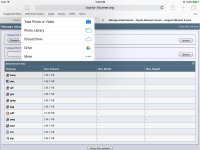

If you have google drive installed then the forum site picks it up and is added as a choice to be selected when wanting to upload a pic or file then once you select drive it will bring up your files then you select a file then (above) you can pic whatever pic you want as a single or multiples (up to 8) pics. You can also change any of your pics to a jpeg, jpg, PDF etc etc.
So theres no need for sharing a whole file or sharing at all. You can use drive just like you would your photo gallery built in your system. But it does so much more.
And when you open a new google drive account they give you 115 gb of free storage and if you open a google photos account they give you another 115 gb for free and these two google apps share with each other anything you do in one can be seen and used on the other but doesnt affect your space from one to the other. So thats over 200 gb of new space right out the gate. And if you need more space its super cheap cheap.
Attachments


Last edited:
JohnTheLuck
Member
If you have google drive installed then the forum site picks it up and is added as a choice to be selected when wanting to upload a pic or file then once you select drive it will bring up your files then you select a file then (above) you can pic whatever pic you want as a single or multiples (up to 8) pics. You can also change any of your pics to a jpeg, jpg, PDF etc etc.
So theres no need for sharing a whole file or sharing at all. You can use drive just like you would your photo gallery built in your system. But it does so much more.
And when you open a new google drive account they give you 115 gb of free storage and if you open a google photos account they give you another 115 gb for free and these two google apps share with each other anything you do in one can be seen and used on the other but doesnt affect your space from one to the other. So thats over 200 gb of new space right out the gate. And if you need more space its super cheap cheap.
I don't think what you describe is a sharable link; it is an attachment to a forum post from an image in your Google Drive. When publishing your post, the image will resides on toyota-4Runner.org server and not from Google Drive. This is not what I want. I don't like attachment because of the constraints with multiple images in a single post, and their size restriction.
BrianSD_42
New member
[MENTION=117408]Oneluv13T4R[/MENTION]
I also am doubtful that is a shareable link. My understanding is Google doesn't support this feature.
Can you post a thread link where you did this?
Thanks
I also am doubtful that is a shareable link. My understanding is Google doesn't support this feature.
Can you post a thread link where you did this?
Thanks

theoutbackdream
New member
You're on an Apple device so it allows you to "share" your photos from different clouds, like Google drive, iCloud, etc., and act as if the image is stored on your device locally, since you pay a pretty penny for not a whole lot of storage. You're only uploading the image from your cloud to t4r's server.

nevada
Senior Member
I found this on another site. maybe it will work...
I was also obviously affected by this PB charade but I've found a way to restore the appearance of PB image links on the web so I am posting it here too.
All you have to do is paste ~original between jpg and IMG at the last part of the PB link:
Image not visible:
Image fixed:

The same Code but with ~original added between jpg and the IMG...

BigFishAllDay
New member
I found this on another site. maybe it will work...
Nice find, Nevada. I just tried it and it works. I wonder how long it will be before PB gets wise.
EDIT:
I'm not sure if anyone following is a member on TacomaWorld, but their forum admin has figured out a fix that repaired EVERY image on that forum. My Tacoma build has been completely restored.
Follow along here > https://www.tacomaworld.com/threads...y-hosting-we-cant-see-your-pics.498692/page-4
Last edited:
Nice find, Nevada. I just tried it and it works. I wonder how long it will be before PB gets wise.
EDIT:
I'm not sure if anyone following is a member on TacomaWorld, but their forum admin has figured out a fix that repaired EVERY image on that forum. My Tacoma build has been completely restored.
Follow along here > https://www.tacomaworld.com/threads...y-hosting-we-cant-see-your-pics.498692/page-4
Everybody needs to petition this guy to work his magic on our site. The whole tacoma world forum is fixed.
Ray Dunakin
Senior Member
I'm betting that's just a temporary fix. As soon as PB gets wise to it, they'll block it.
Similar threads


- Replies
- 31
- Views
- 8K


- Replies
- 15
- Views
- 4K
