Plug and Play Rear Camera Override Dongle

Also, what are people using for front cameras? I bought a camera off amazon works fine, BUT.. Image is mirrored... left is right and right is left..... ordered a non-mirrored camera to swap out....

I first bought THIS ONE and it works great. It has a little green wire that you snip to stop the mirroring so it can be used as a front facing camera. You can also snip the white wire to remove the guide lines.


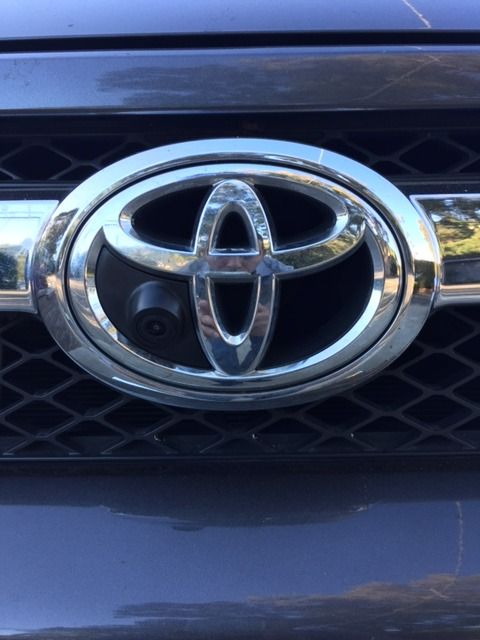
I just ordered THIS ONE as I plan to fit it within the Toyota emblem on my front grill. Got the idea from NoONeBetter.

25815187634_377a61498d_b.jpg
 
Update: Saker was right about the polarity on the rear camera switch, but my front camera issue still continues. Double checked all my wires again. Red is going to camera, green is connected to add-a-fuse ignition, black is to stick groundand blue to illumination. Even without the blue connected, top light still comes on. And I know that my wires are correct , because reversing the wires doesn't power the camera.

So you are using a switch to activate the front camera, is that right? If so, why don't you eliminate the switch and run the camera all the time like Brian suggests in a few pages back. You have a add-a-fuse to the ignition and the camera will only be on when the ignition is hot. The rear camera is always on too.
 
Last edited:
So you are using a switch to activate the front camera, is that right? If so, why don't you eliminate the switch and run the camera all the time like Brian suggests in a few pages back. You have a add-a-fuse to the ignition and the camera will only be on when the ignition is hot. The rear camera is always on too.

Yea. I may run it like that...had the switch ordered, and had the opening, so thought about using it...
 
[MENTION=129513]bjohnston115[/MENTION] [MENTION=103267]Saker[/MENTION].. [MENTION=128325]cutty01[/MENTION] anyone...

Came upon a small glitch. Got my new front camera in.. With this new camera, a direct connection will work, but if I plug it into the splitter, it won't show up?

Any ideas?

Long explanation.

I had another front camera which would show up via the 4-camera switch, but that camera was mirrored. Got a new non-mirrored camera but that one will not show up if connected to the switch. Will work fine if connected directly to the radio screen. Ideas?

The new camera came with a red wire attached on both ends of the video cable. The old camera did not. As I have been reading, that should't be needed, cause that acts like a trigger for some HU to switch to the camera.
 
[MENTION=129513]bjohnston115[/MENTION] [MENTION=103267]Saker[/MENTION].. [MENTION=128325]cutty01[/MENTION] anyone...

Came upon a small glitch. Got my new front camera in.. With this new camera, a direct connection will work, but if I plug it into the splitter, it won't show up?
Any ideas?


So the override dongle works but as soon as you add the auxiliary input dongle, neither front or rear camera show on the screen? If that's the case, check the video connectors on the auxiliary input dongle - mine weren't soldered well.


Sent from my iPad using Tapatalk
 
So the override dongle works but as soon as you add the auxiliary input dongle, neither front or rear camera show on the screen? If that's the case, check the video connectors on the auxiliary input dongle - mine weren't soldered well.


Sent from my iPad using Tapatalk

Rear camera shows up fine.
Other camera (mirrored image) shows fine
New camera only works direct connection but not into the 4 channel splitter....

I'm kinda dumbfounded.... even played around with those power wires on the RCA cable, nothing.. will run down to radio shack tomorrow morning and try grabbing a 2 channel selector box. See if that works.

Knowing very little about RCA cable, it's almost like the signal being put out by the camera is enough to be picked up by the HU (direct connection), but once it gets plugged into the 4-channel (electronic) switcher, the signal is lost.
 
Okay sorry I have been away... It sounds like there may be a couple of issues here.

Update: Saker was right about the polarity on the rear camera switch, but my front camera issue still continues. Double checked all my wires again. Red is going to camera, green is connected to add-a-fuse ignition, black is to stick groundand blue to illumination. Even without the blue connected, top light still comes on. And I know that my wires are correct , because reversing the wires doesn't power the camera.

Also, what are people using for front cameras? I bought a camera off amazon works fine, BUT.. Image is mirrored... left is right and right is left..... ordered a non-mirrored camera to swap out....

The switch should not be grounded to a chassis ground at all. The ground on the AOB switch should go to the GRAY illumination view and the blue should go to the GREEN illumination wire. The other two wires on the AOB switch just break a positive feed and your load should be grounded elsewhere.

I have a front camera which had two wires on it that i needed to snip so it would not be mirrored. Also, if it is mirrored, used the dip switches on the four source box to mirror it again to the correct direction. Each dip switch corresponds to an input.

Rear camera shows up fine.
Other camera (mirrored image) shows fine
New camera only works direct connection but not into the 4 channel splitter....

I'm kinda dumbfounded.... even played around with those power wires on the RCA cable, nothing.. will run down to radio shack tomorrow morning and try grabbing a 2 channel selector box. See if that works.

Knowing very little about RCA cable, it's almost like the signal being put out by the camera is enough to be picked up by the HU (direct connection), but once it gets plugged into the 4-channel (electronic) switcher, the signal is lost.

How is the power for the new camera wired? Maybe there is interference somewhere. You should not need the red wire on the RCA cable at all but try grounding it to the chassis on both ends and see if that does anything.

So it seems like it is only working while plugged directly in which leaves us with the 4 source box or the camera to be the issue. Does the factory camera work when plugged into any input on the 4 source box? If so I think we can agree the box is not the issue. Does the new camera work in any of the inputs?

Video signals are very finicky to noise and interference, it is possible something like this is going on here.

Let me know when you come up with and hopefully we can get it working for you.
 
K.. everything is working fine.. figured out a couple of the glitches, and others are not worth trying to figure out.

1. Switch.. one of my AOB camera switches was acting up. I have 6, and 5 of the 6 were fine (so I know, the wiring was correct). The problem I had, was the top light on one camera switch was always on when I turned the ignition on (not just when the switch was turned on). Wires were set up correctly "according to color". I was almost ready to just leave the ground unhooked, and have none of the LEDs come on... While I had the dash apart, I looked at the harness and found that the Green and the blue wires in the harness were swapped. I verified this by comparing the harness to the harnesses in my other (working) switches. swapped the wires, and now everything works fine. Harness issue not my wiring.. I'm not color blind.. lol

2. Camera #1.. https://www.amazon.com/gp/product/B00GSFIJS6/ref=oh_aui_detailpage_o01_s00?ie=UTF8&psc=1
I purchased a camera from Amazon, and it worked fine in the 4-channel switch box. The only thing was it was mirrored and didn't have wires that I could cut to un-mirror. I ordered another camera to replace this one (see Camera #2) Last night Brian chimes in that the the pins on the switch could be toggled to mirror or un-mirror the image. WAS THAT IN THE INSTRUCTIONS?? I wouldn't know... I didn't even look at them... lol...lol... ended up going back to this camera and just un-mirroring it.. works awesome!!!

3. Camera #2.. https://www.amazon.com/gp/product/B017GC4GTA/ref=oh_aui_detailpage_o00_s00?ie=UTF8&psc=1
Ordered a 2nd camera off amazon cause of the mirroring issue above. The only thing with this camera is that it works fine if connected straight to the HU, but once you connect it into the switch box, then it fails to show. camera works fine, but there is a weird signal issue when connected into the box. I was ready to run down to Radio Shack to pick up a small 2 channel switch box to see if that would solve the issue.. Once Brian chimed in with the fix for camera #1, I just left it at that... It does bug me and makes me want to "figure" it out, but I have better things to do with my weekend.. lol..

Only thing.... I'm gonna order this camera instead.. same like #1 but without the lines... https://www.amazon.com/gp/product/B00H3ZN3JK/ref=s9_al_bw_g107_i3
 
Last edited:
Glad you have it working now. I have had AOB switches where the wires were in the wrong place and I switched the pins. Makes you have to second guess yourself because you followed all directions but it still won't work!


2011 4Runner Trail with KDSS
1992 Land Cruiser
 
I first bought THIS ONE and it works great. It has a little green wire that you snip to stop the mirroring so it can be used as a front facing camera. You can also snip the white wire to remove the guide lines.


I just ordered THIS ONE as I plan to fit it within the Toyota emblem on my front grill. Got the idea from NoONeBetter.

25815187634_377a61498d_b.jpg~original


I just got my $16 "Vehicle Front View Camera for Toyota Prado Highlander Land Cruiser" in the mail today. It took 4 weeks to get here from China, but I have to say it's a perfect fit in the 2010 to 2013 Toyota emblem. It snaps right in with no modifications and is very secure. Looking at NoOneBetter's installation (above) for those of you with the newer 4Runners, you will need to do some dremeling.

The last photo is the view in the factory Nav. The photo was taken at 8:30p at night so it's a bit dark. I think the new camera is as good, if not better than the factory rear battery.

Fit in a 2013 LE:
Front%20Camera%20Toyota%20Logo_zpsopthdz3b.jpg~original


Back of Emblem View (clips catch the emblem edge)
Camera%20Inside_zpsgjjnk6ov.jpg~original


2 Gallon Gas Can 19" From Front of Bumper (Simulating a large boulder)
Gas%20Can%20Front_zpsh56vx2kj.jpg~original


2 Gallon Gas Can Side View (Simulating a large boulder)
Gas%20Can%20Side_zpstwrj96ld.jpg~original


View From Factory NAV Screen (8:30P at Night and I am parked on a 6 degree sloped driveway)
Nav%20Screen_zpsgeojy5lx.jpg~original
 
Last edited:
[MENTION=123768]emymrin[/MENTION] and whoever else...

If you are doing Prime day, the front camera I have that also has the line is coming up in 15 minutes..
 
New Two Source Video Switch!

Hello All! I have a new item I think some of you will like which is replacing my old toggle switch two source selector. I have had some people saying they do not need four sources (still available through the four source box) and others were not 100% satisfied with the Four Source box so I mad this (which I have wanted to do anyway).

The new two source Item is designed to retain the factory look and can be used with the factory style switch of your choice (or any SPST switch).

You can get yours at the link below!

BriGuyDIY | Any time Backup Camera, Auxilary Video Input - Toyota


And now, here is a terrible video shot by me of the install and function of the switch...

<iframe width="560" height="315" src="https://www.youtube.com/embed/5_MCVtOuZh0" frameborder="0" allowfullscreen></iframe>
 
I see I've been out of the loop for awhile, and you now have an auxiliary video input wiring set for the pre-2014 models (like my 11 TE). There's an error on the page though, so I can't open it to order it. Might snip the cables for this one and wire in my own RCA butts, but am curious if there's more info I need on doing it right.
Does it still turn on the reverse camera by default when shifted into reverse with the 4 channel switcher hooked up?

"Good job, guys. "
 
I just got my $16 "Vehicle Front View Camera for Toyota Prado Highlander Land Cruiser" in the mail today. It took 4 weeks to get here from China, but I have to say it's a perfect fit in the 2010 to 2013 Toyota emblem. It snaps right in with no modifications and is very secure. Looking at NoOneBetter's installation (above) for those of you with the newer 4Runners, you will need to do some dremeling.

The last photo is the view in the factory Nav. The photo was taken at 8:30p at night so it's a bit dark. I think the new camera is as good, if not better than the factory rear battery.

Fit in a 2013 LE:
Front%20Camera%20Toyota%20Logo_zpsopthdz3b.jpg~original

Well, I may have been a little premature with my praises of the emblem front facing camera as I have now been through two of them and I am now wondering if the way I am wiring them is causing the issue???

I connected the positive and negative lead of the camera to one of my SPOD terminals. When I connected each camera the very first time, it showed the display on my NAV as expected. Then when I did the test again on another day, just before permanently routing the wires, the cameras failed to show a video. The first camera I returned and reordered the second one so I thought it was the fault of the camera. Now the second camera is doing the same thing so it must be my specific application, right? This second time, I also noticed the main wire (which has the video and positive and negative power wire wrapped) was really hot. I did notice that I plugged the camera power wires into a 30A fused circuit, but that shouldn't matter right? The camera will draw what ever amps it needs.

NoOneBetter is using this same camera getting power from a tap to the stock fuse box and I don't think he has had an issue. I find it hard to believe I got two bad cameras in a row. Is there a problem with my SPOD perhaps? The camera is the only aux device I have tested it with. I tested the volts at the SPOD terminal and it is 12.X with out the motor running and 13.x with the motor running. Can any of you please suggest how to troubleshoot?

Adding mentions to bring in [MENTION=83083]rigtec[/MENTION] , [MENTION=129513]bjohnston115[/MENTION] , [MENTION=56922]NoOneBetter[/MENTION] for their suggestions.

 
Last edited:
Well, I may have been a little premature with my praises of the emblem front facing camera as I have now been through two of them and I am now wondering if the way I am wiring them is causing the issue???

I connected the positive and negative lead of the camera to one of my SPOD terminals. When I connected each camera the very first time, it showed the display on my NAV as expected. Then when I did the test again on another day, just before permanently routing the wires, the cameras failed to show a video. The first camera I returned and reordered the second one so I thought it was the fault of the camera. Now the second camera is doing the same thing so it must be my specific application, right? This second time, I also noticed the main wire (which as the video and positive and negative power wire wrapped) was really hot. I did notice that I plugged the camera power wires into a 30A fused circuit, but that shouldn't matter right? The camera will draw what ever amps it needs.

NoOneBetter is using this same camera getting power from a tap to the stock fuse box and I don't think he has had an issue. I find it hard to believe I got two bad cameras in a row. Is this a problem with my SPOD perhaps? The camera is the only aux device I have tested it with. I tested the volts at the SPOD terminal and it is 12.X with out the motor running and 13.x with the motor running. Can any of you please suggest how to troubleshoot?

Adding mentions to bring in [MENTION=83083]rigtec[/MENTION] , [MENTION=129513]bjohnston115[/MENTION] , [MENTION=56922]NoOneBetter[/MENTION] for their suggestions.

The description on the amazon site says 12v +-10% which puts you at a max voltage of 13.2v. Just the first thought that jumped in my head but maybe it is really finicky with the voltage and you need a regulator to keep it closer to 12v.
 
Hi [MENTION=128325]cutty01[/MENTION],

Can you post some photos of the kit (all parts and wires), the user manual, wiring diagram(s)...etc? To begin trouble-shooting, we need information to see what the equipment manufacturer is asking for. If this camera is specifically for a car application then it would stand to reason that the 12V equipment would have a P/P (peak to peak) range that would include a minimum (11V) to Maximum (14.5V) or else not too many vehicles would qualify to use them!

rig
 
hmm I'd want to see specifically how everything is wired up and where you tapped into. And yea, I'm using a fuse tap from the stock fuse box with a 10A fuse with no issues so far.
 

Members online

Forum statistics

Threads
278,316
Messages
3,554,120
Members
248,016
Latest member
Advally Service

Trending content

Back
Top