Plug and Play Rear Camera Override Dongle

Posted this in the what did you do today thread but figured I'd post it here too. Installed and enjoying it!

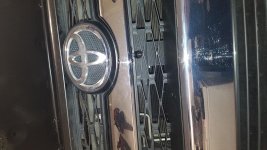
Also, the front camera was off Amazon. Went with two of these switches also.

iMfw4pVl.jpg

zBK5pmxl.jpg

88GsbZVl.jpg

WOa3PGcl.png
 
OK, so I have front and rear cam, aux video input cable, rear camera override harness and 2 single throw switches. Which two wires get run to the two switches? I have the black dual wire loom running down there but I thought one of those wires was for 12V?
 
UPDATE: front cam is working when I flip the switch but front cam also comes on in reverse and I can't figure out what to run to reverse switch in dash. Thanks!
 
Is there any way to make this work with two spst switches where you have one switch for front cam and one switch for rear cam? Thanks!
 
Is there any way to make this work with two spst switches where you have one switch for front cam and one switch for rear cam? Thanks!

Yes you can. One switch will activate the anytime camera in default mode which is rear. The other switch will change the input from rear to front.

The one in the loom should be for rear anytime. That’s easy. It has a 12v supply and the other is the input for the screen. For the other one it’s a 12v trigger that activates the relay so it switches from default rear to front. Take the 12v load from the loom and run it to both input of the switch. One output is for the anytime rear and the other output will be for the relay. Make sure to ground the other switched end of the relay. I really wish he did different color wires but I’ve done enough wiring where I can figure it out.

I believe on his site he even shows how to wire it

Also. Make sure everyone who gets the front camera to check that the picture is reversible. Default cameras are mirrored cause they expect it to be reverse and with lines. When searching they should list a jumper of some kind that allows selection.
 
Thanks! So If I am understanding correctly, you will still need to turn on the rear switch and then the front switch to get front cam though correct?
That's what I just tested and I can't get front to work without turning on rear first. Thanks again!
Yes you can. One switch will activate the anytime camera in default mode which is rear. The other switch will change the input from rear to front.

The one in the loom should be for rear anytime. That’s easy. It has a 12v supply and the other is the input for the screen. For the other one it’s a 12v trigger that activates the relay so it switches from default rear to front. Take the 12v load from the loom and run it to both input of the switch. One output is for the anytime rear and the other output will be for the relay. Make sure to ground the other switched end of the relay. I really wish he did different color wires but I’ve done enough wiring where I can figure it out.

I believe on his site he even shows how to wire it

Also. Make sure everyone who gets the front camera to check that the picture is reversible. Default cameras are mirrored cause they expect it to be reverse and with lines. When searching they should list a jumper of some kind that allows selection.
 
Thanks! So If I am understanding correctly, you will still need to turn on the rear switch and then the front switch to get front cam though correct?
That's what I just tested and I can't get front to work without turning on rear first. Thanks again!

Don’t think of it as turning on rear first. The first switch enables the camera to come on anytime. You could leave the front one on and when you flick it will come on vs the rear.

One is a source selector and the other is on off. But it seems like you got it working. With a dpdt it just does both at the same time. Hit the rear and it piers the on off. Hit the forward and it powers on off and front switch.
 
Thanks for the help! Much appreciated.
Don’t think of it as turning on rear first. The first switch enables the camera to come on anytime. You could leave the front one on and when you flick it will come on vs the rear.

One is a source selector and the other is on off. But it seems like you got it working. With a dpdt it just does both at the same time. Hit the rear and it piers the on off. Hit the forward and it powers on off and front switch.
 
i just got around to installing the override dongle. I have it wired in (as well as the aux selector) and luckily have NOT buttoned everything up just yet, but for some reason the dongle is NOT overriding the screen to show the reverse camera.

this is easy as pie, remove nav unit, unplug 5 pin connector, plug in dongle to harness and nav unit, take two wires coming off dongle, CROSS them (to mimic the switch), adn NOTHING...

am I the only one who got a lemon?
[MENTION=129513]bjohnston115[/MENTION]

If anyone out there could help me out I would appreciate it. I have a meter and one wire is reading 12V and the other is reading no measurable voltage. I cross them and get nothing...

this is pretty frustrating. probably because it is supposed to be so easy...


UPDATE: MERCHANT IS MAKING IT RIGHT!!!! ROCK ON!!! THANKS @ [MENTION=129513]bjohnston115[/MENTION]

 
Last edited:
The first time I tried mine it did something similar. It’s a little finicky with the starting order. Make sure your “activation” switch and the front camera switch are all set as if everything is deactivated. Then turn the car ignition to On or Start your engine. Once everything boots up, then activate the switch that switches the input and it should interrupt and show your second video source.

i just got around to installing the override dongle. I have it wired in (as well as the aux selector) and luckily have NOT buttoned everything up just yet, but for some reason the dongle is NOT overriding the screen to show the reverse camera.

this is easy as pie, remove nav unit, unplug 5 pin connector, plug in dongle to harness and nav unit, take two wires coming off dongle, CROSS them (to mimic the switch), adn NOTHING...

am I the only one who got a lemon?
[MENTION=129513]bjohnston115[/MENTION]

If anyone out there could help me out I would appreciate it. I have a meter and one wire is reading 12V and the other is reading no measurable voltage. I cross them and get nothing...

this is pretty frustrating. probably because it is supposed to be so easy...


UPDATE: MERCHANT IS MAKING IT RIGHT!!!! ROCK ON!!! THANKS @ [MENTION=129513]bjohnston115[/MENTION]
 
Last edited:
The first time I tried mine it did something similar. It’s a little finicky with the starting order. Make sure your “activation” switch and the front camera switch are all set as if everything is deactivated. Then turn the car ignition to On or Start yiur engine. Once everything boots up, them activate the switch that switches the input and it should interrupt and show your second video source.

I started it up without the wires connected coming from the override and it still wouldnt override when i touched them. I tried 12 ways to sunday. Merchant is helping me out. I even stuck my fluke on the wires coming out of the override to make sure one was hot and one was not. Touched wires, still not the desired results. It was an early dongle, not sure the issue, but i am trying the next one as soon as i get it and then hopefully rear on demand. fingers crossed!

EDIT: the aux selector switch and front cam works fine, in reverse. Everything but the override works great.
 
Last edited:
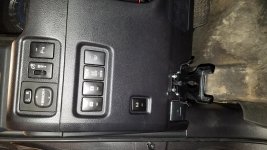
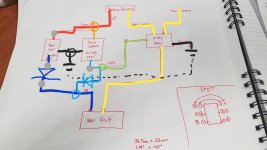
Installed mine last week and I love it. Added the front camera while I was at it. Wired it up so both switches work perfectly independently, via [MENTION=84912]4runnerlaw[/MENTION] 's advice on the diodes. Attached my setup, along with the rough sketch of the WD if it would help anyone. Also grabbed the GPS override from Brian just so I didn't have to cut any more wires.
 

Attachments

  • 20180310_095329.jpg
    20180310_095329.jpg
    131.9 KB · Views: 769
  • 20180304_155115.jpg
    20180304_155115.jpg
    139.2 KB · Views: 780
  • 20180309_195728.jpg
    20180309_195728.jpg
    125.1 KB · Views: 767
[MENTION=115953]HerT4R[/MENTION]

Make sure the override plug is inserted all the way. On mine, both the override plug and the multi-camera plug needed some filing to fit into the female receptacle enough to make good contact.
 
[MENTION=115953]HerT4R[/MENTION]

Make sure the override plug is inserted all the way. On mine, both the override plug and the multi-camera plug needed some filing to fit into the female receptacle enough to make good contact.

You're ballesy man. I am not. I had enough issues freeing the wires from the 26pin connector for the aux selector setup, so much so I freaking broke one edge of the clip :doh:

I am not confident enough to file down the finnicky connectors, one of which i accidentally broke part of it off. I did offer to send the harness back to the merchant even though he hasnt responded yet.

:hippie:
 
You're ballesy man. I am not. I had enough issues freeing the wires from the 26pin connector for the aux selector setup, so much so I freaking broke one edge of the clip :doh:

I am not confident enough to file down the finnicky connectors, one of which i accidentally broke part of it off. I did offer to send the harness back to the merchant even though he hasnt responded yet.

:hippie:

Did Brian help you with your issue? If so, please post the solution.
 
As requested [MENTION=103267]Saker[/MENTION]..................

There are two plastic tabs that hold harness to shifter housing, one white, one black. Release both, this will allow harness to be pulled back giving you room to splice into green (+) and gray (-) wires.
View attachment 198457

Highly recommend to anyone interested!

What gauge are those wires? Looking to get some splices from autozone to use and they look TINY, like 20gauge at least if not 22gauge.
 
Did Brian help you with your issue? If so, please post the solution.


he sent me a new harness.
I removed the old one.
Installed the new one.
tested it out.
PERFECTION.

Unsure what the issue was with the first one but i am not going to lament over it as i am all hooked up now!
 
Brian is a fantastic guy and stands behind his products and workmanship. Early on, I had an issue pulling out my pins and he was very patient trying to help me. In the end he built me a custom harness on his own accord.

he sent me a new harness.
I removed the old one.
Installed the new one.
tested it out.
PERFECTION.

Unsure what the issue was with the first one but i am not going to lament over it as i am all hooked up now!
 

Members online

Forum statistics

Threads
278,316
Messages
3,554,120
Members
248,016
Latest member
Advally Service

Trending content

Back
Top