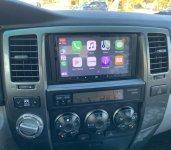
Radio Upgrades... Let see them.

I'm about to throw my hands up after searching for a "branded" head unit to integrate with my existing 06 jbl synthesis system. These unit seem to check all the boxes and then some at a cheapass price but... still sketchy on these units.

What's the display like...that night shot looks way too bright for me. My eyes are sensitive and looking at a glowy, cheap display day in and day out would nullify any interest in this thing.

Just finished up my atoto a6 pro for the yota. No adapter needed for the dash. Pretty good sound quality and it's a droid so tons of pluses there. Connects to wifi, dual bt, supports wifi dash cams, backup cameras, and all your favorite droid apps.
bdf865357f5aa86026f47f79b92b993b.jpg
 
I'm about to throw my hands up after searching for a "branded" head unit to integrate with my existing 06 jbl synthesis system. These unit seem to check all the boxes and then some at a cheapass price but... still sketchy on these units.


What's the display like...that night shot looks way too bright for me. My eyes are sensitive and looking at a glowy, cheap display day in and day out would nullify any interest in this thing.
You can adjust the brightness. I turned mine down and it's good. Plus most of the apps I use have a "night" mode and it goes to a darker color.

Sent from my SM-G965U using Tapatalk
 
Which specific model did you get? I'm gonna grab one...i asked Atoto about fitment and they responded:
Please kindly note that the specific car radio A6YTY721PR only fits the vehicle whose dashboard opening dimension is 205*104 mm.

If the dashboard opening dimension of your vehicle is not 205*104 mm, perhaps you can consider our universal double-din car radios,
for instance, A6Y2721PR and A6Y2721PRB.
But you may need to purchase additional fitting kits to complete the installation


I want a premium unit with the IPS screen, which now is only avail in the 2721 i believe. What other accessories did you get from them, if any? camera, obd2, etc.

thank again
You can adjust the brightness. I turned mine down and it's good. Plus most of the apps I use have a "night" mode and it goes to a darker color.

Sent from my SM-G965U using Tapatalk
 
Which specific model did you get? I'm gonna grab one...i asked Atoto about fitment and they responded:

Please kindly note that the specific car radio A6YTY721PR only fits the vehicle whose dashboard opening dimension is 205*104 mm.


If the dashboard opening dimension of your vehicle is not 205*104 mm, perhaps you can consider our universal double-din car radios,

for instance, A6Y2721PR and A6Y2721PRB.

But you may need to purchase additional fitting kits to complete the installation


I want a premium unit with the IPS screen, which now is only avail in the 2721 i believe. What other accessories did you get from them, if any? camera, obd2, etc.


thank again
[New] ATOTO A6 Pro Android Car... https://www.amazon.com/dp/B075W9H5P3?ref=ppx_pop_mob_ap_share

That's the direct amazon link. If you had the factory nav then you should be good to go.

I didn't need to get anything else from them but you can hook up an obdii reader, dash cam, and a backup camera easily. Even the steering wheel controls hook up directly. You just need to get an adapter for the jbl amplifier.

Sent from my SM-G965U using Tapatalk
 
last question (promise)...

-which jbl adapter harness did you go with, the PAC RP4.2-TY11 or the Axxess/Metra TYTO-01 Wiring Interface (or another). My JBL stock unit is only a CD/radio, no navigation. Seems to be a debate online which adabter harness is less prone to having issues. Crutchfield says i need the PAC but i think it may be overkill considering what the Atoto unit already has.

-How is your radio reception and what did you do re the radio antenna...did you go with the Y adapter:
https://www.amazon.com/gp/product/B0002EXF10/ref=ox_sc_act_title_1?smid=ATVPDKIKX0DER&psc=1

-did you retain fade controls with the system.

I'm looking at the A6T2721BRB...i would need a mount bracket since it's narrower.

[New] ATOTO A6 Pro Android Car... https://www.amazon.com/dp/B075W9H5P3?ref=ppx_pop_mob_ap_share

That's the direct amazon link. If you had the factory nav then you should be good to go.

I didn't need to get anything else from them but you can hook up an obdii reader, dash cam, and a backup camera easily. Even the steering wheel controls hook up directly. You just need to get an adapter for the jbl amplifier.

Sent from my SM-G965U using Tapatalk
 
Last edited:
Which harness did you use, assuming you integrated it with the JBL stock amp.

Installed an ATOTO A6 Pro Android HU for Toyota along with a Pioneer sub that fits in the factory box. Factory SWC and backup camera are wired up and working. Everything works perfectly and I'll also be getting an adapter to use Apple CarPlay.
 
Something i'm working on, decided to do an iPad mini without using a head unit. Still need to work on the bezel, but it's all functioning how I wanted. Replaced the door speakers with some 6x9 and 6.5 units, powered by a 4 channel amp. Mono amp for a 10" sub in the back. Everything is wired into that equalizer, which then hooks into the ipad directly. The little knob in the dummy console switch is to control the volume. The iPad is jailbroken, so it auto powers on/off with ignition, and uses my phone's hotspot. The one thing I'm still considering is getting the steering wheel controls back, but I haven't found anything that would be seamless just yet

ThNoAyS.jpg

PzsYLrj.jpg

GgUeenc.jpg
 
Something i'm working on, decided to do an iPad mini without using a head unit. Still need to work on the bezel, but it's all functioning how I wanted. Replaced the door speakers with some 6x9 and 6.5 units, powered by a 4 channel amp. Mono amp for a 10" sub in the back. Everything is wired into that equalizer, which then hooks into the ipad directly. The little knob in the dummy console switch is to control the volume. The iPad is jailbroken, so it auto powers on/off with ignition, and uses my phone's hotspot. The one thing I'm still considering is getting the steering wheel controls back, but I haven't found anything that would be seamless just yet

that's a nifty little setup. i'd love to have a volume knob down there.
 
So I'm not sure if this is the correct thread, but here goes nothing...

About a year ago, I got a JVC KW-V840BT in-dash entertainment system installed. A decent touchscreen display, bluetooth audio, and Sirius plus Apple CarPlay support. In general I've been very happy with it. That said, recently it has started just randomly turning off, It then reboots a few seconds later, and eventually a screen will come up saying I need to park the car, turn off the ignition, and then turn it back on. This only seems to happen when I'm trying to use SiriusXM or if I get a text or phone call while my phone is plugged in and Apple Play is displayed on the screen. I e-mailed JVC to see if they can be of assistance, but just thought I'd try here too.
 
that's a nifty little setup. i'd love to have a volume knob down there.

Certainly comes in handy, I’m so used to adjusting it now, I forget most cars put them on the dash. Using a touch screen while driving is sketchy as well, so having Siri open apps and find directions is a huge plus
 
My 05 came with the alpine halo 9 ilx f309. I'm not too big on touch screen head units, but I like it so far. Android auto is a huge plus!
 
Can anyone help? My factory JBL subwoofer is worthless after installing an aftermarket head unit. I can only tell it’s working when I’m standing right next to it.

‘05 Ltd with JBL nav
Pioneer AVH 2550 NEX
PAC RP4.2TY11

I have it taken apart right now because the installer did a crappy job and I can’t use any functions that require a parking break. All the cables look to be connected so I have no idea how to fix it. But I really don’t want to make another 3 hour round trip to have installer fix it.

Also trying to use a 12v to 6v stepdown to make backup camera work.

Really wishing I had ordered from Crutchfield right about now. Their headquarters is right down the interstate, it’s even closer than the place that installed my stereo. Hindsight really is 2020!
 
Need Help - Installation fail lol....

Hi all, brand-new both here and to owning a 4runner. Bought a 2006 SR5 Sport last week. Yesterday I upgraded the radio to a bluetooth model. Managed to get everything set and working well however in the process I managed to create a small problem.

When I reassembled the dash and started her up, while testing everything I discovered the 4wd switch no longer works. I verified the harness plug is in place, faced correctly, and fully seated. I also verified there are no pinched or broken wires from the work I did in the dash. I tried disconnecting the battery and reconnecting in case the computer just needed to cycle since it was unplugged, but none of these things worked.
The 4wd worked great prior to opening the dash so Im pretty sure it's something minor related to the work I did. Wanted to poll the crowd and see if there is something Im not thinking of before I get too worried.

Any help would be appreciated!
 
Hi all, brand-new both here and to owning a 4runner. Bought a 2006 SR5 Sport last week. Yesterday I upgraded the radio to a bluetooth model. Managed to get everything set and working well however in the process I managed to create a small problem.

When I reassembled the dash and started her up, while testing everything I discovered the 4wd switch no longer works. I verified the harness plug is in place, faced correctly, and fully seated. I also verified there are no pinched or broken wires from the work I did in the dash. I tried disconnecting the battery and reconnecting in case the computer just needed to cycle since it was unplugged, but none of these things worked.
The 4wd worked great prior to opening the dash so Im pretty sure it's something minor related to the work I did. Wanted to poll the crowd and see if there is something Im not thinking of before I get too worried.

Any help would be appreciated!

i read somewhere one of the pins tends to bend during the process on the 4wd selector plug. you might want to pull it and recheck that connection. this is one of the reasons im actually just running a BT transmitter in this truck, i dont want to mess with that 4wd switch or unplug/replug it in.

good luck
 
i read somewhere one of the pins tends to bend during the process on the 4wd selector plug. you might want to pull it and recheck that connection. this is one of the reasons im actually just running a BT transmitter in this truck, i dont want to mess with that 4wd switch or unplug/replug it in.

good luck

OUTSTANDING ADVICE!!! :first:
pin #2 was pushed flat against the inside of the connector. A little messing about and it was seated in place in no time. Thanks for saving me a ton of troubleshooting headache!
 
hey stupid question here, does the Alpine headunit come with the plastic piece that goes around the HU (which fills the gap between the screen and the dash)?


Finished the install of my Alpine ILX-W650 unit I got from Crutchfield and I am very happy with it. I am using the PAC RP4.2-TY11 Wiring Interface and Metra 95-8210 Dash Kit. Basically, everything that Crutchfield recommended for a 4runner with the JBL Premium Sound System. Alpine requires you to hook up the head unit to the parking break in order to be able to access any settings so I bought a PAC TR-7 Universal Trigger Output Module for Video Bypass of Amazon to wire in with the harness and it works great.

With the PAC wiring interface, I was able to wire the steering wheel controls as listed.

Volume Up
Volume Down
Up Arrow: Next Track
Down Arrow: Previous Track
Hold Up Arrow: Answer Call
Hold Down Arrow: End Call
Mode: Mute
Hold Mode: Activate Siri

Next thing to do is install a back-up camera. The Head Unit has inputs for 2 cameras. I would like to do a second camera but I'm not sure where I will be putting it.
 
I purchased it from Crutchfield where I entered the information on the vehicle and it recommended what trim piece to get. I just went with what the website said to get.
 
Alpine ILX-w650 with an idatalink sw adapter. I also added the phone buttons to my steering wheel. Works great!
 

Attachments

  • 60289500463__C5C6297F-6A7C-49AB-9EDF-D64C958A4A46.jpg
    60289500463__C5C6297F-6A7C-49AB-9EDF-D64C958A4A46.jpg
    68.4 KB · Views: 1,326
Last edited:

Members online

Forum statistics

Threads
278,310
Messages
3,554,080
Members
248,016
Latest member
Advally Service

Trending content

Back
Top