Receiving text/e-mail "on screen" via entune

They should be over the air updates now. At least my latest update was. The first one I had to do was from the USB stick they mailed me, but that basically updated the system to allow them to send updates over the air now.


What version of Entune are you running?


I have version 2.2. Is this the latest version to receive over the air updates?
 
I have version 2.2. Is this the latest version to receive over the air updates?

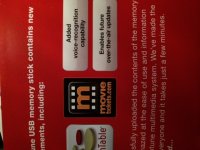
Yes it is. I just checked my USB update package which upgrade me from 1.8.4. to 2.1.0. which on the brochure says it enables over-the-air updates. So I believe 2.1 is the magic number.

Sort of interesting but I don't even have 2.2, only 2.1. Even though I have over-the-air updates. So not sure what is going on for me now. I did get a notification for an update a few weeks ago and clicked okay. I thought it went through but maybe not. I will look into it.

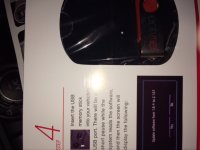
Edit: Sorry photos are sideways, top one shows the USB update in the little picture takes you to 2.1.0 and the bottom photo shows that it enables over-the-air updates.
 

Attachments

  • photo 1.JPG
    photo 1.JPG
    90.5 KB · Views: 1,329
  • photo 2.JPG
    photo 2.JPG
    118.4 KB · Views: 1,313
Last edited:
Yes it is. I just checked my USB update package which upgrade me from 1.8.4. to 2.1.0. which on the brochure says it enables over-the-air updates. So I believe 2.1 is the magic number.

Sort of interesting but I don't even have 2.2, only 2.1. Even though I have over-the-air updates. So not sure what is going on for me now. I did get a notification for an update a few weeks ago and clicked okay. I thought it went through but maybe not. I will look into it.

Edit: Sorry photos are sideways, top one shows the USB update in the little picture takes you to 2.1.0 and the bottom photo shows that it enables over-the-air updates.


Thanks for the info!
 
You can get texts but not emails. Your texts should come through but guessing your phone settings are not quite right.

On the phone, got to settings, Bluetooth, click on car info, then turn on the notifications.

Probably your issue.

Good luck. Didn't read all replies so sorry if this is a repeat.
 
I got the latest entune update last month. It was not available over the air but a dealer installed option. Off the topic of my head the email option is gone you do not even see it, there is also voice commands for more apps and loads quicker. before I had to update addresses that I had stored in entune now it did it automatically. Hopefully this update enables the over the air option.
 
New here on the 4Runner Forums and I've been having trouble as well BUT reading through seemed to get me up and running... sort of! I'm only receiving messages sporadically and I've noticed that any iMessages that are sent to my phone do not show-up, is that correct? I've got an iPhone 4s with the latest 7.1.2 iOS.
 
New here on the 4Runner Forums and I've been having trouble as well BUT reading through seemed to get me up and running... sort of! I'm only receiving messages sporadically and I've noticed that any iMessages that are sent to my phone do not show-up, is that correct? I've got an iPhone 4s with the latest 7.1.2 iOS.

i receive iMessages with my 4s
 
I only receive a notification, not the whole message. Are you saying it displays the whole thing?

EDIT: ah I just noticed you have a 14'
 
Yes it's pretty cool actually, it will read them as well. BUT it's not working all the time and I haven't received any iMessages.
 
new here, I have a Nexus 5, and etune says it cannot load msg, I tried deleting and reconnecting. I'm using hangout app for text msgs, could that be the problem?
 
I believe there is a message limit that is being hit. I know mine worked at first, but once I had a bunch of text messages, it stopped working.
 
I haven't read all of the replies but i have a 14 TEP and my entune reads text messages just fine, but I did have to change a setting on the Iphone in order for it to work.

After your phone is synced and connected to the entune system, go into setting on your phone, go to bluetooth, then select the Toyota 4runner profile, hit the little icon that looks like an i inside of a circle, then turn "show notifications" to the "on" position. After I did this my entune system would notify me of messages and read them just fine.
 
I have an Android phone. I have no access to texts/emails through Entune. Is the any work around or solution for this? I'm running the latest version of Android on a Samsung Galaxy Note 2. Thanks!

I believe the solution is you have to delete as all text message threads on your phone. I tried everything with my Samsun galaxy S3. as soon as I deleted all my threads and re-paired my phone, i was able to receive and view sms messages on my 2014 camry.
 
I believe the solution is you have to delete as all text message threads on your phone. I tried everything with my Samsun galaxy S3. as soon as I deleted all my threads and re-paired my phone, i was able to receive and view sms messages on my 2014 camry.

You don't have to get rid of all of them but if there is a limit on thread length. I had to delete the thread from my g/f because it had well over 1500 texts in it. Once I got rid of that one, it started working despite having 20 or so other conversations. The majority of those had less than 100 back and forth texts tho.
 
Reviving an old thread to know if there is a way to unlock/hack/change entune to be able to read messages while driving.

I am aware that reading while driving is a distraction, but I would prefer reading off of my entune system instead of using my phone.
 

Members online

Forum statistics

Threads
278,310
Messages
3,554,079
Members
248,016
Latest member
Advally Service

Trending content

Back
Top