Remote Lock Chirp Speaker

77Bronc

New member
Does anyone know where the speaker for the lock chirp is located. I have looked and cannot narrow in on the location.

Next question, can you tie this into the horn so I can get a louder confirmation that the truck is locked?

I am so use to the Ford horn for confirmation.

Thanks,
77
 
Register to hide this ad
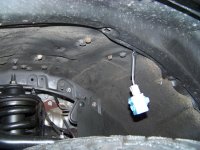
Behind the inner fender on the driver's side, near the firewall.
(At least that is where it was on my 2013 FJC)
Good luck on tying it into the horn! :pop2:
 
Ha, I want to go the other way! I want to get rid of the beep and just have the light flash as confirmation. I have a habit of hitting the lock/unlock button like 5-6 times and hate that the beep goes off every time
 
Ha, I want to go the other way! I want to get rid of the beep and just have the light flash as confirmation. I have a habit of hitting the lock/unlock button like 5-6 times and hate that the beep goes off every time

There is a setting in the TIS software for this, if you have it.
 
Yep! TIS has a setting for the chirp, from 0-5 or something like that iirc. Turned mine down to 2 and its very quiet, almost inaudible in parking lots unless I'm right in front of the 4runner.

Dealer can also turn it up or down for you, but from what I've read, some of them charge to change "user settings", and it would be worth it to just buy the cable and use a laptop/notebook to change the settings whenever you like.
 
Does anyone know where the speaker for the lock chirp is located. I have looked and cannot narrow in on the location.

Next question, can you tie this into the horn so I can get a louder confirmation that the truck is locked?

I am so use to the Ford horn for confirmation.

Thanks,
77

Not positive on this, but I believe the stock unit is a speaker and not a siren-type of unit, so unless you're good with relays and diodes, you will not be able to just tie into the stock horn, as its based on audio sound rather than 12 volts input.

Not impossible, but sorta pointless. Just get the dealer to crank it all the way up, look up the procedure in the manual, or get the TIS cable and set the parameter yourself.
 
[MENTION=116222]77Bronc[/MENTION]

Here's a pic of the "chirper" and a link to my thread that shows how to get it out of it's happy home to mod it....

Antman's "anti-beep switch" mod


100_3922_zps01da60d1.jpg
 

Attachments

  • 100_3922_zps01da60d1.jpg
    100_3922_zps01da60d1.jpg
    117.5 KB · Views: 1,670
Not positive on this, but I believe the stock unit is a speaker and not a siren-type of unit, so unless you're good with relays and diodes, you will not be able to just tie into the stock horn, as its based on audio sound rather than 12 volts input.

Not impossible, but sorta pointless. Just get the dealer to crank it all the way up, look up the procedure in the manual, or get the TIS cable and set the parameter yourself.

OK y'all got my interest, what is this TIS cable? I am going to look in the manual tonight.

77
 
For my 2014, the owner's manual says on page 485-486 on how to adjust or turn off the chirp.

I just went thru my manual, I do not see any section. Can you please tell me what section it is under? I have a 2015 TP, so the 2014 manual should be similar. Just need to know what Topic Section it is listed under.

Thanks,

77
 
TIS Cable/software=Techstream software for Toyota vehicles.

Relatively cheap, uses windows software, plugs into OBDii port to program a bunch of features the dealer regularly charges for.

Search this forum for techstream and you'll find a lot of info on what you can/can't do.
 
TIS Cable/software=Techstream software for Toyota vehicles.

Relatively cheap, uses windows software, plugs into OBDii port to program a bunch of features the dealer regularly charges for.

Search this forum for techstream and you'll find a lot of info on what you can/can't do.

Thanks.
 

Members online

Forum statistics

Threads
278,309
Messages
3,554,063
Members
248,016
Latest member
Advally Service

Trending content

Back
Top