TOYOTA TIS Techstream

Hmmmm well I don't know what to tell you; I bought this SR5 straight off the dealership lot brand new and no special order items. If it has a unique alarm I sure wasn't aware of it. I did try the double push on the FOB as someone suggested but the lights still stayed on for a period of time (and yes even if the lights were off when I parked) By the way it is not a loud honk of horn; you can tell the system barely gives voltage to the horn enough to honk it for a fraction of a second.
I guess I can read through my paperwork tonight and see if there's any mention a special alarm came with the car.....

You know...I wouldn't be surprised if they put one in there w/o telling you. I've read a handful of posts here where the member ended up finding some aftermarket alarm module installed fresh off the dealer lot. Some port installed crap or something, not sure...

The headlights NOT turning off when you press the lock button twice is a very good sign that this is aftermarket (because whatever is keeping it on is bypassing the body ecu's headlight on/off signal). What that headlight feature sounds like is this courtesy light feature found on aftermarket alarms. Only way to know for sure is if you poke around under the dash for any extra modules hanging around :)
 
Hey thanks for pointing this out, you might be helping me solve a mystery. I did call the dealer today and they said they're one of the dealers that does not install additional things like this at their site but that sometimes the port does it.
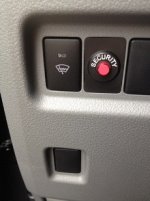
Again, I'll check my paperwork at home. I don't know if it matters but I also have this illuminated button on a lower left console that I never use but I understand it can be used as sort of a valet switch to disable the alarm, is this common on a 2013 from the factory?
alarm_button2.jpg
 

Attachments

  • alarm_button2.jpg
    alarm_button2.jpg
    31.2 KB · Views: 2,680
Hey thanks for pointing this out, you might be helping me solve a mystery. I did call the dealer today and they said they're one of the dealers that does not install additional things like this at their site but that sometimes the port does it.
Again, I'll check my paperwork at home. I don't know if it matters but I also have this illuminated button on a lower left console that I never use but I understand it can be used as sort of a valet switch to disable the alarm, is this common on a 2013 from the factory?
View attachment 111548

Well that solves it! Definitely not factory (at least not on mines, the factory security light is on the center console for me) :)

If you're daring, pull back the panels and follow the wiring from that button, it will lead you to the culprit for sure.
 
lol, that is not a OEM factory system.

even looking at the picture, the cutout is not even the same. toyota has OCD when it comes to matching blank covers or buttons that have function looking the same as the blanks.
 
Yeouch!
Check the service history on the Toyota website, that might give you a clue. My first entry listed the pinstripes and nitro tire flush they tried to upsell me.
 
Well sure enough I got home and dug out the original window sticker and it showed a port installed "premium" alarm system. I guess I sound like an idiot for not knowing this but the day I bought this I had really just stopped in for a test drive. I ended up getting a great trade offer and drove it off the lot within a couple hours of first seeing it.
Anyway I also tonight found a tiny alarm manual tucked in next to the owners manual and at least figured out how to turn off the horn part of it. Mystery solved and thanks to you guys for helping out!
 
Well sure enough I got home and dug out the original window sticker and it showed a port installed "premium" alarm system. I guess I sound like an idiot for not knowing this but the day I bought this I had really just stopped in for a test drive. I ended up getting a great trade offer and drove it off the lot within a couple hours of first seeing it.
Anyway I also tonight found a tiny alarm manual tucked in next to the owners manual and at least figured out how to turn off the horn part of it. Mystery solved and thanks to you guys for helping out!

hey at least you found the manual, most people just throw that crap away. the warden has fits that I keep empty boxes of stuff I bought or manuals from crap I have or no longer have.


good example, I still have the box for my 3200mb tape backup system for my old computer.
 
Last edited:
Techstream v9.00.26 works on Window 7, 64-bit laptop

Hi guys,
First post here. I just wanted to let you know that I bought, received and tested (turned off the door chime w/key in ignition, both seat-belt reminders and the irritating auto-door locks). With shipping it cost me $50 Canadian, which is like $3 US dollars, and the cable came with an installation CD (Techstream v9.00.26 which works on my Window 7, 64-bit laptop). Got it off of EBay from a seller named "obdfocus". This shameless plug is because I had great tech support after misreading the instructions 4 times in a row. This person was Very patient with my dumb ass.
 
Last edited:
With shipping it cost me $50 Canadian, which is like $3 US dollars, and the cable came with an installation CD (Techstream v9.00.26 which works on my Window 7, 64-bit laptop). Got it off of EBay from a seller named "obdfocus". This shameless plug is because I had great tech support after misreading the instructions 4 times in a row. This person was Very patient with my dumb ass.


So Toyota finally caught up with the rest of the world and got TS to work with 64 bit Win 7. Thanks for posting this kakeyed.
 
New member here. I mainly joined to lurk in the 3rd gen area, but I'm a Techstream addict as well and I like to keep track of what new developments are popping up with the DIY Techstream setups people have at home.

Hi guys,
and the cable came with an installation CD (Techstream v9.00.26 which works on my Window 7, 64-bit laptop).

That's actually really interesting. If it just installed and worked on a 64 bit system, you'd be the first person I've seen to actually receive a disc with 64 bit drivers rather than having to tweak the 32 bit ones. It'll be pretty cool if that becomes a more common occurrence.

btw, Techstream has always worked on 64 bit systems. It's the drivers for the cable that needed the 32 bit systems. Some of the more expensive cables offer 64 bit drivers that make installing Techstream on 64 bit systems super easy. Ironically, current Techstream 2.0 machines are still only using 32 bit Win7 systems with Mongoose Pro VIMs.
 
Well I guess 32/64 bit drivers will be included more often from now on. That cable is the same cable as all the others, they just have 64 bit drivers on the disc.

The hilarious thing I noticed in that ad was their request that Toyota not remove their items because it isn't violating trademarks. haha
 
I've D/L'd 9.00.026 version. Runs perfectly on Windows 7, 64 bit. Now Just waiting on this:
41RBayJf-UL.jpg


Can I only extract drivers from Install CD, because cable comes with older 8.000... TIS? If so what's the file names? Thank You
 
I've D/L'd 9.00.026 version. Runs perfectly on Windows 7, 64 bit.

Can I only extract drivers from Install CD, because cable comes with older 8.000... TIS? If so what's the file names? Thank You

Where did you get ver. 9.00.026? I've tried a few versions and haven't had any luck at getting a copy to register so it will work.
 
I've D/L'd 9.00.026 version. Runs perfectly on Windows 7, 64 bit. Now Just waiting on this:
41RBayJf-UL.jpg


Can I only extract drivers from Install CD, because cable comes with older 8.000... TIS? If so what's the file names? Thank You
Post the link to the 9.0.26 version, please.
 
Last edited:
I D/L'd v9.00.026 but the driver from that doesn't recognize the cable. Techstream works fine on my Win 7, 64 bit system, but cable is - no go. I get "Unable to connect to VIM" message. What can I do to make it work?
 

Members online

Forum statistics

Threads
278,312
Messages
3,554,085
Members
248,016
Latest member
Advally Service

Trending content

Back
Top