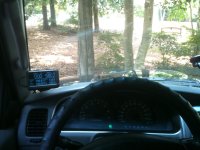
ultra gauge what are your thoughts

i love it save me a bunch of gas lol i make sure i dont do pass 2000 rpm and watch the gauge's instant mpg i got about 18.5 mpg with 33s on hwy and 16.2 mpg city, but it sure does suck when a prius can beat you on the freeway lol
 
I'm seriously considering this as well for my 99 limited. However, I think I will spend the extra $100 for the scangauge because I know for sure it has a Trans Temp feature where the ultra gauge is still a 'maybe' in that area.
 
I'm seriously considering this as well for my 99 limited. However, I think I will spend the extra $100 for the scangauge because I know for sure it has a Trans Temp feature where the ultra gauge is still a 'maybe' in that area.

its not a maybe its not included but they are coming out with one with trans temp gauge soon i think. so if ur willing to wait a lil more ultragauge will have trans temp too
 
ive been looking at all kinds of videos i cant decide lol scanguage II is looking pretty sweet as far as mounting, fuinctions, oh and the 60 diferent color combinations FREAKING SWEET!
 
I say scangauge. The ultra gauge is nice, but its just so big and bulky. The scangauge mounts in great spots that are in the line of sight, but not in the way. And for someone with a 99+ that can display tranny temps, that is just even more reason to go with scangauge..
 
its smaller thiner lighter more modern and cheap if ur 96-98 go with ultra if ur 99-02 and want trans temp go with scangauge

Good call. If I didn't have a 99 with the option for the trans temp, I would go with the ultragauge. That trans temp is a nice option though and worth the extra money for the scangauge IMO.
 
Calibrating Distance EDIT : FAIL

:fro:

sure it would work if that was how the ultragauge calculated it. But instead i have to let the ultragauge calculate distance for the larger tires and then reset it to 1 mile Manually. Why this ISNT based on the revolution per mile difference based on the different tire size i dont know. Now im wondering if i can use the map app on my iphone to do the calibration. What a joke..


Well finally got my ultragauge hooked up and now just need to calibrate the distance. After i read the directions for calibrating distance i said i dont have a GPS unit and theres got to be a easier and more accurate way to calculate distance then driving between two mile posts.

Then i remembered how tire rack offered revolutions per mile data for the tires it sold. Arent the ultragauge directions for calibrating distance really figuring the difference in the number of tire revolutions between two tires?

So i guess my question is could i use the revolutions per mile difference between a 265/70/16 and a 275/65/16 to determine the percentage difference? ie:

X -Y
X = the % difference?

Would this be alot more accurate to boot?
 
Last edited:
:fro:

sure it would work if that was how the ultragauge calculated it. But instead i have to let the ultragauge calculate distance for the larger tires and then reset it to 1 mile Manually. Why this ISNT based on the revolution per mile difference based on the different tire size i dont know. Now im wondering if i can use the map app on my iphone to do the calibration. What a joke..

You don't own a GPS or know anybody who owns one or have a GPS app on you smartphone?

Real easy to do with a GPS. As far as calculating tire circumference, you have to consider that the size is "nominal", IOW, not all 265/75/16" tires are the exact same size. Sure, it's a small error but it's a small error that will be compounded once you start multiplying it to get revolutions per mile.

Just calibrate with a GPS. It's easy. If you don't have a GPS, borrow one. Or do what I did and get one for $50 on CL.
 
I simply drove between mile markers and its fine.

I am still in the process of calibrating my gas mileage haven't done my first fill up yet.
Other than that I like the Ultra Gauge, only problem I have with it is that it is so insanely hot here that I have to unhook it off the windshield bracket and place it into the shaded speedometer area and then cover it with something like an envelope of junk mail.
One thing I wish it had was to be able to unhook the Gauge from the wire so that I could just take inside or stick it in the armrest console.

One thing I have learned from it already is why my gas mileage sucks in this area, HILLS.
Where I drive everyday is up & down small hills continuously, can rarely drive more than a mile in any direction without going up or down and it sucks down the gas going up hills no matter how slow you go.

It fits nicely in the lower left corner of windshield and took like 2 minutes to install start to finish.

 

Attachments

  • Ultra Gauge, Bethany 004.jpg
    Ultra Gauge, Bethany 004.jpg
    129.4 KB · Views: 820
I figured it out

I ended up calulating the distance difference using the revs per hr data and also calculated in the field. It seems as if i was successful calibrating distance but now everything else is messed up. All ive done so far is set engine and tank size and calibrate distance. I dont get it.
 
I used the velcro

and mounted mine on the dash under the temp gauge. I removed the lower dash and ran the cord behind the lower dash coming out the steering wheel cowl under the steering wheel. I figure its out of site from outside, i can still see it and its out of way.
 
I ended up calulating the distance difference using the revs per hr data and also calculated in the field. It seems as if i was successful calibrating distance but now everything else is messed up. All ive done so far is set engine and tank size and calibrate distance. I dont get it.

:confused: What's "messed up?"

You have to calibrate the distance before you can calibrate MPG. Once you've got the distance done, go fill the tank to the top. Make sure you always fill it the same way, preferably at the same station (if you're really anal about it, you'd use the same pump at the same time of the day.)

By "the same way" I mean if you fill it until it automatically stops once, then always do it that way. I let the pump stop 3 times to make sure the tank is full.

After you've filled it, zero out your average MPG. Then set the tank to "full" by holding down the button on the right side top until it beeps. It will read "tank full, 18.5 gallons" (assuming that's what you set up.) After that, just drive normally until it's time to fill up again.

When you fill up again, note the number of gallons used. Then go to the Vehicle Setup menu and the "calibration" and one of the options will be "calibrate MPG." There will be a display with what the UG thinks you used in terms of gas. Say it reads 12.7 and you actually used 11.6. You then use the buttons to set it to 11.6 and push the menu button (on the left side) and it's calibrated. Then reset the average MPG to zero and it should be pretty accurate from then on.
 
I'm about to purchase an ultragauge but saw there is a new option. Whats the advantage of having metric units available on the new version?
 
yup nothing has changed but this unit is awesome, got up to 160 degress in my truck in the heat of the summer still works flawlessly
 
I keep wondering when they'll add the trans temp information. Scangauge apparently has it for the 99-up so the information must be there in the OBD somewhere.
 

Members online

No members online now.

Forum statistics

Threads
278,316
Messages
3,554,112
Members
248,016
Latest member
Advally Service

Trending content

Back
Top