
You are using an out of date browser. It may not display this or other websites correctly.
You should upgrade or use an alternative browser.
You should upgrade or use an alternative browser.
3rd Gen TR4 Backup cam?
- Thread starter Auce
- Start date

weekendclimber
New member
Where should I be running the wire that connects to the reverse in wire on the radio. Please help me out. Thanks.
You're looking for pin 1 or 4 on the back of plug 1D of the lower drivers side junction box/fuse panel. From the back it's the lowest left plug, or if your looking at it from the front the lowest right plug. Pins 1 and 4 are the top and bottom ones closest to the tab on the plug. Run a tab into that for the reverse in wire on the radio to trigger the head unit to switch to the camera.
Wiring diagram:

Driver's side JB/Fuse panel:

Red wire with yellow stripe upper right pin location:

blarblarjosh
New member
Weekendclimber's suggestion is the proper way to do this, but when I did my research the different years have different colored wires and it's hard to splice into a bunch of cables in a harness. I went ahead and extended the reverse wire from the radio and ran it to the taillight which is convenient as it follows the wires to the reverse camera for the most part. You'll have to use a coat hanger or something to fish the wire through the grommet to the tail light and then just splice the positive wire from the reverse bulb.
weekendclimber
New member
Weekendclimber's suggestion is the proper way to do this, but when I did my research the different years have different colored wires and it's hard to splice into a bunch of cables in a harness. I went ahead and extended the reverse wire from the radio and ran it to the taillight which is convenient as it follows the wires to the reverse camera for the most part. You'll have to use a coat hanger or something to fish the wire through the grommet to the tail light and then just splice the positive wire from the reverse bulb.
This also works. As for my suggestion, the pin location should still be the same on a 2000 as for the 1999 that I have though the wire color may have changed. I pulled the plug out to give myself more room to work with when I did this myself. Going to go back in and remove the pin soon to splice it in there properly.
Daddycreswell
New member
I tried running a wire from the taillight to the back of the radio reverse in and it didn't trigger it. Attached is a picture of the wires I tapped into.

Sent from my SM-N960U using Tapatalk
Sent from my SM-N960U using Tapatalk
19963.4lsr5
New member
Has any members tried using a Toyota backup cam from the wrecking yard, and got to work on our 3rd gen? Is it worth it going this route?
Or would it be better off using an aftermarket backup cam?
I think you should get what your radio calls for. I have a 2013 corolla radio in my 97 and I must use the Toyota or aftermarket equivalent. There is a company that sells the kit but I’ve forgotten the name for now it’s in a few posts about installing a newer Toyota or Scion radio in older 4Runners.
Sent from my iPhone using Tapatalk

snydmax
New member
I think you should get what your radio calls for. I have a 2013 corolla radio in my 97 and I must use the Toyota or aftermarket equivalent. There is a company that sells the kit but I’ve forgotten the name for now it’s in a few posts about installing a newer Toyota or Scion radio in older 4Runners.
Sent from my iPhone using Tapatalk
That’s interesting, gotta pic of your carolla head unit install? Guess I’ll look for the posts you’ve referred to.
blarblarjosh
New member
I tried running a wire from the taillight to the back of the radio reverse in and it didn't trigger it. Attached is a picture of the wires I tapped into.
Just to verify, when you say it didn't trigger, nothing happened or the screen went black? If it went black then it did properly trigger, but there is something going on with the video connection whether the camera is not getting power or its plugged into the wrong video in. I know my head unit had 3 sets of video in. 2 sets of pig tails; 1 for a front camera, 1 for some type of external player, and then another one on the head unit itself for the reverse camera. It took me a bit to realize that there was a video in on the unit so if you're getting a black screen check for that.
weekendclimber
New member
I tried running a wire from the taillight to the back of the radio reverse in and it didn't trigger it. Attached is a picture of the wires I tapped into.
Sent from my SM-N960U using Tapatalk
Can you provide the make and model of your radio? I can then lookup the wiring diagram and give you some more specific advice on wiring this :mullet:
19963.4lsr5
New member
My 1997 SR5 Build and Repair thread has the install. I could have done a better job of trimming the panel. I started out with a T1819 Scion radio.

Sent from my iPhone using Tapatalk
Sent from my iPhone using Tapatalk

plcfcng
Member
looking at the picture again what I did with mine is the ground I used was a body ground not the wire ground. I would try moving the ground to a clean spot on the body either a existing screw or add one and remove the paint with a eye let on the end. The use a hot 12 volt jumper at the radio head or confirm the signal with a test light. Also if there is a extension that you used because there was not enough cable try to undo the camera and take the extension If that does not work maybe a camera or stereo is the problem.:gossip:
I'm in the middle of installing a camera on my 2002 T4R as we speak. I'm using this camera that I bought off eBay:
Car Reverse RearView Backup camera for Toyota 4Runner Fortuner Hilux Innova | eBay
I had to tear apart the lift gate to replace the rear windshield wiper motor (the spline sheared when I was trying to remove the rear arm due to corrosion). Since I had everything torn apart, decided to go for the camera install too. There was some valuable advice I found on here regarding the rear window, for anyone about to take this on:
"You need to remove the bolts that hold the rear window in place so you can drop the regulator assembly down. So roll your rear window down about a 1/3rd of the way for easy clearance to the bolts. Once you get the window down you'll see the bolts for the track. Remove those (I believe there's 4) and however many bolts that are holding the regulator to the rear hatch. You should then be able to slide the regulator down,slide the rear window back up,and install the wiper motor."
While this was key for accessing the wiper motor, it also made accessing the holes to pass the camera wires through a lot easier to get to. It was too dark for photos tonight, but I will post some in the next day or so of how the final install went.
Car Reverse RearView Backup camera for Toyota 4Runner Fortuner Hilux Innova | eBay
I had to tear apart the lift gate to replace the rear windshield wiper motor (the spline sheared when I was trying to remove the rear arm due to corrosion). Since I had everything torn apart, decided to go for the camera install too. There was some valuable advice I found on here regarding the rear window, for anyone about to take this on:
"You need to remove the bolts that hold the rear window in place so you can drop the regulator assembly down. So roll your rear window down about a 1/3rd of the way for easy clearance to the bolts. Once you get the window down you'll see the bolts for the track. Remove those (I believe there's 4) and however many bolts that are holding the regulator to the rear hatch. You should then be able to slide the regulator down,slide the rear window back up,and install the wiper motor."
While this was key for accessing the wiper motor, it also made accessing the holes to pass the camera wires through a lot easier to get to. It was too dark for photos tonight, but I will post some in the next day or so of how the final install went.
Trigger Wiring
I used the same wires to tap into for my camera. The positive wire on the reverse light (the red one) had two wires tapping into it; one for power to the camera, the other for the trigger on my Sony head unit. The negative wire (the white wire) just had the negative wire for the camera power.
Worked just fine on mine; those power taps can be finicky some times. Did you verify that you have a solid connection on them?
I tried running a wire from the taillight to the back of the radio reverse in and it didn't trigger it. Attached is a picture of the wires I tapped into.
Sent from my SM-N960U using Tapatalk
I used the same wires to tap into for my camera. The positive wire on the reverse light (the red one) had two wires tapping into it; one for power to the camera, the other for the trigger on my Sony head unit. The negative wire (the white wire) just had the negative wire for the camera power.
Worked just fine on mine; those power taps can be finicky some times. Did you verify that you have a solid connection on them?

Reno - 3rd gen
New member
Just got and installed this cheap double din stereo last night and tested out the backup camera that came with it. I was pretty skeptical since it's only $50!!!, but so far this might be the best mod I've done for the price. I still need to mount the camera and tidey up some wires, but I'll throw up some pictures when I'm all done this weekend.
https://www.amazon.com/gp/product/B07PXPTL4S/ref=ppx_yo_dt_b_asin_title_o00_s00?ie=UTF8&psc=1
https://www.amazon.com/gp/product/B07PXPTL4S/ref=ppx_yo_dt_b_asin_title_o00_s00?ie=UTF8&psc=1

jgue467
Senior Member
Just got and installed this cheap double din stereo last night and tested out the backup camera that came with it...
So what powers the speakers? The description doesn't mention output power or it is preamp only? Funny thing is china is still nice enough to offer other units as low as 39.95, not for long! :cowboy:
Daddycreswell
New member
No I didn't test, I am going to get some T-taps and try again. My camera already has power, I tied the red wire from the video cable to the accessory wire behind radio. I can turn the camera on by hitting camera button on the radio. Just couldn't get the red wire on the taillight to trigger the camera.
Sent from my SM-N960U using Tapatalk
Sent from my SM-N960U using Tapatalk
Reno - 3rd gen
New member
So what powers the speakers? The description doesn't mention output power or it is preamp only? Funny thing is china is still nice enough to offer other units as low as 39.95, not for long! :cowboy:
I believe it's just pre-amp. I have a 10' kicker sub on it's own amp and I replaced the old stock speakers in the doors with kicker speakers so I've never had an issue with with it not being loud enough.
The mounts took a little work to get the headunit to line up low enough with enough tilt to see while driving (Just drilled some new holes to get it to line up how I wanted), but for $50 I'm happy. Now I've got bluetooth, a functioning backup camera, and can view photos from the memory card off my Go-Pro while on trips. Plus it updates the look of the interior a little.
Attachments
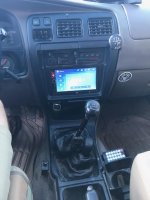
Planning to install a Kenwood DMX7706S this weekend and wondering if the backup camera can be turned on with the head unit CAM hard button while the runner is NOT in reverse?
If I understand the wiring correctly I believe the answer is no. If the camera is powered by the reverse light it could only send a video signal to the head unit when the shifter is in reverse.
I wonder then what is the point of the head unit having a CAM hard button?
I was hoping this could be configured to turn the rear camera on at will, like if I want to keep an eye on my mountain bikes on the trailer hitch rack.
If I understand the wiring correctly I believe the answer is no. If the camera is powered by the reverse light it could only send a video signal to the head unit when the shifter is in reverse.
I wonder then what is the point of the head unit having a CAM hard button?
I was hoping this could be configured to turn the rear camera on at will, like if I want to keep an eye on my mountain bikes on the trailer hitch rack.
scottndsky
New member
You're looking for pin 1 or 4 on the back of plug 1D of the lower drivers side junction box/fuse panel. From the back it's the lowest left plug, or if your looking at it from the front the lowest right plug. Pins 1 and 4 are the top and bottom ones closest to the tab on the plug. Run a tab into that for the reverse in wire on the radio to trigger the head unit to switch to the camera.
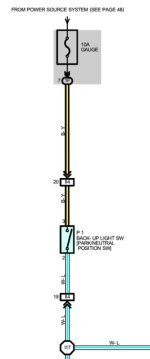
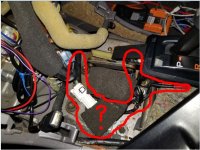
Is there no place under the center console to tap into the backup light switch by the shifter? Where are these other upstream connectors and switches including the L/R split at I17?
Also, where can I find wiring diagrams like this? These are extremely helpful. Is there a full reference manual posted somewhere?
Many Thanks!
Attachments
Similar threads
- Replies
- 7
- Views
- 5K


- Replies
- 2
- Views
- 537

- Replies
- 0
- Views
- 3K
