3rd Gen TR4 Backup cam?

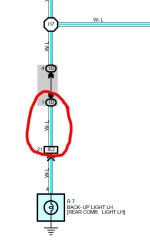
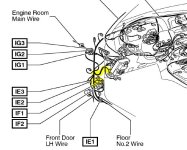
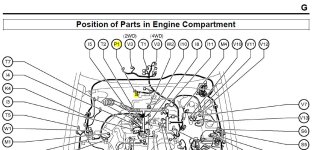
Is there no place under the center console to tap into the backup light switch by the shifter? Where are these other upstream connectors and switches including the L/R split at I17?

Also, where can I find wiring diagrams like this? These are extremely helpful. Is there a full reference manual posted somewhere?

Many Thanks!

Shoot me a PM and I'll email you the 2002 doc that's floating around if you can't find it elsewhere. It's risky to post a link from my experience.

Edit: And, assuming your wiring is the same as the 2002 the White/Blue wire from that diagram should get 12v when in reverse on that plug in your picture. That should be P1, and you're looking for pin 2. I would plug that plug in and test with a meter first though.
 
Last edited:
Shoot me a PM and I'll email you the 2002 doc that's floating around if you can't find it elsewhere. It's risky to post a link from my experience.

Thank you! I sent a "visitor message". I'm not sure that's the same as a PM. Do we have to be friends first?

Edit: And, assuming your wiring is the same as the 2002 the White/Blue wire from that diagram should get 12v when in reverse on that plug in your picture. That should be P1, and you're looking for pin 2. I would plug that plug in and test with a meter first though.

Excellent! There are actually two plugs in that area. One is under the foam padding that's not easy to see in the pic. I'll try to buzz it out.
 
Edit: And, assuming your wiring is the same as the 2002 the White/Blue wire from that diagram should get 12v when in reverse on that plug in your picture. That should be P1, and you're looking for pin 2. I would plug that plug in and test with a meter first though.

Actually, after studying the diagrams, I believe that P1 connector is underneath the car attached to the side of the transmission. Those connectors under the center console are for unrelated features. I think your suggestion regarding 1D is the way to go. I think I need to tap somewhere between D1 and IE2 (behind the kick panel), which is where I tucked the back-up wire anyway.

Many Thanks!
Scott
 

Attachments

  • P1.JPG
    P1.JPG
    116.1 KB · Views: 9,228
  • Wire.JPG
    Wire.JPG
    28.9 KB · Views: 3,144
  • Diagram.JPG
    Diagram.JPG
    64.2 KB · Views: 3,527
Hi all

My backup camera came from Aliexpress. I bought it really cheap, but it makes the work.
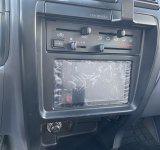
Connected to an Android radio (a very clean install - no cutting or damaging any plastic trim).
Up today (almost 1,5 years ater installing) everything still works like a charm.
Of course running the wires from the camera to the back of the radio was a real PITA, it just needs patience. I think I have lost an entire WE to do it properly (together with the CB radio - not shown on the picture) but it worthed.

Raphaël
 

Attachments

  • 20190825 - Back-up camera-2.jpg
    20190825 - Back-up camera-2.jpg
    59.1 KB · Views: 1,387
  • 20190825 - Android Radio.jpg
    20190825 - Android Radio.jpg
    113 KB · Views: 1,465
Hi all

My backup camera came from Aliexpress. I bought it really cheap, but it makes the work.
Connected to an Android radio (a very clean install - no cutting or damaging any plastic trim).
Up today (almost 1,5 years after installing) everything still works like a charm.
Of course running the wires from the camera to the back of the radio was a real PITA, it just needs patience. I think I have lost an entire WE to do it properly (together with the CB radio - not shown on the picture) but it worthed.

Raphaël

Thanks Gegene!

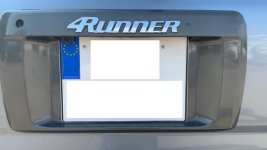
Can you show where you actually mounted the camera? I don't see a lot of plastic underneath there to mount a camera to. The two lights consume most of that area on my bezel.

Also, I was only considering locations along the center line. Someone warned me *not* to mount the camera off-center, as you did, because it would result in a skewed image on the screen. Can you share a picture if the backup image you see on your head unit?

Many Thanks
 

Attachments

  • BackPlate_resized.jpg
    BackPlate_resized.jpg
    79.5 KB · Views: 1,358
Has anyone installed a rear view mirror back up cam? If so what rear view did you end up getting? I have a 98 and really don’t want to attach a rear view to the windshield.
 
Thanks Gegene!

Can you show where you actually mounted the camera? I don't see a lot of plastic underneath there to mount a camera to. The two lights consume most of that area on my bezel.

Also, I was only considering locations along the center line. Someone warned me *not* to mount the camera off-center, as you did, because it would result in a skewed image on the screen. Can you share a picture if the backup image you see on your head unit?

Many Thanks

I used the passenger side of the rear hatch trim: Shawnathan9's Build Thread

There's enough room behind that end that allows you to bolt on a rear camera. - Another forum member stated that you could even remove the entire license plate trim to route your cable without drilling.

For me, the time I saved by drilling and not removing a ton of parts made sense. The gasket sealer should keep the area nice, dry, and rust free.

Good luck. Routing the cable through the hatch and rubber boot was the PITA that I dealt with.
 
How about this,
4th gen 4Runner aftermarket backup camera. Replaces the left license light and has its own led. Only modification is you have to drill two new mounting holes so the camera can clear the bezel. It bolts up to the original license light holes. Quality is decent, but i suspect background noise and I'm trying to sort it out. Its connected to an Alpine ILX-650 and can be view at anytime by selecting the camera button. I tapped into the 12v accessory of the radio harness. Reverse trigger off the gauge cluster.

BRAUTO New Back Up CCD Rear View... Amazon.com: BRAUTO New Back Up CCD Rear View Reverse Parking Camera for Toyota 4Runner 2002-2010: Automotive
 

Attachments

  • 7C0C23B1-45D5-4E34-9F92-7366BAAB54A6.jpg
    7C0C23B1-45D5-4E34-9F92-7366BAAB54A6.jpg
    124.8 KB · Views: 1,462
Last edited:

Attachments

  • IMG_8227.jpg
    IMG_8227.jpg
    121.4 KB · Views: 1,327
  • IMG_8228.jpg
    IMG_8228.jpg
    127.3 KB · Views: 1,209
I put a rear camera from a Toyota Prius and a front camera from a LEXUS RX300


Sent from my iPad using Tapatalk
 
Last edited:
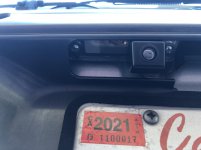
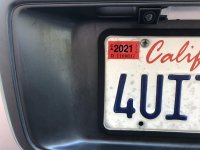
Changed out to this unit from AliExpress and it works great. Fits like oem, no modifications needed. Picture quality is very good.

That's pretty slick! I think I'm going to order one too.
Does the camera cast a shadow on your license plate at night?
It looks like it might block some of the light from your LED bulb.
 
I haven't check to be honest. Will take a look tomorrow and report back. Overall, I'm very happy with it. I even ordered a new right license plate lens to clean it up as my originals were dull and faded.

That's pretty slick! I think I'm going to order one too.
Does the camera cast a shadow on your license plate at night?
It looks like it might block some of the light from your LED bulb.
 
While it blocked some of the light, its not enough to hinder the light output. Still shines up the license plate just fine.

That's pretty slick! I think I'm going to order one too.
Does the camera cast a shadow on your license plate at night?
It looks like it might block some of the light from your LED bulb.
 

Members online

Forum statistics

Threads
278,310
Messages
3,554,079
Members
248,016
Latest member
Advally Service

Trending content

Back
Top