TRUSTYAXE
New member
I just tried this on my 2016 TE and couldn't get it to work ('cannot connect to USB device').
- I've got the filenames correct and the folders are the only things on this card
- The formatting of the USB stick is correct (FAT32),
- It's a 16GB card, so oversizing shouldn't be an issue
- The format has been tried with both jpg and jpeg extensions
- I've tried having the device in the port before starting as well as after starting
- The device loads on 6 other computers I have in my house just fine.
- My android phone works just fine when connected, so I know the port is live.
Any ideas? Are there minimum resolution requirements before this thing will work or something stupid like that?
I can't believe Toyota can engineer such a great vehicle only to fall down with their clunky entune system. Everything else about connectivity is done through bluetooth on this thing, yet file transfers still require a usb connection? Just plain silly.
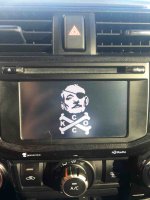
Here's how to change the startup image on the entune nav:
Load a usb device, such as a flash drive with the image of your choice. The images file name, including the file extension, can be up to 32 characters. Name the image without spaces or strange characters. When saving the images to a USB, name the folder that the startup image is saved to “StartupImage” and name the folder that the screen off image is saved to “DisplayOffImage”. If these folder names are not used, the navigation system cannot download the images. (The folder names are case sensitive.)
The images file extension is JPG or JPEG. Image files of 10MB or less can be saved.
Up to 3 images can be downloaded. Plug the flash drive into your car usb port.
On the entune nav system:
Press the “SETUP” button
Touch “General” on the “Setup” screen.
Touch “Customize Startup Image”
Touch “Transfer”
Touch “Yes”
You can also delete and switch between screens.
You should now see your new startup screen flash by when the entune system is started each time.
If all above is correct, use another stick.