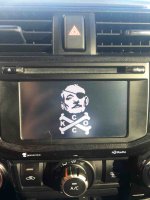
4Runner Startup/Display Off Images

I just tried this on my 2016 TE and couldn't get it to work ('cannot connect to USB device').

  • I've got the filenames correct and the folders are the only things on this card
  • The formatting of the USB stick is correct (FAT32),
  • It's a 16GB card, so oversizing shouldn't be an issue
  • The format has been tried with both jpg and jpeg extensions
  • I've tried having the device in the port before starting as well as after starting
  • The device loads on 6 other computers I have in my house just fine.
  • My android phone works just fine when connected, so I know the port is live.

Any ideas? Are there minimum resolution requirements before this thing will work or something stupid like that?

I can't believe Toyota can engineer such a great vehicle only to fall down with their clunky entune system. Everything else about connectivity is done through bluetooth on this thing, yet file transfers still require a usb connection? Just plain silly.


Here's how to change the startup image on the entune nav:
Load a usb device, such as a flash drive with the image of your choice. The images file name, including the file extension, can be up to 32 characters. Name the image without spaces or strange characters. When saving the images to a USB, name the folder that the startup image is saved to “StartupImage” and name the folder that the screen off image is saved to “DisplayOffImage”. If these folder names are not used, the navigation system cannot download the images. (The folder names are case sensitive.)
The images file extension is JPG or JPEG. Image files of 10MB or less can be saved.
Up to 3 images can be downloaded. Plug the flash drive into your car usb port.
On the entune nav system:
Press the “SETUP” button
Touch “General” on the “Setup” screen.
Touch “Customize Startup Image”
Touch “Transfer”
Touch “Yes”
You can also delete and switch between screens.
You should now see your new startup screen flash by when the entune system is started each time.

If all above is correct, use another stick.
 
If all above is correct, use another stick.

Matched all those requirements, so I'll experiment with other sticks and see if I get better results.

What size sticks have you guys had success with? I assume the smaller the better as I've heard 64GB sticks have trouble (at least with Tacos)
 
Matched all those requirements, so I'll experiment with other sticks and see if I get better results.

What size sticks have you guys had success with? I assume the smaller the better as I've heard 64GB sticks have trouble (at least with Tacos)

Try cycling the ignition off and on between attempts. Kind of the "power the computer down" to get it to work concept.

I think used a 4 gb drive.
 
Matched all those requirements, so I'll experiment with other sticks and see if I get better results.

What size sticks have you guys had success with? I assume the smaller the better as I've heard 64GB sticks have trouble (at least with Tacos)

The file names, “StartupImage” and “DisplayOffImage”, must not have the quotation marks in the parent file name.
Just pointing that out just to make sure.
Hope you nail in down.
 
Matched all those requirements, so I'll experiment with other sticks and see if I get better results.

What size sticks have you guys had success with? I assume the smaller the better as I've heard 64GB sticks have trouble (at least with Tacos)
Were you able to figure it out? I used an 8GB USB stick. Once, I loaded three pics and only one displayed it was because the other two picture files were too large. I have a '15 and I'm not sure if anything has changed for the '16 but also check the Entune manual? Let us know if you get it. Oh, I also would turn vehicle on before I inserted USB stick
 
I haven't retried it yet. I'll get to it this afternoon and let you guys know.

Did you have any other files on the disk other than the two folders and images inside? Does it matter if there are other files?
 
Did you have any other files on the disk other than the two folders and images inside? Does it matter if there are other files?

I think when I loaded mine, no other files or images were on it, plus I think I did one file at a time.

IE: StartupImage with images, then DisplayOffImage with images.

Worked with no issues several times when changing images....
 
Quote from Entune forum,

I finally got it to work. (2014 Tundra)
My first, older USB did not work.
My newer USB worked.
Both were formatted FAT32.
The one thing I changed was I took the underscore out of the filename.
IMG_1234.JPG was changed to IMG1234.JPG
I don't know if that made the difference, or the different USB.

I had nothing else loaded on the usb drive when I did mine. Make sure you create a new folder on the drive, the folder names are correct, and the file name does not have special characters as noted above.
 
filenames?

I had some problems, too. This seemed to fix it:

I changed the filenames to be as simple as possible (e.g., "file1.jpg"). No spaces, special characters, not longer than 8 characters with a 3 character filename extension.

I had to make sure I only had 3 files in the DisplayOffImage folder and there were no other files or folders on the drive.
 
Maybe these have already all been noted, but a few observations from my attempts:

1) If the first stick doesn't work, don't hesitate to try a new stick (bad programming must be cheaper than good programming)
2) Don't bother putting more than three files in the folder, it only transfers the first 3 (see note on #1)
3) Any way to turn off the caution message? It spoils the fun.
 
Need this with a blue stripe.

Sent from my Nexus 6P using Tapatalk
Good call

Toyota_Screen_Saver_Blue.jpg

https://www.dropbox.com/s/42no51hkv1i8yvs/Toyota Screen Saver Blue.jpg?dl=0
 
K.C.C.O.


http://uploads.tapatalk-cdn.com/20161117/c8f1eb81f8b2222eaa58d6e1854548fc.jpg


Sent from my iPhone using Tapatalk
 

Attachments

  • IMG_0468.JPG
    IMG_0468.JPG
    49.9 KB · Views: 2,889

Members online

No members online now.

Forum statistics

Threads
278,312
Messages
3,554,083
Members
248,016
Latest member
Advally Service

Trending content

Back
Top