5th Gen Extended PIDs for Torque App

Yes ODBLink. Ill have to play around with it and see if it will import. thanks for the reply

I looked at the OBDLink App and it has "User-defined PID" tab, but how to import. It asked the CSV file to be loaded, but doesn't specify where.
I have glitches with gouges on Torque Pro, so would of be interested in double check those parameters in OBDLink App, so I'd be interested if someone find the way of uploading Extended PIDs to OBDLink App.
 
2022 Update.
Did anyone having the same issue?
My Torque Pro was working with files mentioned in the 1st post, but with another adapter than OBDLink MX+. But recently, most likely after some update in 2022 of Torque App as I'd assume, it lost the PIDs and Layout. I didn't use it for a while, not sure how long was it this way, but when I tried last week to remap everything according to original poster, Torque Pro App doesn't see nor recognize the PID file, it doesn't show up in the directory. So basically App default to its original stage and not allowing to use old methodology to insert custom PIDs.
Wondering if anyone else experience same issues and have a way around to get PIDs back...?

 
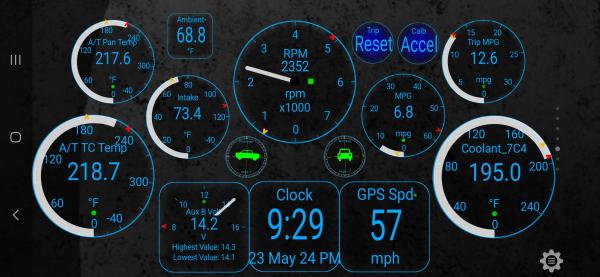
I installed Torque Pro last year (about 8k miles ago), and am using the VeePeak OBDCheck BLE+ reader. I was able to add the PID's from the OP in the Torque Pro settings menu, under the "Manage extra PIDs/Sensors". I just copied the uncompressed PID folder to my phone and found it through the Torque app to import them.

Here's what my dashboard looks like:

zkengle-albums-trans-cooler-install-picture63230-torque-app-screenshot-arriving-camp-mountains-towing-~3-000lbs-no-cooler-installed-~175-miles-3hrs-45min-ambient-air-temp-68f-t-pan-temp-max-around-217f-t-c-temp-max-around-235f.jpg
 
Last edited:

Members online

Forum statistics

Threads
278,310
Messages
3,554,078
Members
248,016
Latest member
Advally Service

Trending content

Back
Top