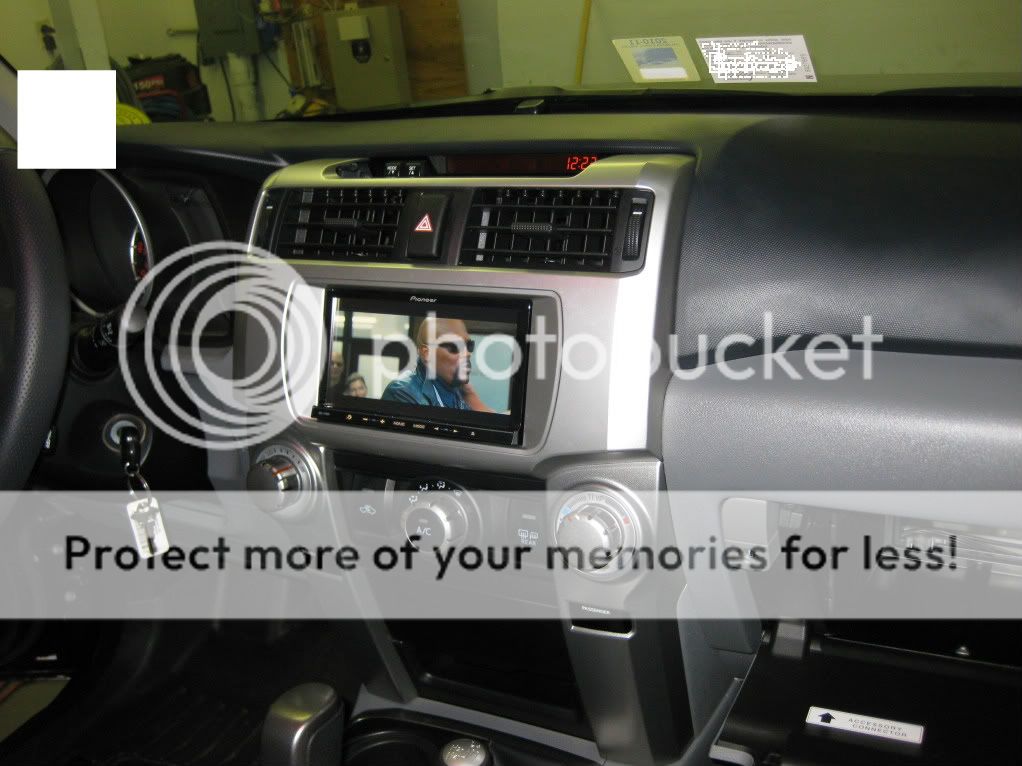
Aftermarket Stereo

i doubt this has come up yet, but there are basically two kinds of double din dash kits for the 2010-2011 4runner, one of them is made by Metra, and the other is made by Scosche

I didn't really notice the difference until i saw a photo of Harpers dash kit. People always complained about the space on either side of the nav unit. I think with the Scosche there isn't a lot of space on either side because of how the plastic is laid out.

Metra

Picture022-4.jpg~original


Scosche


IMG_2464.jpg~original


notice the slight differences in the plastic around the nav unit. I kinda like Scosche better. But, like i said, i didn't notice this until after i bought the kit and installed. it.
 
yeah, but it is the point that it is metra.. :) we're not on good terms with each other.

Also, Scosche is more stable.
 
does anybody know if there is a way to dim the brightness of the z130BT when i turn my headlights on? Driving at night the screen is very bright.

thoughts?
 

Two things - thanks for posting both images....I know which I will go with now when (if) I make the jump and upgrade to a Nav system.

Second, what is with the 4R? Carbon Fiber? What are those digital numbers at the bottom of the console just above the 4WD selector on the LE? I am guessing it is something that is custom based on the rest of the 4R but just curious if anyone knows.
 
Second, what is with the 4R? Carbon Fiber? What are those digital numbers at the bottom of the console just above the 4WD selector on the LE? I am guessing it is something that is custom based on the rest of the 4R but just curious if anyone knows.
I'm pretty sure that is Harper7's 4R, the carbon fiber is an overlay, and the "numbers" are voltage indicators for his dual batteries.
 
Two things - thanks for posting both images....I know which I will go with now when (if) I make the jump and upgrade to a Nav system.

Second, what is with the 4R? Carbon Fiber? What are those digital numbers at the bottom of the console just above the 4WD selector on the LE? I am guessing it is something that is custom based on the rest of the 4R but just curious if anyone knows.

that is harper7's work. the carbon fiber is a film or something that you can apply to anything. As you can see he likes it. He was talking about doing a sweet camo 3M film on his roof. Not sure if he ever got around to it though.

those red and blue digital displays are for his dual batteries, it displays the voltage for each
 
I'm pretty sure that is Harper7's 4R, the carbon fiber is an overlay, and the "numbers" are voltage indicators for his dual batteries.

Figures it is something he would do :hiding: I actually don't mind the carbon fiber look, we have an 06' F-150 FX4 which came with the 'carbon fiber' around the dash and wheel like his, I like it. Toyota needs to enlist him for a 'Harper' edition!
 
does anybody know if there is a way to dim the brightness of the z130BT when i turn my headlights on? Driving at night the screen is very bright.

thoughts?

I found a couple of cool hidden features with my Z120BT that are probably the same on your Z130BT.

Best for night driving......hold the "Home" button down for about 3 seconds and the whole screen goes black. To bring it back up again just touch the screen or any button.

To bring up the other hidden screen to adjust brightness,dimmer,contrast and such just hold down the "Mode" button for 3 seconds.

Try it on your Z130 and see if it works Matt. You'll love the black screen driving at night or you can just turn it way down.
Figures it is something he would do :hiding: I actually don't mind the carbon fiber look, we have an 06' F-150 FX4 which came with the 'carbon fiber' around the dash and wheel like his, I like it. Toyota needs to enlist him for a 'Harper' edition!

I used 3m Di-Noc carbon fiber vinyl wrap and put in some voltage gauges for my dual batteries.Painted all the other silver to black. That silver was getting scratched with my kids and dog pretty hard on painted plastic,especially the center console.The write-ups are over on my build thread in the gallery.......Voltage Gauges
 
I found a couple of cool hidden features with my Z120BT that are probably the same on your Z130BT.

Best for night driving......hold the "Home" button down for about 3 seconds and the whole screen goes black. To bring it back up again just touch the screen or any button.

To bring up the other hidden screen to adjust brightness,dimmer,contrast and such just hold down the "Mode" button for 3 seconds.

Try it on your Z130 and see if it works Matt. You'll love the black screen driving at night or you can just turn it way down.

alright, i asked the same question in the other thread. haha. I've only driven like 10 miles at night, so it hasn't really come up until now. I remember you mentioning the home and mode buttons that you just mentioned, it hasn't worked though. I'm gonna try and hold it down longer. When you do the home or mode thing, does it matter what screen you are in? ie, do those functions differ whether you are viewing the map or the audio screens?
 
alright, i asked the same question in the other thread. haha. I've only driven like 10 miles at night, so it hasn't really come up until now. I remember you mentioning the home and mode buttons that you just mentioned, it hasn't worked though. I'm gonna try and hold it down longer. When you do the home or mode thing, does it matter what screen you are in? ie, do those functions differ whether you are viewing the map or the audio screens?
Mine works on any screen.
If it doesn't work maybe go over to the Pioneer forum and ask. Just google "AVIC411" to find it.
 
Mine works on any screen.
If it doesn't work maybe go over to the Pioneer forum and ask. Just google "AVIC411" to find it.

easy enough. yeah i've been over the avic forums a bunch before i bought it, but, i didn't ask those questions! thanks gary
 
if your unit is wired right, it will switch into a "night mode", when your headlights are on.
When in that mode, the map inverts color (background becomes black/brown, etc), and the media player screen dims.
 
if your unit is wired right, it will switch into a "night mode", when your headlights are on.
When in that mode, the map inverts color (background becomes black/brown, etc), and the media player screen dims.

lol. Dammit. Well then it is not wired correctly! hahaha. thanks for the help Foques
 
Glad to be of assistance! :)

IIRC, it is the dimmer wire that needs to be wired up. If you like, I can take a video of what happens when I turn on the headlights.
 

Members online

Forum statistics

Threads
278,312
Messages
3,554,089
Members
248,016
Latest member
Advally Service

Trending content

Back
Top