
Backup camera intermittent

I've been having this issue lately too. It had happened maybe 1-2 times a year until the last few months when it has become more common. Restarting the vehicle hasn't been fixing it lately either.

I'm going to try taking a peek at this (http://www.toyota-4runner.org/2093109-post7.html) and if that doesn't do it, I might just go for the backup camera switch mod, both seem better than wasting time at the dealership.
 
Just dropping another name in the hat for malfunctioning back-up camera, 2014 TEP.
Seems to have a variety of issues which almost leave me wondering about a loose or bad connection.
Works fine (<70% of time)
Works with color and wavy video
Works with no color and wavy video
Works with no color image too dark to be usable (can't even see guidelines)
Doesn't work at all
I do notice malfunctions more frequently in below freezing temperatures and/or wet conditions. That leads me to wonder if my unit was never sealed properly and has now been repeatedly exposed to water and road salt for years leaving corroded connectors. I guess the only way to see is to pop open the liftgate and take a look. Alternative diagnosis: loose connection at back of head unit, and if I'm removing the head unit I'm replacing that POS.
 
Just dropping another name in the hat for malfunctioning back-up camera, 2014 TEP.
Seems to have a variety of issues which almost leave me wondering about a loose or bad connection.
Works fine (<70% of time)
Works with color and wavy video
Works with no color and wavy video
Works with no color image too dark to be usable (can't even see guidelines)
Doesn't work at all
I do notice malfunctions more frequently in below freezing temperatures and/or wet conditions. That leads me to wonder if my unit was never sealed properly and has now been repeatedly exposed to water and road salt for years leaving corroded connectors. I guess the only way to see is to pop open the liftgate and take a look. Alternative diagnosis: loose connection at back of head unit, and if I'm removing the head unit I'm replacing that POS.

Did you figure out this problem? My back up camera would go out intermittently. Now it seems to be out for good. Putting it in reverse gets a black screen. I"M SO PISSED.
 
I posted in this thread nearly a year ago and have had no issues with the camera since, here's what I did:

In another thread, someone had surmised the problem may be due to a faulty park/neutral position switch which is mounted on the right side of the transmission. I ordered a new switch, and in preparation for installation I doused the existing switch and surrounding areas with penetrating lubricant (I used Tri-Flow although I doubt that matters).

Apparently that cleaned things up and/or restored the connection - the camera has worked fine for the past 10 months. I never did install the new switch I ordered.

Hope this helps
 
Did you figure out this problem? My back up camera would go out intermittently. Now it seems to be out for good. Putting it in reverse gets a black screen. I"M SO PISSED.

Haven't had a single issue since I replaced the head unit. Must have been a bad connection behind the head. Although video quality still leaves something to be desired and OEM camera has the guide lines in the camera not in the head.
 
I posted in this thread nearly a year ago and have had no issues with the camera since, here's what I did:

In another thread, someone had surmised the problem may be due to a faulty park/neutral position switch which is mounted on the right side of the transmission. I ordered a new switch, and in preparation for installation I doused the existing switch and surrounding areas with penetrating lubricant (I used Tri-Flow although I doubt that matters).

Apparently that cleaned things up and/or restored the connection - the camera has worked fine for the past 10 months. I never did install the new switch I ordered.

Hope this helps

Thanks for sharing that!

Sorry to be a stickler, but these explanations can be deceiving on the forums. Right side of transmission: looking towards the transmission, or meaning passenger side?

Have a pic of the switch / part number? I will try this tnight.
 
Same. My 2011 limited having similar issues. Not sure if it's head unit or actual camera dieing... Sometimes no connection... Other times it's like stuck on night mode or a black screen... I have the anytime camera kit and it doesn't even activate backup system when the camera isn't working... Usually a quick restart fixes it.. but I'd rather not start and stop the truck multiple times to get the rear camera to kick in
.. I'll probably tear it open next week to see if anything loose from the head unit

Did you figure your issue out bruv?
 
Thanks for sharing that!

Sorry to be a stickler, but these explanations can be deceiving on the forums. Right side of transmission: looking towards the transmission, or meaning passenger side?

Have a pic of the switch / part number? I will try this tnight.

bump. any updates?
 
Thanks for sharing that!

Sorry to be a stickler, but these explanations can be deceiving on the forums. Right side of transmission: looking towards the transmission, or meaning passenger side?

Have a pic of the switch / part number? I will try this tnight.

Left and right should always be from the drivers (or passengers) seat looking forward. :) The switch is on the right side of the transmission. see attached.
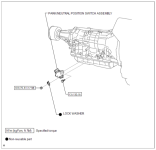
 

Attachments

  • 4runnerTransParkNeutSwitch.png
    4runnerTransParkNeutSwitch.png
    91.4 KB · Views: 62

Members online

Forum statistics

Threads
278,306
Messages
3,554,046
Members
248,016
Latest member
Advally Service

Trending content

Back
Top