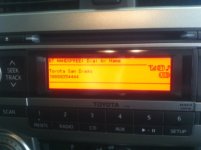
Bluetooth Phone contacts transfer?

Has anyone had luck transfering contacts via bluetooth with the Blackberry curve 8900? I get a push server error. I read the car manual and the blackberry manual but can't get it to work properly. I was able twice to tranfer the first contact in my phonebook but nothing else.

Thanks
I believe you're out of luck unless you have navigation. Attached are the sheets listing the phone capabilities for both the audio and the navigation system. You can access information for any of the toyotas and phones at this site: Toyota Bluetooth Phone
View attachment 540_09Audio.pdf

View attachment 540_08Navi.pdf
 

Attachments

Don't blame the Navigation. It's your Iphone. My wife and I both switched from the Iphone to the Droid's and they work perfect with my navigation and also with her microsoft sync. Pandora works great too.:reddance:
i don't get it. if you transfer the contacts to the Nav, how is it not the Nav failing to reconcile the incoming call on the iPhone with the corresponding contact in its own address book?

you're saying that when you get an incoming call on your Droid while driving that the call ID always shows up on the Nav display?
 
i don't get it. if you transfer the contacts to the Nav, how is it not the Nav failing to reconcile the incoming call on the iPhone with the corresponding contact in its own address book?

you're saying that when you get an incoming call on your Droid while driving that the call ID always shows up on the Nav display?

Yeah the caller id shows up on the Nav screen when there is an incoming call.
 
Yeah the caller id shows up on the Nav screen when there is an incoming call.
well i'll be damned... sucks for me. maybe it'll get fixed with iPhone OS 4 this summer.

thanks for clarifying that; actually glad to know it's not the Nav unit.
 
Here are the instructions for transferring contacts from the manuals of the NAV and no NAV systems.

But the part of the instructions that say (NAV):

"Refer to the manual that comes with the cellular phone for the details of transferring data."

There is no way on the iPhone to initiate the transfer that I know of.
 
I have the 3Gs w/ OS4 and my entire phone book is listed when my phone connects...everytime with no problems.

I'm guessing you have the Nav? I was curious about the non-nav contacts, I should've said that prior, sorry.

I have the iphone and would have to put each contact individually...guess I'm too lazy...lol but thanks!
 
I have the 3Gs w/ OS4 and my entire phone book is listed when my phone connects...everytime with no problems.
yeah, my address book synced fine with iOS 3.x too... but the call ID didn't work unless the caller's contact info was manually saved to the Nav unit. (and it's the iPhone software, apparently.)
 
So it sounds like the TE's and Limiteds or anyone with the NAV can do it fine using their Iphone but those of us without NAV and an Iphone are unable to sync our contacts.

It's still great that we can dial by name if we manually input the phone numbers, but if anyone did figure out how to sync the contacts from the iphone to the non-nav units, that would be awesome.

When a phone call is made by name, it just displays the phone number and the text "no name" even if you manually gave it a name. Not irritating enough to spend all day fixing it, but it still would be nice to fix this glich by syncing the contacts from the iphone directly.
 
Looks like this site has several phones that are considered "4Runner Compatible" and can transfer contacts:
LetsTalk.com - Cell Phone Specials

I guess you could buy a used one on ebay for 50 bucks and then sync contacts that way, and just sell it to someone else when youre done.

Pain in the butt to go through that trouble, but it seems like it would work...
 
Last edited:
yeah, my address book synced fine with iOS 3.x too... but the call ID didn't work unless the caller's contact info was manually saved to the Nav unit. (and it's the iPhone software, apparently.)

It makes sense, to me, that the bluetooth and head unit wouldn't have a TRUE caller ID built in. It can look at it's memory, see if that number exists in the car's contacts, and display the name, but it isn't going to have a service that is paid over the line built into the head unit.

i.e. If you sync your contacts, you'll get the name displayed on the head unit. If you get a call from a non contact, it won't display the name via Caller ID.
 
Rooted Droid BT problems

Anybody on here with a rooted Droid?

My phone was streaming BT audio & BT phone before I rooted. But after I rooted, I havent been able to either stream BT or use Bt for calling.

Anybody had the same experience? I have Android 2.2 on CYM Version 6.
 
Yesterday at a stoplight I initiated the transfer of my contacts. After about 12 seconds I got the "transfer complete" or whatever it said, and my entire contact list was copied over. I have the say the OEM Nav unit is an absolute pleasure. The only thing I would change about it is the iPod scrolling; otherwise I love it.
 
I just found out this forum. It is awesome. Thank you all for sharing your experiences!

I purchased my SR5 with premium package about 3 months ago. I was able to transfer most of my contacts to the vehicle's phone book via bluetooth in the first day. I have Samsung Eternity phone. I am able to view both contact name and phone number in the orange display.

Good luck to all!
 
Unit now displays contact names with iphone calls

I borrowed a buddies Nokia E71x and used that to store my contacts in my 4runner since the iphone doesn't transfer contact info to the non-nav head units.

After loading them, I switched back to my iphone and now when I make or receive a call from any number that I stored, it displays the name rather than the annoying "no name."

So it is possible for us iPhone users to get the names to display on the non-navigation units, but you gotta get ahold of a compatible phone to do it.
 

Attachments

  • Iphone Display-4Runner.JPG
    Iphone Display-4Runner.JPG
    61.9 KB · Views: 4,530
I Think that has nothing to do with Nav System, if you have hand free bluetooth capable, it should work the same depend on how you set it up to display in your address list.
 
I Think that has nothing to do with Nav System, if you have hand free bluetooth capable, it should work the same depend on how you set it up to display in your address list.

How do you send the contact info from an iPhone? There is not an option to send like some of the other phones have.

According to the Toyota list of compatible phones, it says iphones are not capable of doing that... I wish they were wrong but after trying many times, the only solution I've found is to use someone elses compatible phone to upload the data and then switch back to the iPhone when done adding contacts.
 

Members online

Forum statistics

Threads
278,309
Messages
3,554,071
Members
248,016
Latest member
Advally Service

Trending content

Back
Top