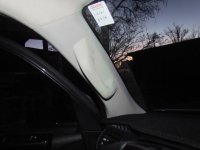
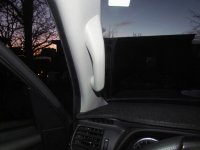
Drivers Side “A” Pillar Grip Handle Installed on 2014 -2025 T4R

I don't see a green box or anything that when I point to it saying "manage attachments" I see "Edit" "Quick reply" "Reply with quotes" "Multi Quotes"


If you see a green box that states: Go Advanced, click that first!

Look below your post you will see additional options: Manage Attachments

Then: Choose File

pnbE924Lj


pnoM1sZ3j
 
Last edited:
If you see a green box that states: Go Advanced, click that first!

Look below your post you will see additional options: Manage Attachments

Then: Choose File

pnbE924Lj


pnoM1sZ3j

Thanks for helping this dumbass out!! I have used this in the past just completely forgot HOW to do it!!:hail::thumb3:
I did this & the pic showed up before I clicked save changes. Now just 3 IMG are showing but not the pics. in post #218
 
Last edited:
I don't see a green box or anything that when I point to it saying "manage attachments" I see "Edit" "Quick reply" "Reply with quotes" "Multi Quotes"

You have to use these buttons:
-Manage attachments
-Choose file (navigate to your photo album, click on a photo)
-Upload
-Close the window
-Preview post
-Submit post

I find that it helps if your photo is in the 4x3 aspect ratio, horizontal. Also, a size of about 200Kb seems to work well.

One more thing: in order to correct a previous post hit the little pencil icon. You can manage attachments, delete or add new items, then Save. Good luck.
 
Last edited:
Finally finished up yesterday, thank you to everyone who joined in with their tips and help. I did not end up needing to trim the top of the handle at all, it fit fine without any trimming on the mounting surface:
 

Attachments

  • IMG_1488.jpg
    IMG_1488.jpg
    121.5 KB · Views: 2
  • IMG_1489.jpg
    IMG_1489.jpg
    117 KB · Views: 2
Last edited:
Finally finished up yesterday, thank you to everyone who joined in with their tips and help. I did not end up needing to trim the top of the handle at all, it fit fine without any trimming on the mounting surface:

The above post had the photos showing when I posted it, now they don't show up. I'm not sure what the deal is. I did everything [MENTION=200736]ElectroBoy[/MENTION] listed above in order to upload the photos...I guess I am not up on the nuances of T4R.org.
 
Last edited:
Hello [MENTION=604721]smeerun[/MENTION]. New guy here, I've been following this thread and yours on the subject for some time. I have everything on order to complete this mod, the parts are due to deliver today. One question - do you need to remove all the raised portions of the bottom mounting surface of the grab handle with a dremel, so it's flat, with no raised surfaces? Thanks!

yes correct. the bottom of the handle has square shapped sections that protrude that require to be cut off with a sharp razor box cutter type knife or dremel them off.. they are like tabs that need to come off...

the round area where the bolt goes stays but the square section needs to be cut flat.

-J
 
The above post had the photos showing when I posted it, now they don't show up. I'm not sure what the deal is. I did everything [MENTION=200736]ElectroBoy[/MENTION] listed above in order to upload the photos...I guess I am not up on the nuances of T4R.org.

Hmmmm...
Maybe you’re trying to upload a photo that is too large. I’ve had the process choke for me if a photo is over 1Mb or so.
 
Received my kit last week and my handle & covers today. Looks like I've got a project for tomorrow!

Sent from my SM-G986U using Tapatalk
 
yes correct. the bottom of the handle has square shapped sections that protrude that require to be cut off with a sharp razor box cutter type knife or dremel them off.. they are like tabs that need to come off...

the round area where the bolt goes stays but the square section needs to be cut flat.

-J

Thanks for the response. After getting the bracket mounted and the trim piece back on, it became apparent what needed to be cut. I ended up cutting the round raised portion of the bottom mount flat also in order for the handle to be flush. Nothing off the top mount as far as the round raised portion, just the square notch thingie.
 
Hmmmm...
Maybe you’re trying to upload a photo that is too large. I’ve had the process choke for me if a photo is over 1Mb or so.

The two JPG photos I uploaded are about 350 kb each. Too large? They showed up initially when I posted the reply, but when I navigated to another thread, then back, they just have this showing:

-img_1488-jpg -img_1489-jpg

Would they work if I uploaded them as thumbnails instead of full size?
 
Hmmmm...
Maybe you’re trying to upload a photo that is too large. I’ve had the process choke for me if a photo is over 1Mb or so.

The two JPG photos I uploaded are about 350 kb each. Too large? They showed up initially when I posted the reply, but when I navigated to another thread, then back, they just have this showing:

-img_1488-jpg -img_1489-jpg

Would they work if I uploaded them as thumbnails instead of full size?

I've had nothing but issues trying to upload pics from my phone, even small ones, so I just use imageshack
 
I've had nothing but issues trying to upload pics from my phone, even small ones, so I just use imageshack

I don't use any photo store/share sites since the great Photobucket debacle, so I guess I am out of luck being able to post any images on this forum.
 
Did mine today. It was a lot easier to do than I expected. Once my Dobinsons IMS kit is in and installed and the new wheels & tires are on, it's going to be getting daily thanks from my old knees. [emoji38]

Sent from my SM-G986U using Tapatalk
 
Thanks for the response. After getting the bracket mounted and the trim piece back on, it became apparent what needed to be cut. I ended up cutting the round raised portion of the bottom mount flat also in order for the handle to be flush. Nothing off the top mount as far as the round raised portion, just the square notch thingie.

Yep! Thats what I was trying to say, once you get it mounted up it will be clear what you'll need to shave down to make it flush. :)

I don't use any photo store/share sites since the great Photobucket debacle, so I guess I am out of luck being able to post any images on this forum.

I highly recommend using imgur.com to host images for the internet and here is why:

Reddit.com is one of the largest conglomerate of online communities (globally) and >80% of people host their images on Imgur and then post to reddit. It would be detrimental to the historical value of Reddit's posts if Imgur were to ever go under and thus it's extremely likely that Reddit would acquire Imgur simply to retain both the simplicity of Imgurs image hosting service and to avoid the Photobucket situation all over again.

Of course, we can never fully know what the future holds and we're just a bunch of folks hoping that these sites all stick around. :shrug:

Glad you got the handle installed regardless!!
 
Sadly Doesn't Work on All 5th gens

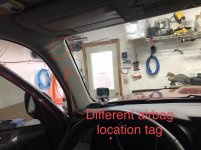
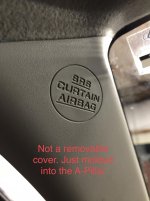
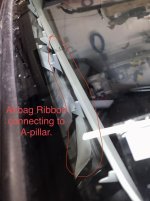
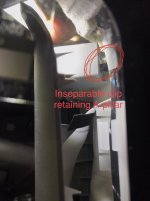
Well I'm sad to write that this kit doesn't work with ALL 5th gens. I was so excited to install this in the truck to surprise the wife but unfortunately I cant. My 4Runner is a 2011 Trail Edition and appears to have a different A-Pillar and air bag design. As you can see in the photos the "SRS CURTAIN AIRBAG" logo is in a different location, and not actually a bolt cover. The A-pillar is also not supposed to be removed by just anyone. There is a one way clip at the top that the will only release if you break it. It looks like the A-pillar is connected to the airbag with a ribbon and I'm guessing Toyota was protecting people from removing the cover and messing up the airbag.

Good news is its easy to tell by looking if you are one of the few like me that this won't work for by looking at the airbag warning logo. I'm also happy to say this kit wont go to waste, a friend is going to use it on their rig.
 

Attachments

  • tag location.jpg
    tag location.jpg
    128 KB · Views: 3
  • tag up close.jpg
    tag up close.jpg
    128.6 KB · Views: 3
  • ribon through windshield.jpg
    ribon through windshield.jpg
    122.6 KB · Views: 3
  • inseparable clip.jpg
    inseparable clip.jpg
    126.2 KB · Views: 3
Last edited:
Jason, do you have bracket and install instruction for pre facelift 5th gen (2010-2013)? On my 2013 SRC cover doesn't exist whole A-pilllar cover is one piece. Also removal of it is not simple pop it off and looks like some cord holding it and must be cut. Without clear instructions I'm hesitant to cut anything near curtain air bag.

Yes, it can be done, it takes two brackets and have had people do it successfully just need to line up brackets with out the plastic apillar in place then install the apillar and drill holes into it.

you can just remove that cover, the cord can be removed. the airbag is installed AFT of where the handle goes and airbag is not affected at all.

-J

Well I'm sad to write that this kit doesn't work with ALL 5th gens. I was so excited to install this in the truck to surprise the wife but unfortunately I cant. My 4Runner is a 2011 Trail Edition and appears to have a different A-Pillar and air bag design. As you can see in the photos the "SRS CURTAIN AIRBAG" logo is in a different location, and not actually a bolt cover. The A-pillar is also not supposed to be removed by just anyone. There is a one way clip at the top that the will only release if you break it. It looks like the A-pillar is connected to the airbag with a ribbon and I'm guessing Toyota was protecting people from removing the cover and messing up the airbag.

Good news is its easy to tell by looking if you are one of the few like me that this won't work for by looking at the airbag warning logo. I'm also happy to say this kit wont go to waste, a friend is going to use it on their rig.

So did you contact Jason and inquire about your model ?
It looks like someone asked about earlier year models and was told it would work, but not with the bracket you describe!

Reach out to Jason and see what you really needed.
 
hi yes, it works on 2011 i have done it before. please email me and we can figure it out as this thread is 2014+ and there is a way to get it going for older models. 2010-2013's.


-J
 
hi yes, it works on 2011 i have done it before. please email me and we can figure it out as this thread is 2014+ and there is a way to get it going for older models. 2010-2013's.


-J

Awesome support from you guys thank you so much! I'm excited again to get this installed.
 
Ordered and paid this past weekend, thankfully Jason is still making these! Thanks Jason for the quick reply. Man, I used this handle all the time on my 2002, it will be great to have it on my 2017 now. Thanks Saker for doing the original write up.
 
Anybody ever have trouble getting hold of [MENTION=154554]Jasontamu[/MENTION]? Was talking with him last week, and made payment. Now, nothing...?
 

Members online

Forum statistics

Threads
278,316
Messages
3,554,120
Members
248,016
Latest member
Advally Service

Trending content

Back
Top