Installed HU and Omnifi.. check out the pics..

atomic punk

New member
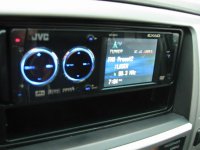
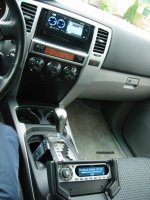
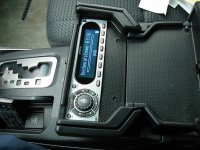
This setup looks much better in the dark, and I'll take some pics of that later on. But here are some pics in the daylight of my JVC KD-AVX1 head unit and the Omnifi MP3 player - which is hooked up directly to the head unit via the external IN RCA plugs. With the help of Mr.Dremel, this install was very easy and fast too.

Here is the shot of the head unit.
 

Attachments

  • dvd2.jpg
    dvd2.jpg
    44.1 KB · Views: 2,246
Register to hide this ad
I forgot one thing: the hard drive for the MP3 player is in the upper portion of the glove box, it fits PERFECTLY in there with not much room to spare.

Here's a closer up shot of the Omnifi. Sorry about the huge pic size (and I don't know how to upload multiple pics in one post)
 

Attachments

  • o.jpg
    o.jpg
    90.1 KB · Views: 2,262
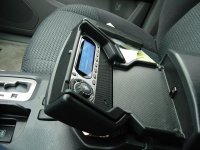
Last one...

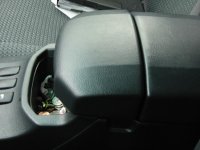
I still have some cleanup work to do in that console area (run the wire TIGHT to the bottom of the lid, and shave off some plastic flashing from the dremel cuts). For anyone that might be interested in doing the same install, the Omnifi control unit fits perfectly in that flipout area, but its face must be flush mounted to the inner surface in order for that lid to SNAP shut, like it should.
 

Attachments

  • o6.jpg
    o6.jpg
    79.3 KB · Views: 2,258
Slick install atomic. How is the omnifi working so far? Also, is that the JVC HU that plays DVD's with MP3's on it?
 
Thorton:
The Omnifi is working great. It's a neat little unit for the price, I would recommend it. The only thing I don't like (I think WKParker mentioned) is that you have to use the scroll function ALL the time from A-Z, you cannot jump easily to an artist or album). Me personally, I would have liked to see a "Queuing" function like Windows Media Player has, where you can choose multiple songs to play in succession AFTER the current one is finished playing.

Yes, this head unit can play MP3s on DVDs, but since I have the Omnifi (and I intend on replacing the 20gb HDD with a 100gb one), I don't need to use that function.

Cliff: the HDD is on the top shelf inside the glovebox.
 
Nice install, atomic!

>>The only thing I don't like (I think WKParker mentioned) is that you have to use the scroll function ALL the time from A-Z, you cannot jump easily to an artist or album).

I recently found that when you are looking at a long list (like "All Artists"), pressing the Fast Forward (>>) button will jump ahead something like 10 percent of the total items listed. IOW, if you have 100 artists on the list, each button press will jump ahead 10 names. Try it - it really helps navigation.
 
I love the use of the otherwise useless console tray. very slick!

I bought the OmniFi, but decided that the UI is too annoying and ebayed it.

for now the Scion HU is good enough.
 
awesome install. you should put some type of trim or something to cover up the marks where you cut. i'd be really picky about osmething like that but other than that, that is a great idea. i might move my xm commander to that spot.
 
galacticrunner1 said:
awesome install. you should put some type of trim or something to cover up the marks where you cut. i'd be really picky about osmething like that but other than that, that is a great idea. i might move my xm commander to that spot.

Thanks for the compliments, I'm rather proud of my few hours of work.

battlestargalaticrunner1:
That's exactly what I plan to do in there: right now, the control unit is not "secured" in there, it's just tightly placed in there. It doesn't move, but could use a few spots of glue underneath to hold it in place, as well as maybe some black silicone around the cut marks from the dremel to make it look spiffy. There is NO room at all for a trim plate on 3 of the sides, so that's not really an option unless I want to hack up a trim plate and use just 1 side for the base of the unit there.

By the way, WKParker, if you are still subscribed to this thread, I just bought a new HDD for the Ominifi (60gb) from ebay so I can put that in place of the 20gb stock one... I can't wait to triple the amount of songs I have in there.
 
Atomic, what brand drive did you buy for the upgrade? Le t me know how it goes.

Also, did you see my note about jumping ahead on the artist list? You'll definitely need that with 60GB!
 
I bought a Toshiba HDD from ebay. I forget the P/N, but you can Google under "Omnifi hard drive replacement" or something like that and get a link to the replacement step by step with pics. I'll let you know how it goes...

The control unit is only about 1/2" thick if you remove the mounting brackets: but the eject button and scroll knob make the thing stick out about 1" total I believe. It JUST fit in that spot, no room to spare.

WK: I tried that superfast scroll feature, works well, thanks!!!!!!
 
Atomic, did you have any problems fitting the JVC HU in there? I've heard the faceplate on those is slightly oversize, which can cause problems. Also, did you ever find a solution for the steering wheel controls?
 
I had no problem inserting the head unit into the Metra dash kit. I fit perfectly. That JVC unit is not slightly oversized - however, I think because there is no trim ring with the unit, the faceplate can use more available space, even with the standard 1 DIN sized unit behind the faceplate.

No solution to the steering wheel controls yet, they do not work, and I'm not happy about it since the remote control for the JVC unit is AWFUL. It's got about 4 thousand buttons on it, and the ones you use the most are not easy to find (power, volume, source, up/down preset, etc). Whoever designed this remote control was probably thinking of a user who could spend 3 full seconds staring at the control before pressing a button. 'Kinda hard to do when driving for most people.... maybe JVC makes a smaller, more user-friendly remote that is compatible with this unit.
 

Members online

Forum statistics

Threads
278,316
Messages
3,554,120
Members
248,016
Latest member
Advally Service

Trending content

Back
Top