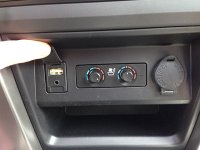
Need Pics of you USB Port ASAP Please

TOY2G

New member
I am working with PAC for a solution to keeping my OEM USB port (the one under the head unit). But they plug they have listed as fitting, does not..
USB-TY2
usbty2.jpg


it appears to be designed for vehicles with the USB port only and mine has both USB and AUX on the plug. I need to see what is the norm and where the split is.

So please post a pic along with year and trim

Thanks for the help.
 
Register to hide this ad
My USB port is in glove compartment and it's standard since I can easily connect USB key or a standard USB cable in it. But AUX is in centre console under head unit. I can take picture later today of course but USB port is the same one we have on computers - nothing unusual really.
 
'14 LE.

Not sure why pic flipped upside down....

Damn - you've got seat heaters AND coolers...!!!

I definitely like that position for those controls vs. the US models sitting just in front of the middle arm rest/storage box.

The US version is basically the same with Aux in the center console and USB in the glove box.

Search on [MENTION=65614]Antman[/MENTION] thread as he has pics when he did some mods around those... It's here
 
Last edited:
its not actually cooled, its ventilated. so if you truck interior is hot, its just going to blow hot air until the a/c cools the interior.

all the knob does once you turn it left is increase the speed of the fan in the seat.
 
My USB port is in glove compartment and it's standard since I can easily connect USB key or a standard USB cable in it. But AUX is in centre console under head unit. I can take picture later today of course but USB port is the same one we have on computers - nothing unusual really.

so you do not have one at all under your HVAC controls? Interesting.

thanks
 
so you do not have one at all under your HVAC controls? Interesting.

That was one of the changes for 2013. 2012 and older have the setup [MENTION=56372]scanny[/MENTION] described: AUX plug under the HVAC controls and USB in the glove box.
 
Last edited:
its not actually cooled, its ventilated. so if you truck interior is hot, its just going to blow hot air until the a/c cools the interior.

all the knob does once you turn it left is increase the speed of the fan in the seat.

I have to double check what we do for the 4Runners, but I know that the Avalons and Lexus use a special thermo-electric filament that gets cold when electricity is applied. They could just be ventilated with no cooling element, but I thought we had started using the thermo-electric elements in all our "seat coolers."
 
I am working with PAC for a solution to keeping my OEM USB port (the one under the head unit). But they plug they have listed as fitting, does not..
USB-TY2
usbty2.jpg


it appears to be designed for vehicles with the USB port only and mine has both USB and AUX on the plug. I need to see what is the norm and where the split is.

So please post a pic along with year and trim

Thanks for the help.

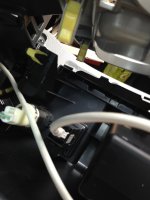
You don't need that cable, just need to modify a USB cable to fit -- I actually did this today on my 2013 4Runner. Don't cut the back of the plug like one of the people in the link I'm providing, just stick the USB cable in.

See http://www.ft86club.com/forums/showthread.php?t=8595

IMG_0483.jpg
 

Attachments

  • IMG_0483.jpg
    IMG_0483.jpg
    109.9 KB · Views: 2,474
You don't need that cable, just need to modify a USB cable to fit -- I actually did this today on my 2013 4Runner. Don't cut the back of the plug like one of the people in the link I'm providing, just stick the USB cable in.

See Using Factory USB port with Aftermarket HU - Scion FR-S Forum | Subaru BRZ Forum | Toyota 86 GT 86 Forum | AS1 Forum - FT86CLUB

View attachment 117747

Where did you find a double male USB. I drove all over the place today looking for one.

Once you remove the metal, does it plug in pretty firmly?
 
Where did you find a double male USB. I drove all over the place today looking for one.

Once you remove the metal, does it plug in pretty firmly?

I used an old USB extension cable I already had. Just make sure to cut the metal off the correct side of the cable: Apple Genuine USB Mouse Keyboard Extension Cable 36" Long | eBay.

It, surprisingly, did plug in firmly. I planned on gluing it in place but I felt it was firm enough to stay in place and didn't want to ruin the plug.
 
I used an old USB extension cable I already had. Just make sure to cut the metal off the correct side of the cable: Apple Genuine USB Mouse Keyboard Extension Cable 36" Long | eBay.

It, surprisingly, did plug in firmly. I planned on gluing it in place but I felt it was firm enough to stay in place and didn't want to ruin the plug.

Well.... I found a cable with two male ends, cut the metal of of one end, prayed the 4 contacts up a little to insure good contact....and nothing.

On a side note, I did finish the install on my backup camera. But still no USB
 
Well.... I found a cable with two male ends, cut the metal of of one end, prayed the 4 contacts up a little to insure good contact....and nothing.

On a side note, I did finish the install on my backup camera. But still no USB

This is just guessing but I wonder if prying up the contacts was a good idea because it could have caused them not to line up properly -- maybe try plugging it in a few times to see if you can get them to seat. Also, I would try an extension cable before you give up. I feel very lucky mine worked.
 
This is just guessing but I wonder if prying up the contacts was a good idea because it could have caused them not to line up properly -- maybe try plugging it in a few times to see if you can get them to seat. Also, I would try an extension cable before you give up. I feel very lucky mine worked.

I tried again with a new cable and still nothing works. I'm putting this one to sleep for a while.
 

Members online

No members online now.

Forum statistics

Threads
278,317
Messages
3,554,129
Members
248,016
Latest member
Advally Service

Trending content

Back
Top