New Dashcam Install - Blackvue DR900S-2CH

Naylor99

Member
Just installed the latest Blackvue dashcam; DR900S-2CH 4K UHD

I have both front and rear cameras installed. I plan to hardware it via a Power Magic Pro unit, but for now it is just plugged in to the 12v adapter.

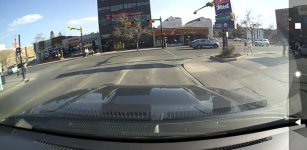
Front camera, showing inside view then outside view (apologies for the dirty windshield. The mount under the mirror is for my radar detector):

IMG_7909.jpg
IMG_7908.jpg


Rear camera unit:

IMG_7912.jpg
IMG_7910.jpg


I installed the rear camera unit by utilizing the three headliner buttons and a sign I found at Home Depot:

https://www.homedepot.com/p/The-Hillman-Group-4-in-x-18-in-Fire-Extinguisher-Sign-844112/100197218

the_hillman_group_stock_signs_844112_64_1000.jpg


I had to drill three holes, and trim the sign down a bit, but the back was covered with a protective film, and I was pleased to find that it was a nice plain white color. Here is a 'straight up' view. Nice and clean. I will find some white dots or something to cover the visible holes, but I am very happy with this install.

IMG_7911.jpg


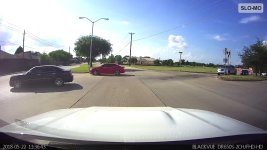
Here are a couple of screenshot samples:

IMG_7915_2.png


IMG_7914_2.png


I have the DR650 (older) version of this in my Mazda Miata RF. Quite happy with these little cameras. Purchased through thedashcamstore.com. I have no affiliation with them or with Blackvue.
 
Register to hide this ad
Nice.. when did that come out? I've been on the fence with the DR-750... which was the new camera when I was researching the DR-650 LOL
 
Great work. I've been looking at cams for a while not and this one is always at the top of my list to check out.

Without the radar mount, how visible is the cam behind the mirror while you're seated in the driver seat? The less clutter in my field of view the better which is why I have avoided some of the cams that have built in view screens.

Also, I think I read that this cam has phone app software that allows for settings and monitoring. Do you have that? Is it mandatory? Is there a subscription for that service?

I'm trying to figure out all in costs and if there is any recurring annual costs as well.

Thanks for the post and excellent looking install.
 
Without the radar mount, how visible is the cam behind the mirror while you're seated in the driver seat?

Can't even see it.

Also, I think I read that this cam has phone app software that allows for settings and monitoring. Do you have that? Is it mandatory? Is there a subscription for that service?

Thanks for the post and excellent looking install.

I have a free app that allows for configuration and viewing/downloading. You can also config this unit to connect to your local WIFI and then access it via a cloud connection. No subscription required for that. Of course the camera has to be powered on for that, so I cant do that until I hardwire it in and have it 'switchable' with the Power Magic box. For example, I can pull my Miata into the garage, and if I need to download a few clips, I can switch it 'on', go into the house and download from the camera to my Mac or PC.

I think they (Blackvue) have some fee based services, like automatic upload to the cloud, etc. Also there are limits to how many times you can use the cloud access for free - but you can always pop the card out and read it on your Mac/PC. I am not using any subscription services.

Once set up and running, I don't generally do much with the recordings - they are just there for insurance if anything happens and I need them. But every once in a while I see something that I just have to review...check this out!

https://www.youtube.com/watch?v=gyFE4m1Q85k

Wild stuff you see on the road these days.
 
Last edited:
Your camera seems to be pointed up high. Do you find when you are watching play back that your camera often fights brightness?

Here's mine. Some might argue that it seems low but it doesn't often change when driving.
 

Attachments

  • croppedScreenshot_1528151086934_.jpg
    croppedScreenshot_1528151086934_.jpg
    37.9 KB · Views: 6,270
Your camera seems to be pointed up high. Do you find when you are watching play back that your camera often fights brightness?

Here's mine. Some might argue that it seems low but it doesn't often change when driving.

I know what you mean, but I wanted to maximize what I could pick up on screen. Mine was originally pointed like yours, but I realized that 1/3 of the video was of my hood. Not much point in recording that. Now I can see more sky...maybe I will catch a meteor shower! UFO! Wild eagles!

Who knows?

Have not noticed any issues with brightness so far.
 
Last edited:
I have a free app that allows for configuration and viewing/downloading. You can also config this unit to connect to your local WIFI and then access it via a cloud connection. No subscription required for that. Of course the camera has to be powered on for that, so I cant do that until I hardwire it in and have it 'switchable' with the Power Magic box. For example, I can pull my Miata into the garage, and if I need to download a few clips, I can switch it 'on', go into the house and download from the camera to my Mac or PC.

Perfect, and agreed re: insurance. We all have stories where these "would" have been handy to have, and now I want to be able to say "Glad I have it".
I'm sure it pays for itself just with use in 1 incident where you can prove what actually happened vs a verbal only claim.

Thanks again
 
I also have my camera pointed in a more downward viewing position. As much of the hood as possible, still plenty of upward view. If someone were to impact your fender more from the side, the view dedicated to meteors may not be useful. Accidents are rarely directly in front of you. I know from experience and wish I had even more of a wide angle view. I have since then lowered my cameras' view.
 
Last edited:
Nice! Clean install, been looking into these too.

Your camera seems to be pointed up high. Do you find when you are watching play back that your camera often fights brightness?

Here's mine. Some might argue that it seems low but it doesn't often change when driving.
I have mine set kind of in the middle.

I would opt for what you guys have too, if not even a little lower, so you can catch more of the periphery, I reckon you could see almost to the pillar. It makes no sense to record so much sky. This is to catch accidents (unless I guess if your looking for planes or meteors dropping out of the sky) I want as much of the truck in view while still showing the extents :)
 
I also have my camera pointed in a more downward viewing position. As much of the hood as possible, still plenty of upward view. If someone were to impact your fender more from the side, the view dedicated to meteors may not be useful. Accidents are rarely directly in front of you. I know from experience and wish I had even more of a wide angle view. I have since then lowered my cameras' view.

You may be right. I will experiment a bit and adjust as appropriate...
 
Thanks for giving the idea of installing a camera in the back. I use Garmin dashcams and they're great. My windows are heavily tinted. I have to see how it affects the dashcam before I commit to putting one in the back.
 
I put in a BlackVue 590 the other month. I have nothing but great things to say. Great product, and the camera is amazing!

Hardwired it in with no issues at all in about 30 minutes.
 
Thanks for giving the idea of installing a camera in the back. I use Garmin dashcams and they're great. My windows are heavily tinted. I have to see how it affects the dashcam before I commit to putting one in the back.

my back window is super tinted... can only see during the day, but at night all you see is headlights. One back thing about having the rear camera is that when the back window gets dirty its hard to clean since the wipers doesn't clean the area.
 
I had to drill three holes
SOOO glad you posted this! I've been trying for about a week to get around to installing my BlackVue, and wondering how I'd do the back -- having visions of attaching it to the glass, and then absent-mindedly or accidentally rolling it down. A few times I've gone out in the morning to find the glass down, maybe from having the fob in my pants pocket.
MAIN QUESTION: Are you saying you drilled into the headliner? [shudder!] How far? Using what as an anchor? Butterfly-anchor bolts? How did you know you might not damage some wiring?
 
SOOO glad you posted this! I've been trying for about a week to get around to installing my BlackVue, and wondering how I'd do the back -- having visions of attaching it to the glass, and then absent-mindedly or accidentally rolling it down. A few times I've gone out in the morning to find the glass down, maybe from having the fob in my pants pocket.
MAIN QUESTION: Are you saying you drilled into the headliner? [shudder!] How far? Using what as an anchor? Butterfly-anchor bolts? How did you know you might not damage some wiring?

Glad you found it timely. No, no, no drilling into the headliner! Please! 8-) Clearly I need to explain this better.

First, pull down the three buttons in the headliner, using dash pry tools - gently, they will come straight down and out. Mine came out intact, but with age they may get brittle. I'm sure they are easily replaceable if you break one, so don't panic if that happens.

Second, measure carefully the distance between each of the three holes. You can make a cardboard template first to be sure.

Third, get that fire extinguisher sign you just bought at Home Depot. Flip it over, peel off the blue film that covers it, and mark and drill three small holes (on your workbench) so that you can use those buttons to affix it back to the headliner.

I trimmed it down a bit (lengthwise) because it was a little too fat and didn't look right. Look at my pics again and I think you will see what I am talking about. (Trim the width, not the length). To do this, use a new sharp utility knife and a ruler, and just pull the knife across in a straight line, exerting just a small amount of pressure each time. After a little while you will be able to gently bend and break off the unwanted piece.

Now you are ready to install your new camera mounting plate; You are just going to push the buttons through those holes, then back into the holes they came from, and that will hold the nice white sign in place.

Fourth, use the 3M pad mount that came with your camera to stick your camera to the sign, centered side to side, and as close to the back window as you can. Hold it up and test for position few times before you attach it for real, and center the camera lens, not the camera itself. Those sticky pads really work!

Hope this helps!
 
Last edited:
I have had mine for about a year, mounted in the same spot as on yours. Luckily have not needed it, hope not to, lol.

For those wondering; cannot see it from driver view, and there are settings where you can have it make noise/lights when it turns on, or make it silent/no lights. Also you can select to record audio or leave it off.

I did not get the rear one, but after an incident last weekend, thinking I will (I was on the highway, I go to change into the right lane, and some guy in a pick-up came right behind me and into the lane I was changing into; he was doing well over the speed limit, dangerously over). If an incident occurred, the rear camera would have assisted to see how fast and recklessly he was changing lanes, he was not behind me I know because I looked in the rear view and side view when changing, he had to have blast over from the lane to the left of me.
 

Members online

Forum statistics

Threads
278,316
Messages
3,554,112
Members
248,016
Latest member
Advally Service

Trending content

Back
Top