OBDII scanner cannot connect to ECU 2004 V6 4WD Limited

JtotheRed

New member
So I've been scouring the forums here and all over the web searching for answers to no avail. I've had a few issues arise (CEL and such) and wanted to scan the ECU to see what the problem is. Upon connecting the OBDII scanner to the DLC I realized there wasn't a connection between the two? The OBD reader does power on when plugged into the port and I've tested the voltage on pin 16 and it's getting 12v constant so there is power and all the fuses are good, it just reads "unable to connect to ECU."

I guess my questions would be how to troubleshoot and diagnose what's wrong with the connection between my DLC and ECU? I can't seem to find an accurate pinout diagram of the DLC anywhere for an '04 T4R 4x4 limited so I can tell which pins are which and to where the wires run to in the rig. While falling down the rabbit hole I've also read that they may be wired differently depending on when in 2004 it was manufactured, specifically pre and post August 2004??? (Mine was made in July 2004)

Also I've recently read on other automotive forums (Audi and VW) about the "After Market Radio Problem" (Ross-Tech: VCDS: Afterrmarket Radio Problem) which apparently after installing an aftermarket stereo can cause a disruption between the DLC and the ECU because of the K-line shorting to +12v? Not sure if this can be an issue for Toyotas, but I do have an aftermarket stereo with steering wheel controls that all work well.

In reference to the pictures I've (unsuccessfully) attached, looking at the front of the DLC it appears to have wires running to 4, 5, 7, 9, 13, 14, 15, 16 pin placements. Looking at the two pictures from the back (sorry for the lack of clarity), it appears to be wired: 4(White/Black) 5(Brown) 7(Red/Yellow) 9(Black/White) 13(Pink/Blue) 14(Red/Black) 15(Red/White) 16(Orange)

So in summary I just really want to know the pinout for the DLC (diagram if possible) and why the ECU won't link to the OBDII scanner and how to troubleshoot. I should also mention the ECU has already been replaced once before about 5 years ago, after the first aftermarket stereo was installed, but before installing the second aftermarket stereo.

Sorry for the long convoluted post and many thanks to anyone offering up whatever little info they may have!
 
Last edited:
Register to hide this ad
Just another thought, you may want to also try another OBD2 scanner to rule out that the issue isn't with the scammer you're trying now.

Also if the second scanner has the same issue, you might want to check the connector to the ECU to make sure there's no bent pins, etc. since it was replaced.
 
Last edited:
Just another thought, you may want to also try another OBD2 scanner to rule out that the issue isn't with the scammer you're trying now.

Also if the second scanner has the same issue, you might want to check the connector to the ECU to make sure there's no bent pins, etc. since it was replaced.

Yea I've tried multiple scanners all with the same result. At first I had tried a few Bluetooth versions that I assumed were all crap, but now after having taken it to AutoZone and Advanced with the same results I've realized there's no link between the DLC and ECU.

Thats a good idea though about pulling the ECU, I guess I'll start there. I think it's just behind the glovebox?

What's more unnerving is the reason I really became aware of this is because of the CEL starting to flash and the VSC OFF and VSC TRAC lights have all come on which I originally hoped was just a faulty gas cap, but seems to be worse than that. Now the truck idles roughly and the engine is obviously having problems. I think it may be misfiring which hopefully I could remedy with new spark plugs and coils, but could mean I need a new head gasket? The unfortunate thing is I can't diagnose the engine faults without first fixing the computer connection and I'd hate to spend a bunch of money on a computer to only find out I need to replace the head!
 
Going out on a limb a little here.

OP, the running change made to the ODBII bus that I think you're referring to simply changed what data is available to be read. It may just be a protocol change\upgrade. As an example, before the change/update/whatever-it-was, we can't access transmission temps via Scangauge/Torque/etc. Vehicles after the "date" (model year change?) can see transmission temp and some other additional data elements on those same tools. Similarly, if you're into car stereos, 4Runners after that date can now talk to some generations of iDatalink Maestro adapters to relay ODB info to the stereo.

I always assumed the ODB connector pinout was universal since ODBII is intended to provide some common diagnostics across all manufacturers. And of course, there are universal code readers/scanners. Maybe there are some unused pins in the initial standard, but I would think it would be risky for a manufacturer to use those for a proprietary purpose since the Standard's body could choose to use them down the road in a future version of the standard.

Just my .02. Good luck!
 
I can't remember but does our trucks still have the OBD1 port in the engine bay like other Toyotas where you can jump the E1 and T1 terminals and count the flashes?
 
So I've been scouring the forums here and all over the web searching for answers to no avail. I've had a few issues arise (CEL and such) and wanted to scan the ECU to see what the problem is. Upon connecting the OBDII scanner to the DLC I realized there wasn't a connection between the two? The OBD reader does power on when plugged into the port and I've tested the voltage on pin 16 and it's getting 12v constant so there is power and all the fuses are good, it just reads "unable to connect to ECU."

I guess my questions would be how to troubleshoot and diagnose what's wrong with the connection between my DLC and ECU? I can't seem to find an accurate pinout diagram of the DLC anywhere for an '04 T4R 4x4 limited so I can tell which pins are which and to where the wires run to in the rig. While falling down the rabbit hole I've also read that they may be wired differently depending on when in 2004 it was manufactured, specifically pre and post August 2004??? (Mine was made in July 2004)

Also I've recently read on other automotive forums (Audi and VW) about the "After Market Radio Problem" (Ross-Tech: VCDS: Afterrmarket Radio Problem) which apparently after installing an aftermarket stereo can cause a disruption between the DLC and the ECU because of the K-line shorting to +12v? Not sure if this can be an issue for Toyotas, but I do have an aftermarket stereo with steering wheel controls that all work well.

In reference to the pictures I've (unsuccessfully) attached, looking at the front of the DLC it appears to have wires running to 4, 5, 7, 9, 13, 14, 15, 16 pin placements. Looking at the two pictures from the back (sorry for the lack of clarity), it appears to be wired: 4(White/Black) 5(Brown) 7(Red/Yellow) 9(Black/White) 13(Pink/Blue) 14(Red/Black) 15(Red/White) 16(Orange)

So in summary I just really want to know the pinout for the DLC (diagram if possible) and why the ECU won't link to the OBDII scanner and how to troubleshoot. I should also mention the ECU has already been replaced once before about 5 years ago, after the first aftermarket stereo was installed, but before installing the second aftermarket stereo.

Sorry for the long convoluted post and many thanks to anyone offering up whatever little info they may have!

No need to panic, pretty sure the scanners you've tried are not using the proper protocol. I went through the same issue a few years back to the point I lost sleep over it for some reason :wink2:.

Has something to do with early years 4th gens, mines an 03 so pretty sure you might be going through the same PITA.

Bluetooth scanners wont work (might be a way to make them work but not worth the pain at least for me) you need a mid to high end scanner that lets you choose protocol and car by brand among other options, auto scan rarely works (based on several scanners I tried).

You can also use techstream but it gets a bit laggy if you are looking at live data.
 
No need to panic, pretty sure the scanners you've tried are not using the proper protocol. I went through the same issue a few years back to the point I lost sleep over it for some reason :wink2:.

Has something to do with early years 4th gens, mines an 03 so pretty sure you might be going through the same PITA.

Bluetooth scanners wont work (might be a way to make them work but not worth the pain at least for me) you need a mid to high end scanner that lets you choose protocol and car by brand among other options, auto scan rarely works (based on several scanners I tried).

You can also use techstream but it gets a bit laggy if you are looking at live data.


I'm going to have to disagree with this. Not sure what scanners you tried that didn't work, but plenty of us (me included) have had no trouble with Torque (or other phone apps) and a cheap ELM327 Bluetooth ODBII adapter on the early 4th Gens. There was also the Scangauge and some competitor that I can't remember the name of now that worked fine before whatever changed in 2005ish.

Checking Amazon, I paid $21 for my ELM327 adapter back in 2012 and I've always just used Torque Lite (free version) to check/reset codes and monitor most any engine parameter available via the ODBII bus. Worked on Hondas, too.

I recently needed to do some VW specific coding and had to use the Carista app since it was a car setting instead of a basic ODBII code. Carista didn't like my old ELM327 so I bought Carista's branded Bluetooth adapter ($30). Carista can't do anything except read the basic universal codes from the Toyotas\BMWs\Hyundais in my fleet (not surprising since they specialize in VW related hardware), but the app and adapter still worked fine for that. And Torque Lite had no problem using the Carista adapter just like it did the cheap ELM327 from 2012.

Now, if you were trying to run Toyota specific diagnostics, that's a different beast entirely and not related to basic ODBII interfacing that the OP asked about.

As always, I guess YMMV.
 
I'm going to have to disagree with this. Not sure what scanners you tried that didn't work, but plenty of us (me included) have had no trouble with Torque (or other phone apps) and a cheap ELM327 Bluetooth ODBII adapter on the early 4th Gens. There was also the Scangauge and some competitor that I can't remember the name of now that worked fine before whatever changed in 2005ish.

Checking Amazon, I paid $21 for my ELM327 adapter back in 2012 and I've always just used Torque Lite (free version) to check/reset codes and monitor most any engine parameter available via the ODBII bus. Worked on Hondas, too.

I recently needed to do some VW specific coding and had to use the Carista app since it was a car setting instead of a basic ODBII code. Carista didn't like my old ELM327 so I bought Carista's branded Bluetooth adapter ($30). Carista can't do anything except read the basic universal codes from the Toyotas\BMWs\Hyundais in my fleet (not surprising since they specialize in VW related hardware), but the app and adapter still worked fine for that. And Torque Lite had no problem using the Carista adapter just like it did the cheap ELM327 from 2012.

Now, if you were trying to run Toyota specific diagnostics, that's a different beast entirely and not related to basic ODBII interfacing that the OP asked about.

As always, I guess YMMV.

Ultragauge maybe? well I had one and it didn't read my 4R, tried it on the rest of the cars at home (crv, escalade, silverado) and it worked. oddly enough I also have a 2012 Landcruiser Prado and it doesn't work either:playball:

We tried highend Launch/Autel scanners but the issue was they used the auto scan feature and for some reason they did not work. Since I never had a check engine light and the 4r ran with no issues I let it be.

Overtime I even ran it by [MENTION=66389]BlackWorksInc[/MENTION] and he mentioned that Toyota region locks TIS (which he couldn't run my Vin#), since both my 4R and prado are non-US region vehicle it kinda led me to look into the scanners options.

Bluetooth scanners come in handy, I use obd fusion which they are all pretty much the same.

Back to the OP, Run a scanner that lets you choose the vehicle based on model code (should be something along the lines of "GRN215L-GXXXX")
 
Sorry it's been a bit since I could check back but I've been busy. I do really appreciate everyone's responses to my situation.

Back to the OP, Run a scanner that lets you choose the vehicle based on model code (should be something along the lines of "GRN215L-GXXXX")

miller507 - I've actually used a wide array of scanners now, high end non-Bluetooth, with the same responses. I haven't been able to locate one that's just vehicle based, but after much more research I'm thinking it doesn't have to do with the scanner, but the actual communication lines (K-line) not sending information.
 
Progress update

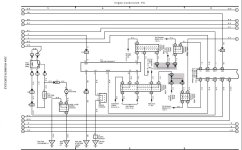
So in the past week I haven't had much time to work on the rig, but I have had time to research more which has given me more insight as to what might be going on. I was able to locate and purchase a wiring diagram and locate the schematic for the DLC3 which I have attached a picture of to this post. From viewing the diagram, I see 7 wires that run into the pins of the DLC. My DLC3 connector matches the 7 pins in the diagram, but then I have an 8th wire running to Pin 9 that I'm not sure what its for (TAC?).

Now to really where I am at the moment. I've learned that when dealing with communication protocols, '04 TR4s use ISO9141-2 to transmit information. These pins are located in positions 7 (K-line) and 15 (L-line). Pin 15(L-line) just initializes the ECU to fire up while the rest of the communication is done using pin 7(K-line). To test these lines they should have ~12V of power running to them and when they're communicating, they should briefly drop to 0V during communications. Pin 15(L-line) has 12V and drops when the scanner is connected meaning its telling the ECU to turn on. The problem I think is with pin 7(K-line). Without the scanner hooked up the voltage is basically 0V and when the scanner is hooked up it hovers around 1V which is a far cry from the 12V it should be providing. This points to grounding or short somewhere pulling the voltage away from pin 7 and not allowing communication with the ECU. I'm starting to think it must have something to do with the installation of the new stereo and there not being any communication (data link) between it and the ECU via the K-line therefore possibly grounding the signal and not letting it complete the K-line circuit. I doubt its an important module failing because its been this way for over a year now (no link between the ECU and the DLC/OBD2) and everything has worked fine as far as engine and electronics have gone.

My new questions now would be how do I pinpoint where along the K-line is the signal being grounded? Where is the K-line running into the stereo (which wire in the harness)? Has anyone ever heard of this happening before in Toyotas? I feel fairly confident that if I can figure out the grounding of the K-line I will be able to establish communication with the ECU again.

Thanks again for everyone's help and I hope we can solve this isssue soon!
 

Attachments

  • DLC3 Wiring Diagram.jpg
    DLC3 Wiring Diagram.jpg
    128.3 KB · Views: 2,606
Have an '03 V8 and Scangauge II turns on my VSC and Trac lights, so I don't use it anymore. Didn't give much info anyway.
 
It's years later, but I purchased an 03 V8 in 2026 with the same communication issue. I've tried multiple scanners, with the same problem. Those same scanners work on older 4th gens as well, which I've witnessed in person.

Now at this point in time, we have ChatGPT, Claude and all these new AI models that help troubleshoot. The issue with all of these models, is they pull old information off forums and end up putting you into a troubleshooting loop with no end point.

I understand the likelihood of anyone seeing this reply is low, but since it is on topic, I was hoping someone could provide an update on what the solution ended up being for this issue.

All the best!
 
Now I do everything myself as Cayrunner probably does, but have you considered taking it into a shop, just to see if their (presumably) pro equipment can read it? Might be cheaper than throwing parts or different tools at it. You would then have a better idea if it's the truck and a problem with it, or if it's your scan tools.
 
This is the place to start.

All fuses are good. All prongs are getting 12V on power when grounded as well. The ground fuse is good too.

Note* There are some leaks from the roof that I'm working through as well, but the driver side pillar has water come through during rain. That's a whole 'nother topic. Could possibly cause, or have caused a disruption in the wiring. I'm very hesitant to start taking all that apart before trying something else first.
 
There is a terminal block that is in the drivers kick that gets damaged from water ingress like you describe, that bricks the ECU on the other side of the car.. I suspect that's what is going on and your ECU is partially bricked. Be warned a replacement ECU has to be programmed at the dealer.
 

Members online

Forum statistics

Threads
278,316
Messages
3,554,120
Members
248,016
Latest member
Advally Service

Trending content

Back
Top